Set up the Branding department approvers on the platform.
Antes de Iniciar
Role required: admin or delegated_developer
Procedimento
-
Exit ServiceNow Studio and return to the platform.
-
Select All in the Filter Navigator.
-
Type sys_user_group.list in the Filter Navigator search and press the Enter key.
The Groups List View loads, displaying the existing Groups.
-
Select New.
-
In the Name field, enter Branding Dept.
-
Select and hold (or right-click) in the header bar of the form view and select Save.
-
Select the Group Members tab.
-
Add members by selecting Edit.
-
Search for Users on the left side of the slush bucket.
-
Use the [>] button to select add the following users to the group.
- Andrew Och
- Beth Anglin
- Luke Wilson
-
Select Save.
Next, follow a similar process to add a role.
-
Select the Roles tab.
-
Select Edit.
-
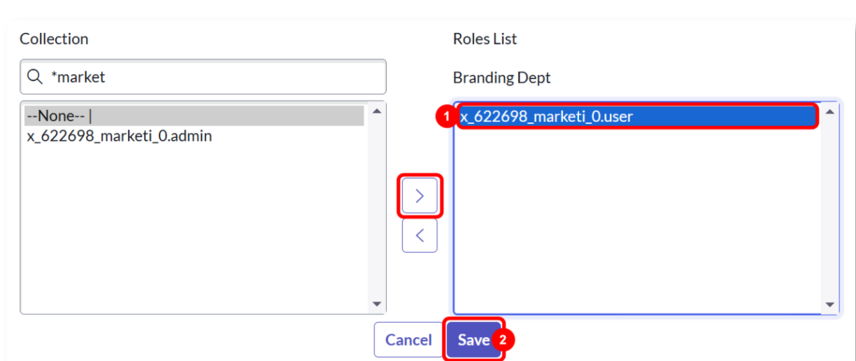
Search for *market.
-
Add the user role from the Marketing Services app to the Branding Dept Group.
Your role may have a slightly different prefix.
-
Select Save.