Add a question to ask for the failure code that the customer received after a failed credit card transaction.
About this task
Procedure
-
Select Add node on the Amount-not-debited path.
-
In the pop-up window, select Ask users at least one question to configure a question node.
-
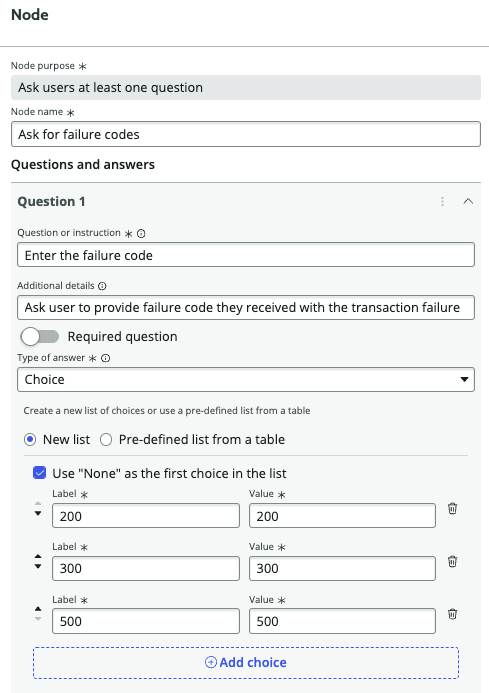
In the Node name field, enter Ask for failure codes.
-
In the Question or instruction field, type Enter the failure code.
-
Make this question a required question by selecting the Required question field.
-
In the Type of answer field, select Choice.
-
In the Label field, enter Failure code 200 for the first option in the list.
-
Select Add choice.
-
In the Label field, enter Failure code 300 for the second option in the list.
-
Select Add choice.
-
In the Label field, enter Failure code 500 for the third option in the list.
-
Select Save and close.
What to do next
Configure a path for each failure code the customer can receive after a failed credit card transaction.