Overlapping usage view
Use the Overlapping usage view in Software Asset Workspace to get insights into the feature level usage and rationalize your SaaS and Single sign-on (SSO) applications.
The Overlapping usage view displays reports showing the spend on your applications based on
application category - SaaS or spend detection. You can also view the list of applications grouped by categories based on the main function of the software application, such as video conferencing, project management, and email marketing.
This list of applications includes the following details:
- Spend
- Usage
- Total number of subscriptions
- Reclamation candidates
Access the Overlapping usage view by navigating to .
Note:
Request the Software Asset Management - SaaS License Management Integrations application from the ServiceNow Store to view the Overlapping usage view.
Note:
The Overlapping usage dashboard supports domain separation when Domain Extension Installer (com.glide.domain.msp_extensions.installer) and Domain Support (com.snc.pa.domain_support) plugins are activated. To filter the data, select a
domain from the Domain drop-down list.
End users and roles
| End user | Required role | Goal |
|---|---|---|
| SAM Admin/SAM User | sam_admin/sam_user | View the Overlapping usage dashboard. Note: A SAM Admin or a SAM user must have the it_demand_user role to create demand. You can create a demand from the Application feature usage page. |
Overlapping applications
By selecting the Overlapping applications tab, you can view the following information: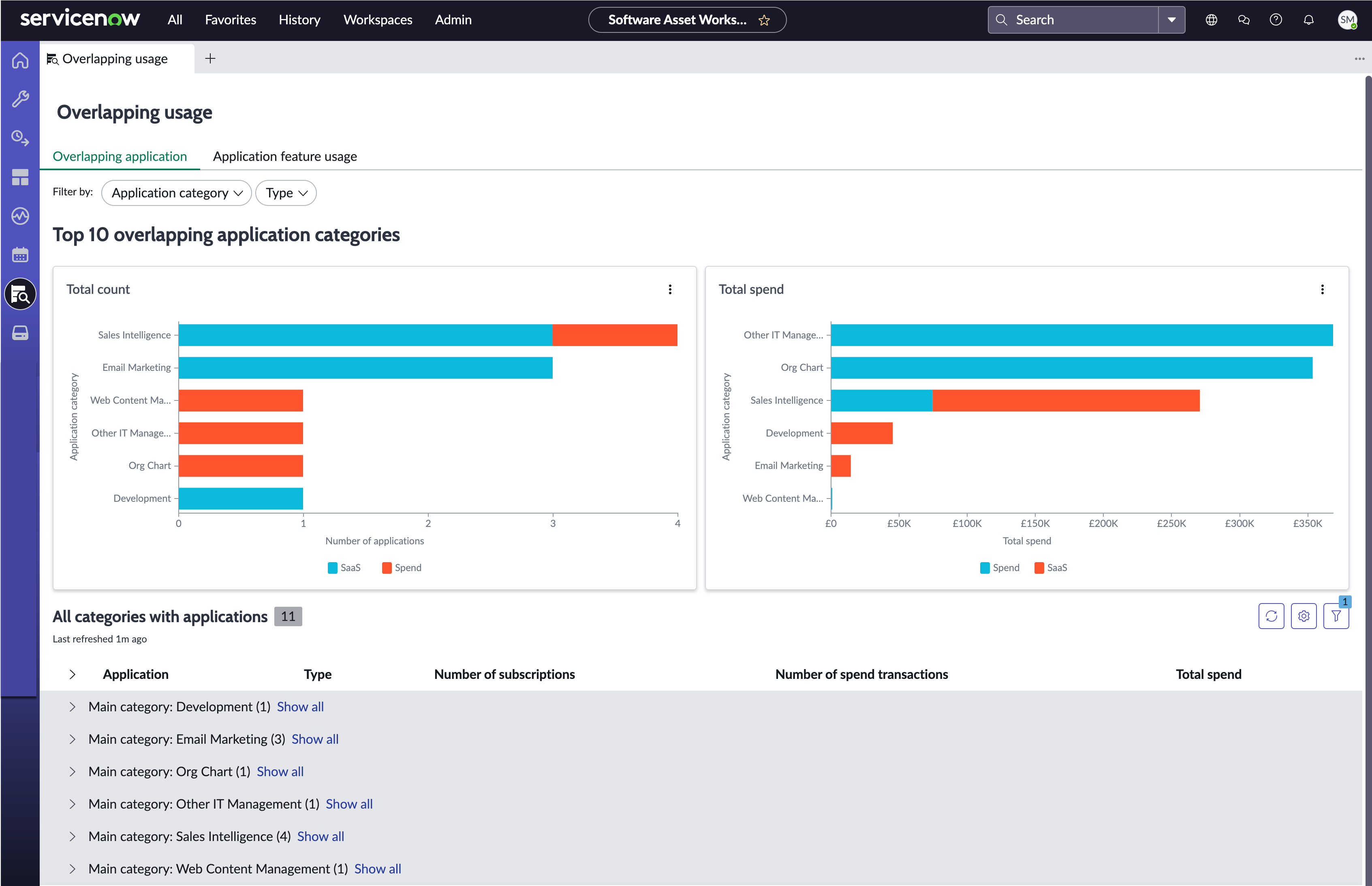
- Total count: Total number of overlapping software applications grouped by application category, such as spend detection or SaaS. Selecting any application category bar navigates you to the list of applications of that type with details on their relevant number of subscriptions, total spend, and overall usage.
- Total spend: Total spend on overlapping software applications grouped by application category, such as spend detection or SaaS. Selecting any application category bar navigates you to the list of applications of that type with details on their relevant number of subscriptions, total spend, and overall usage.
- All categories with applications: The list of overlapping software applications grouped by category based on the main function of the software application. The number next to each category indicates the number of applications in that category, such as development and email marketing.
Application feature usage
By selecting the Application feature usage tab, you can view the following information: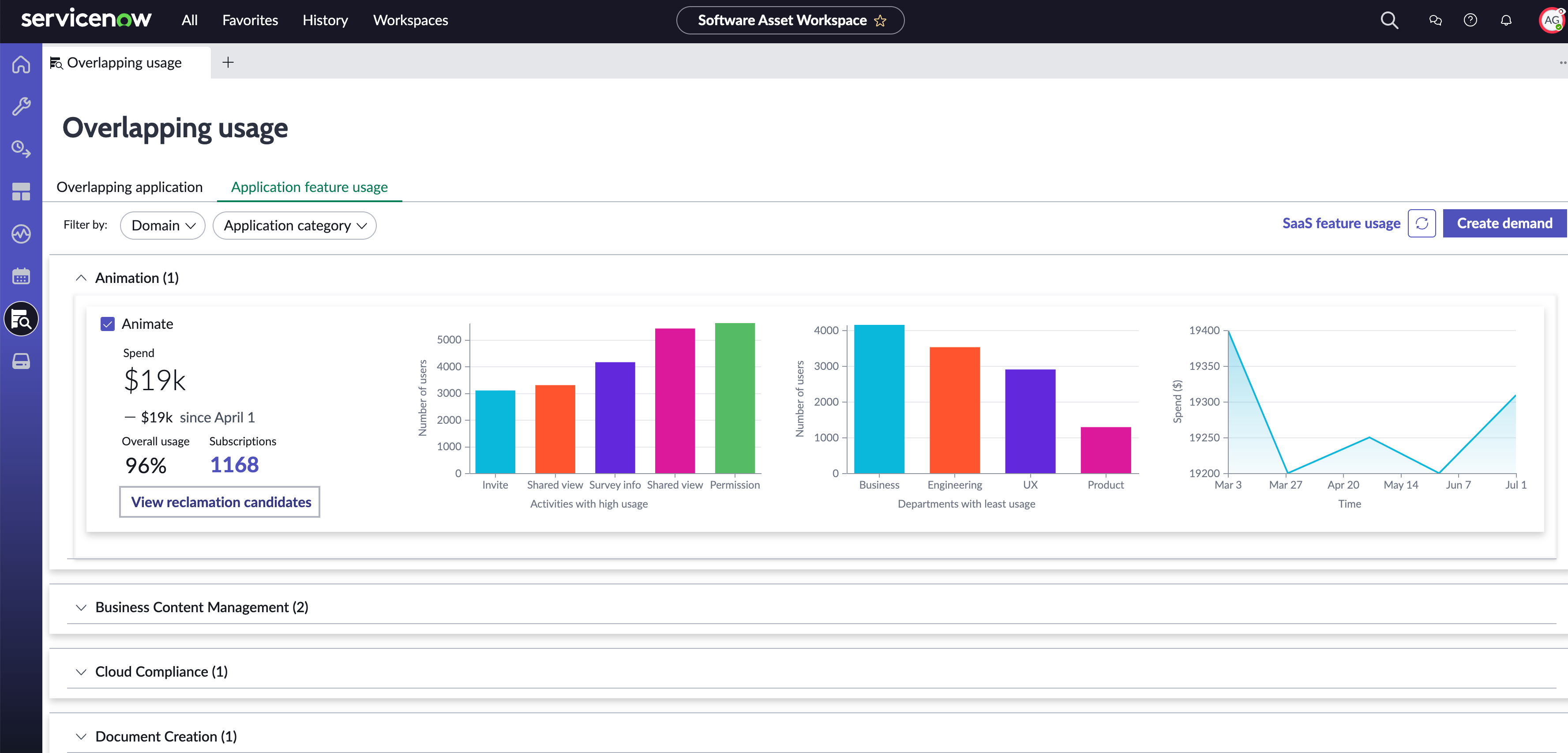
- A list view of the application categories.
- Detailed and descriptive feature usage information of an application. By expanding an application category, you can view the following data for each application within that category.
Attribute/Chart Description Spend Total spend for the application. Overall usage The percentage of users who have performed at least one event in the application. Subscriptions Total number of subscriptions for the application. View reclamation candidates List of reclamation candidates for the application that aren't closed. Activities with high usage Top five activities with the highest usage based on the number of users. Note:- This chart gets replaced by Users with last login activity for SSO applications and the SaaS applications for which only the last login activity is pulled.
- This chart displays data for all events that have normalized mappings available in the SaaS Event Mapping (samp_saas_event_mapping) table.
Departments with least usage Five departments with least usage for the application in your organization. The usage is based on the number of users. This data helps IT administrators to determine if users within these departments need access and alternatively to help drive adoption for those users.
Note:This chart displays data only for users who are assigned to a specific department.Spend trend chart Graphical representation of monthly spending trends on the application.
SaaS feature usage
The SaaS feature usage page includes the event details for each integration, such as the event ID, event name, last activity, subscription, product, subscription profile, and publisher. Navigate to the SaaS feature usage page in the License operations view by selecting the SaaS feature usage link.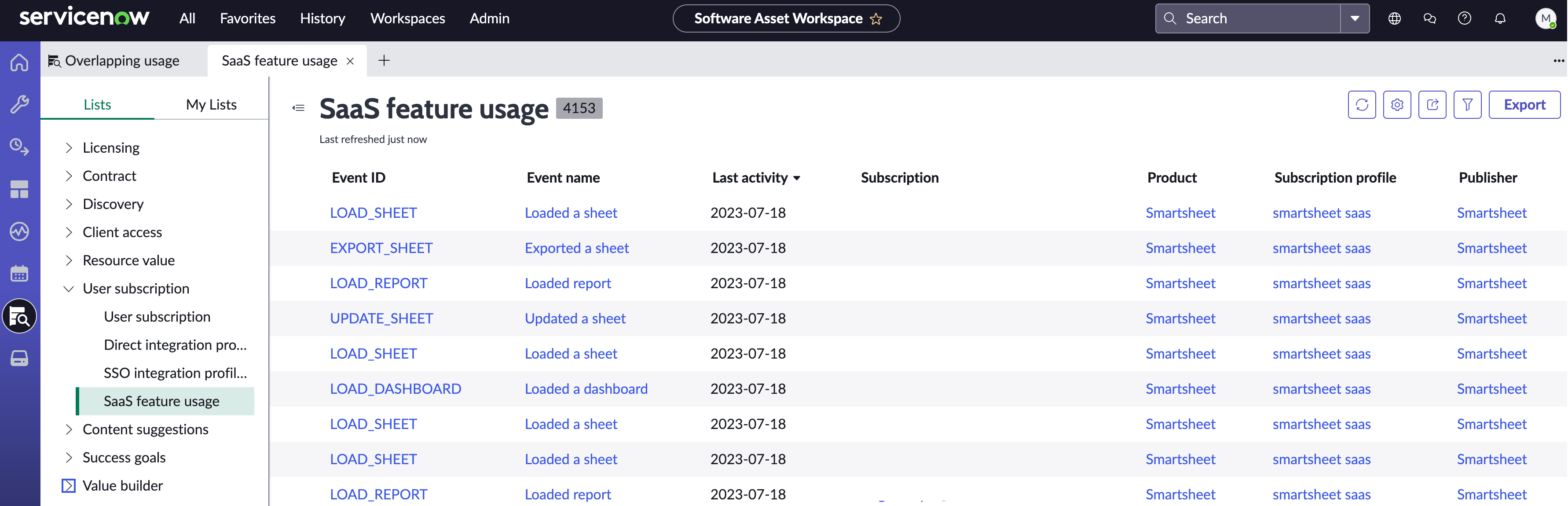
Note:
The SaaS feature usage page displays event details for up to one year from the current date.
Creating demand to rationalize software applications
Creating demands enables you to take meaningful action against any redundant software you discover. You can discontinue software, reduce software usage, migrate users to approved software, or take other actions.
Note:
The PPM Standard plugin (com.snc.financial_planning_pmo) must be installed to create demands.
Select Create demand to rationalize software applications. For more information, see Create demand to rationalize software applications.