SAFe Board — Team level
Summarize
Summarized using AI
This content was generated using new OpenAI-powered functionality. Results are provided on an as is basis and are not guaranteed to be accurate or complete.
Summary of SAFe Board — Team level
The SAFe Board at the Team level enables team members to effectively plan, prioritize, and monitor their sprint activities within a SAFe Agile Release Train (ART). It provides tools to manage stories, sprints, scrum tasks, and tests, enhancing collaboration and visibility throughout the sprint lifecycle.
Show less
Key Features
- Backlog Tab: Allows creation, prioritization, and organization of stories for one or multiple sprints. Stories can be reordered by drag-and-drop to adjust priority. Filtering by feature or keyword search helps quickly find relevant stories. You can also create, organize, monitor, start, and complete sprints while viewing key sprint metrics such as start/end dates and story points status. Unfinished stories can be moved back to the backlog or future sprints.
- Sprint Tracking Tab: Provides three views to track sprint progress:
- Story board: A visual task board for managing and collaborating on stories, allowing state updates by moving stories across lanes and filtering by criteria.
- Task board: Tracks scrum tasks associated with current sprint stories, enabling state updates via lane movements and filtering.
- List view: Displays scrum tasks and tests linked to sprint stories, allowing addition of tasks/tests without leaving the page, and quick assessment of their state and results.
Usage Requirements
To access the team backlog on the SAFe Board, a team must be configured as a SAFe Team group type with the safescrumuser role assigned to members and be part of an Agile Release Train.
Key Outcomes
- Efficient Backlog Management: Teams can prioritize and sequence stories with visual cues on priority and sprint allocation.
- Enhanced Sprint Tracking: Visual and list views enable tracking progress of stories, tasks, and tests, facilitating better collaboration and sprint completion readiness.
- Improved Team Collaboration: Visual task boards transform list and form navigation into an interactive experience, simplifying state updates and communications.
As a team member, you can plan and monitor activities within your team by accessing the Team level on the SAFe Board.
The Team level includes the following tabs:
- Backlog
- Sprint Tracking
Backlog
The Backlog tab enables you to plan and prioritize stories for a sprint or multiple sprints by assessing stories in the backlog.
In addition, you can: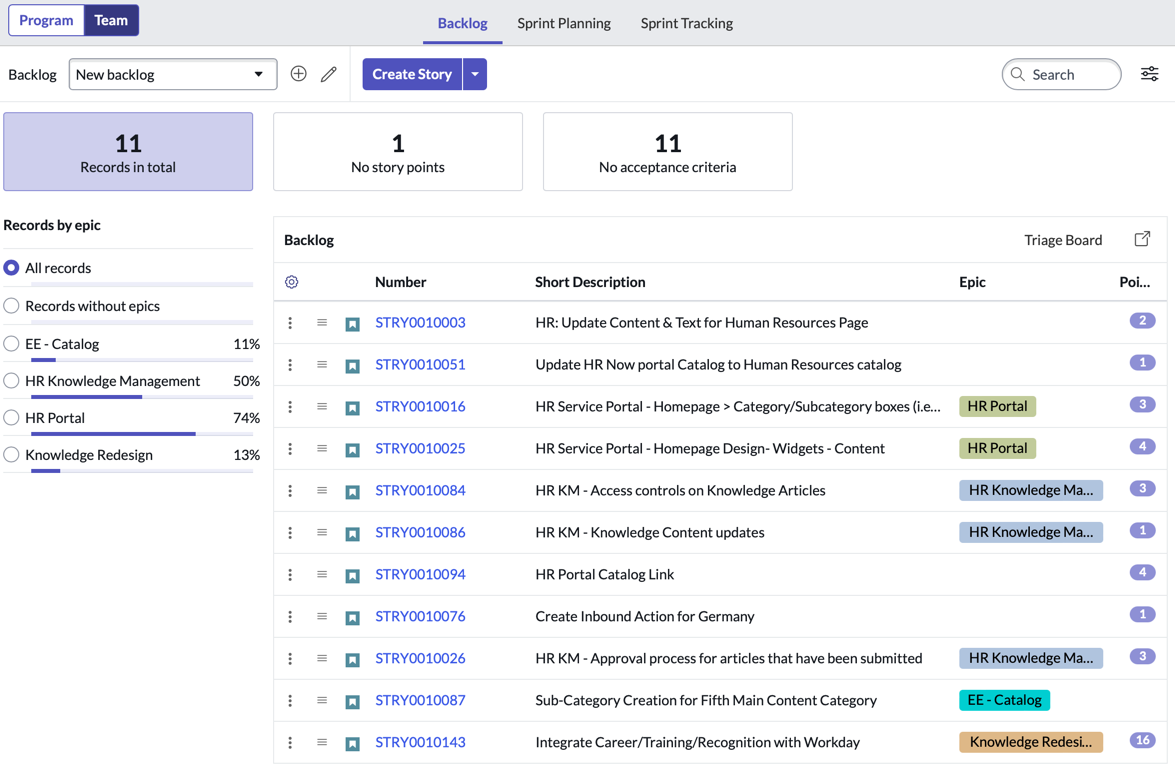
- Create stories.
- Reorder stories in the backlog using the drag feature. The story at the top of the backlog assumes higher priority with a lesser rank value. The story at the bottom of the backlog assumes lower priority with a higher rank value.
- Filter stories by a feature.
- Type a keyword in the search box to view only stories whose details match with the keyword.
- Create, organize, monitor, start, and complete sprints.
- View current and future sprints in chronological order.
- View these key aspects of a sprint: planned start and end dates, number of story points (total, complete, and pending) for the current sprint.
- Assess stories in the backlog and drag them to sprints.
- Move unfinished stories from the completed sprint to the backlog or a future sprint.
Note:
To see the backlog of your team on SAFe Board, ensure that your team is:
- Of the group type SAFe Team, with the role safe_scrum_user assigned to the team members
- Added to Agile Release Trains
Sprint Tracking
The Sprint Tracking tab provides the following views:
- Story board
- Story board is built on visual task boards, which transform the navigation of lists and forms into an interactive graphical experience. The visual task board interface provides a graphic-rich environment suited for
managing and collaborating records. To know more about the actions that can be performed in the board, see Visual Task Boards. In addition, you can:
- Track all the stories of the current sprint across lanes.
- Move stories from one lane to another, which in turn updates the state of the stories.
- Filter stories based on search criteria.
- Task board
- Task board enables you to track all the scrum tasks of stories of the current sprint across lanes.
- Move scrum tasks from one lane to another, which in turn updates the state of the scrum tasks.
- Filter scrum tasks based on search criteria.
- List
- List displays scrum tasks and tests associated to stories in each sprint. You can:
- Add scrum task and tests without leaving the context of the record.
- View the state, short description, and assignee of the scrum task without drilling down into details.
- View the short description and run result of a test.
- Assess scrum tasks and tests that are pending before the closure of current sprint.