File Explorer troubleshooting
The troubleshooting section can help you resolve some of the technical issues that you may encounter when setting up File Explorer component.
Refer to the following section on the scheduled jobs, system properties, and File Explorer flow designer subflows in detail.
Scheduled jobs for File Explorer
Scheduled Jobs are automated jobs that are run to process the notifications from Microsoft SharePoint, ingest the files metadata into ServiceNow instance and renew the file repository subscriptions on a recurring schedule.
Scheduled Jobs are automated jobs which are run in the background to:
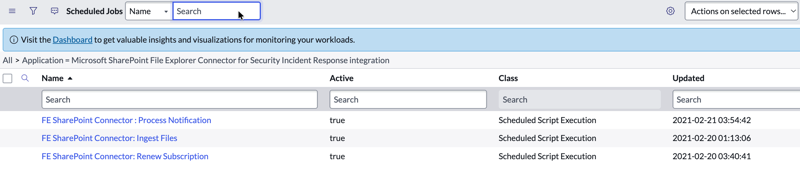
- process the notifications from Microsoft Microsoft SharePoint.
- ingest the files metadata into ServiceNow AI Platform instance.
- renew the subscription with Microsoft SharePoint document library to receive notifications.
| Job | Description |
|---|---|
| Microsoft SharePoint File Explorer Connector: Process Notification | Runs every 30 seconds and responsible for reading the notifications which indicates any change occurred on the subscribed document library and marks the state of drives (sn_fe_file_repo_drive) as pending. |
| Microsoft SharePoint File Explorer Connector: Ingest Files | Runs every 30 seconds and primarily responsible for processing the drives (sn_fe_file_repo_drive) which are in pending state and pulls the delta file changes from the configured Microsoft SharePoint document library since the last pull. |
| Microsoft SharePoint File Explorer: Renew Subscription | Runs every 10mins and responsible for renewing the Microsoft SharePoint document library subscription a day before its expiry date. Usually, these subscriptions expire in 30 days. |
Available File Explorer system properties
Following are the available Microsoft SharePoint File Explorer connector system properties.
| Property Name | Description |
|---|---|
| sn_fe_sharepoint.max_retry_count | Controls the frequency of attempts that Microsoft SharePoint connector application tried to pull the failed drive or renew the failed subscription. The default frequency value is set to 50. |
| sn_fe_sharepoint.retry_after_seconds | Time interval between each attempt to pull the failed drive or renew the subscription. The default value is set to 900 sec or 15 mins. |
| sn_fe_sharepoint.max_subscription_expiration_time | Maximum subscription expiry period in number of days for Microsoft SharePoint. The default expiry period is set to 30 days. |
File Explorer Flow Designer Subflows
Following are the Flow Designer subflows which are installed with Microsoft SharePoint File Explorer connector.
| Name | Description |
|---|---|
| Add Microsoft SharePoint Permissions | Grants edit permission for a specific folder to specific users. |
| Create Drive Subscription | Subscribes with a configured Microsoft SharePoint document library to receive notifications about any updates occurs on the document library. |
| Create New Microsoft SharePoint Folder | Creates a new Microsoft SharePoint folder under a given parent folder. |
| Delete Microsoft SharePoint Item | Deletes Microsoft SharePoint files and folders. |
| Download Microsoft SharePoint File | Returns the download URL of Microsoft SharePoint files |
| Get Files Metadata | Subscribes and pulls the changes from Microsoft SharePoint document library. |
| Move Microsoft SharePoint Item | Moves the Microsoft SharePoint files/folders to the destination folder |
| Open Microsoft SharePoint Item | Returns the web URL of Microsoft SharePoint file/folder to open in a browser. |
| Renew Drive Subscription | Renews the subscription with Microsoft SharePoint document library. |
| Create Folder Structure | Follows the folder template configurations and creates the folder structure on Microsoft SharePoint document library. |