Exploring Entity View Action Mapper
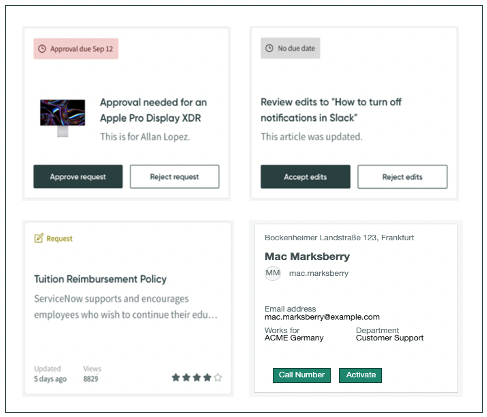
The Entity View Action Mapper (EVAM) is an application that standardizes how different data sources display in cards and lists.
EVAM overview
EVAM enables you to show information as a card grid view or as a list of information in a list view. Users can page through large data sets of search results and see different views based on filtering.
Prior to EVAM, lists were restricted to a single type of data source. If there were more data sources, you would have to write a custom implementation. EVAM enables you ingest multiple lists from different data sources, and
then configure specific views without the need for customization.
Features of EVAM
- Use multiple data sources for a single list view
- EVAM can accept multiple disparate data sources and configure the data through sorting and filtering to return the data as a single list.
- Define view templates
- Map the data source output to a UX component view by using view templates. You can configure multiple view templates per data source based on a condition to customize how data displays for users.
- Create view configurations to combine conditions, database fields, and declarative actions
- Create a view configuration to combine conditions, database fields, and declarative actions with an associated view template. You can also group view configurations together to create configuration bundles.
- Enable user interactions to trigger actions
- EVAM enables user interactions to trigger a server script or UXF client action.
EVAM users
| User | Description |
|---|---|
| Service desk agents | Service desk agents need a streamlined way to view and manage incidents, requests, and tasks across different tables. EVAM allows them to filter, sort, and take action on records quickly. |
| IT support staff | IT teams use EVAM to monitor and manage IT assets, service requests, and incidents by consolidating information into a structured, actionable interface. |
| Managers and team leads | Supervisors overseeing teams or operations benefit from EVAM's ability to present key performance indicators and open tasks and team workloads in an easy-to-navigate format. |
| Customer service representatives | Customer support teams interact with cases, accounts, and customer information efficiently, improving response times and service quality through EVAM. |
| Business analysts and process owners | Analysts use EVAM to configure views that bring together data from multiple sources, enabling better decision-making and process optimization. |
| Developers and admins | Developers and system administrators configure EVAM to create custom views, ensuring the right data is surfaced to the right users for improved usability. |
EVAM workflow
EVAM consists of the following:
- Entity (data source) - The entity that has associated data that you intend to display. For example, a community post or a user.
- View – A view is how a card displays data and actions.
- Actions – An entity can have an action that performs on the card. For example, you can activate a user into your system.
- Map – The mapping process maps the data source data to component properties that display on the card. You can also associate actions that trigger from the card view.
- Entity: examples include a community post or sys_user
- Mapping: fields found in an entity
- View/Action: locations or actions that entity fields are mapped to
EVAM benefits
| Benefit | Feature | Users |
|---|---|---|
| Allows users to configure multiple view templates per data source based on conditions to customize how data displays for users. The view template maps fields from the view configuration to component. | Define an EVAM view template | Admins or evam_admins |
| Use EVAM to take in different data sources, configure views, and show them in a card display view. | Create a multi-data source list display in Entity View Action Mapper | Admins or evam_admins |
| Define the list of data sources to render. The EVAM definition is the main record for an EVAM configuration. | Create an EVAM definition | Admins or evam_admins |
| Define the list of data sources to render. The EVAM definition is the main record for an EVAM configuration. | Create an EVAM action definition | Admins or evam_admins |
What to explore next
To learn more about configuring and using EVAM, see: