지출 분석
지출 분석 페이지에서는 지정한 시간 범위 또는 비용 유형에 걸친 클라우드 Kubernetes및 공유 자원 지출을 표시하여 클라우드 비용에 대한 가시성을 확보할 수 있습니다.
중요사항:
insights_owner 역할이 있는 경우 할당된 계정만 필터와 데이터에 나타납니다.
지출 분석 페이지를 사용하여 다음을 볼 수 있습니다.
- 클라우드 지출 분석
- Kubernetes 지출 분석
- 공유 비용 분석
주:
중첩된 태그 값에 대한 자원 지출은 볼 수 없습니다. 예: {"name":"test","created-by":"xyz","prod":"false","shared_resource":"false"}.
클라우드 지출 분석
클라우드 지출 분석 탭을 선택하여 다음 작업을 수행합니다.
- 시간 범위 필드에서 선택할 수 있는 기간 동안 현재 클라우드 자원에 지출하는 방식을 파악합니다.
- 다음 값 중 하나를 사용하여 클라우드 지출 분석을 그룹화합니다.
- 제공자
- 구매 옵션
- 영역
- 서비스 계정
- 서비스 범주
- 클라우드 서비스
- 자원 그룹
- 태그 범주
- 클라우드 지출 결과를 현재 월별로 정렬하거나 3개월, 6개월, 9개월 또는 12개월과 같은 시간 범위를 선택합니다.
- 다음 필터를 통해 값을 검색하고 선택하여 결과를 더 잘 파악할 수 있습니다.
- 제공자
- 마스터 서비스 계정
- 서비스 계정
- 영역
- 서비스 범주
- 클라우드 서비스
- 구매 옵션
- 자원 그룹
- 태그 범주주:태그 범주 및 기본 태그 범주 목록에 대한 자세한 내용은 해당 문서를 참조하십시오 태그 및 태그 범주기본 태그 범주 목록.
- 태그 값
- 태그 범주 선택됨
Kubernetes 지출 분석
Kubernetes 지출 분석 탭을 선택하여 다음 작업을 수행합니다.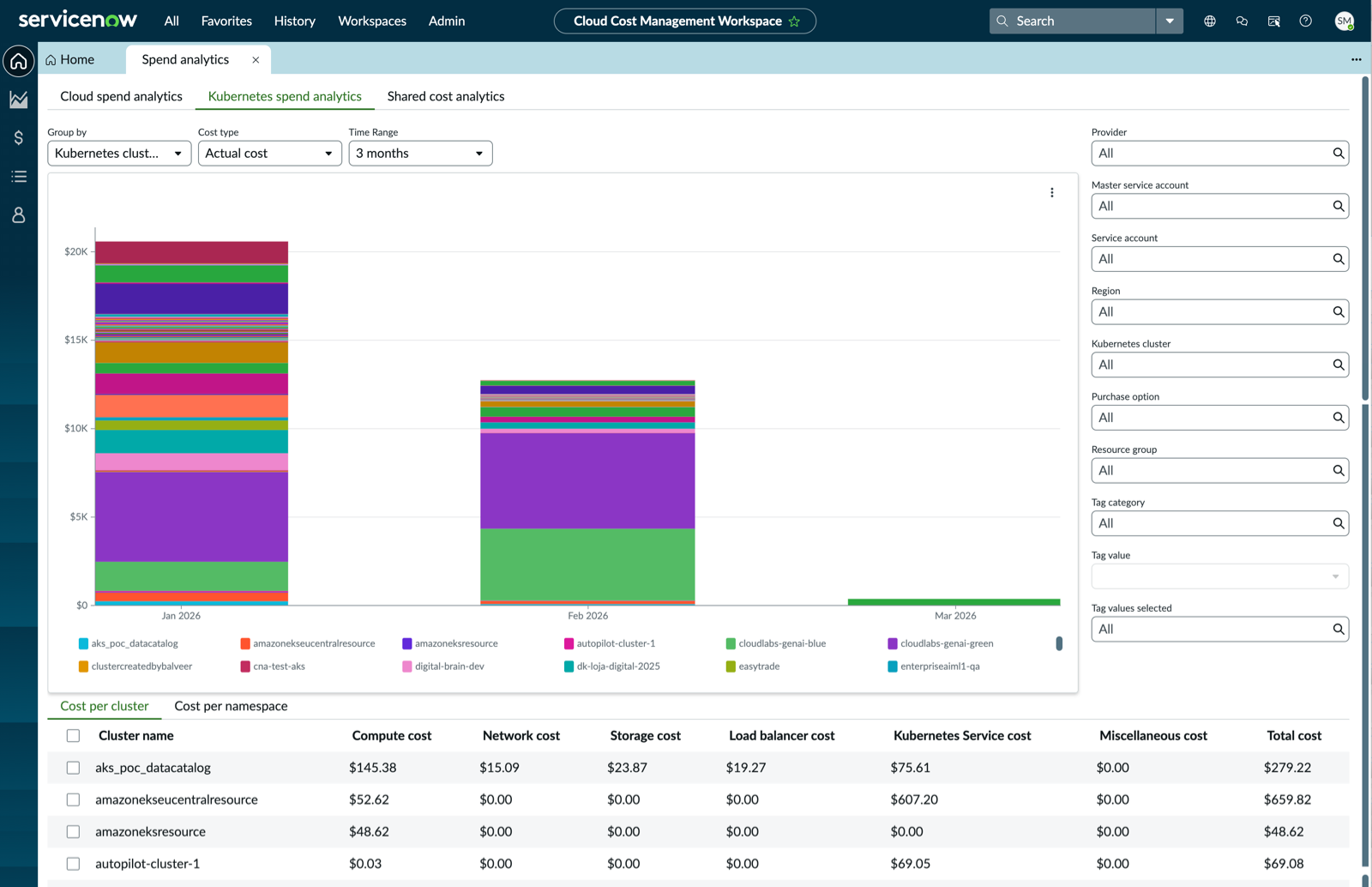
- 시간 범위 필드에서 선택할 수 있는 기간 동안 클라우드에 지 Kubernetes 출하는 방식을 이해합니다.
- 다음 값 중 하나를 사용하여 지출 분석을 그룹화 Kubernetes 합니다.
- Kubernetes 클러스터
- Kubernetes 네임스페이스
- 태그 범주
- 비용 유형을 실제 비용 또는 할부 상환 비용으로 선택합니다.
- 실제 비용: 각 청구 기간마다 조직에서 직접 클라우드 서비스에 대한 비용을 지불합니다.
- 할부 상환 비용: 조직은 청구 기간 동안 분산된 선결제 및 월별 예약 수수료의 유효 비용을 지불합니다. 할부 상환 비용 유형은 제공자 사이트에 자세히 설명되어 있습니다.
- 지출 결과를 현재 월별로 정렬 Kubernetes 하거나 3개월, 6개월, 9개월 또는 12개월과 같은 시간 범위를 선택합니다.
- 다음 필터를 통해 값을 검색하고 선택하여 결과를 더 잘 파악할 수 있습니다.
- 제공자
- 마스터 서비스 계정
- 서비스 계정
- 영역
- Kubernetes 클러스터
- Kubernetes 네임스페이스
- 구매 옵션
- 자원 그룹
- 태그 범주주:태그 범주 및 기본 태그 범주 목록에 대한 자세한 내용은 해당 문서를 참조하십시오 태그 및 태그 범주기본 태그 범주 목록.
- 태그 값
- 태그 범주 선택됨
- 클러스터당 Kubernetes 비용 및 네임스페이스당 Kubernetes 비용에 대한 상세 정보를 봅니다.
공유 비용 분석
공유 비용 분석 탭을 선택하여 다음 작업을 수행합니다.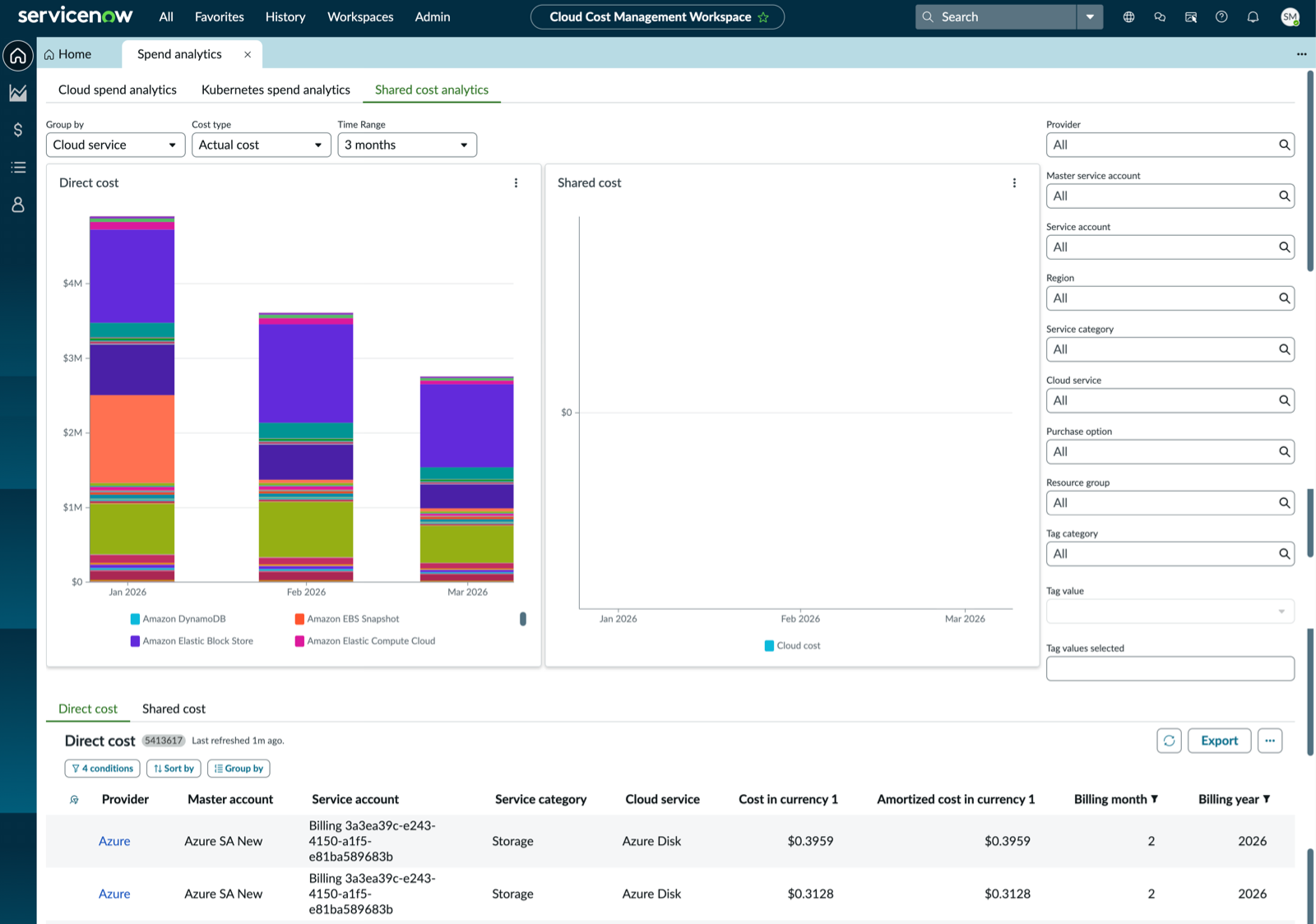
- 시간 범위 필드에서 선택할 수 있는 기간 동안 공유 클라우드 자원에 현재 지출하는 방식을 파악합니다.
- 다음 값 중 하나를 사용하여 공유 비용 분석을 그룹화합니다.
- 제공자
- 구매 옵션
- 영역
- 서비스 계정
- 서비스 범주
- 클라우드 서비스
- 자원 그룹
- 태그 범주
- 비용 유형을 실제 비용 또는 할부 상환 비용으로 선택합니다.
- 실제 비용: 각 청구 기간마다 조직에서 직접 클라우드 서비스에 대한 비용을 지불합니다.
- 할부 상환 비용: 조직은 청구 기간 동안 분산된 선결제 및 월별 예약 수수료의 유효 비용을 지불합니다. 할부 상환 비용 유형은 제공자 사이트에 자세히 설명되어 있습니다.
- 공유 자원 비용 결과를 현재 월별로 정렬하거나 3개월, 6개월, 9개월 또는 12개월과 같은 시간 범위를 선택합니다.
- 다음 필터를 통해 값을 검색하고 선택하여 결과를 더 잘 파악할 수 있습니다.
- 제공자
- 마스터 서비스 계정
- 서비스 계정
- 영역
- 서비스 범주
- 클라우드 서비스
- 구매 옵션
- 자원 그룹
- 태그 범주주:태그 범주 및 기본 태그 범주 목록에 대한 자세한 내용은 해당 문서를 참조하십시오 태그 및 태그 범주기본 태그 범주 목록.
- 태그 값
- 태그 범주 선택됨
- 클라우드 자원의 직접 비용과 공유 비용에 대한 상세 정보를 봅니다.