Collaborative documentation using CWM
Manage all kinds of documentation for work such as meeting notes, project requirements, or technical specifications using rich text Docs with real-time collaboration.
Docs can be created within a Space, and organized into folders. Within a Space, you can create multiple Docs and within each Doc, you can create unlimited pages to help you effectively organize your information.
Docs features
The following are the key features of Docs:
- Auto-save content.
- See who is viewing or working on a Doc using the feature of live user presence.
- Get notified when someone @-mentions you in a Doc.
- Create and apply templates for documents.
- Use rich text paragraph formatting, which includes headings, lists, alignment, and others.
- Move text blocks to change their placement using block-level editing.
- Tag team members inline or insert tables using the / command.
- Add reference to other ServiceNow AI Platform tables to connect work across teams.
- Insert images by uploading files or using web URLs.Note:The experience of inserting Google Images links might not work.
The following screenshot shows the various options for Docs within the CWM workspace.
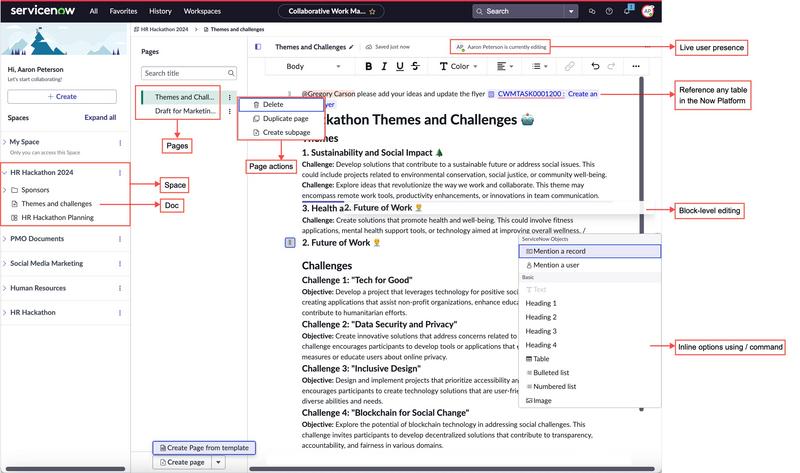
Real-time collaboration within CWM Docs
With the feature of real-time collaboration, edit a Doc page concurrently with multiple other editors. Colored cursors denote the current location of each editor on the page. You can choose to show or hide these live presence
indicators based on your preference while working on or reviewing the content of the page.

Note:
Application performance may degrade with a large number of concurrent editors.