Copy an existing exporter script as a starting point for a custom
exporter.
Before you begin
Important: Starting with the
Washington DC release,
DevOps Config is being prepared for future deprecation. It will be hidden and no longer installed on new instances but will continue to be supported. For details, see the
Deprecation Process [KB0867184] article in the
Now Support Knowledge Base.
Role required: cdm_exporter_editor or cdm_editor or cdm_admin
About this task
DevOps Config content packs provide a variety of exporters. You can
use any of the provided exporter scripts as a starting point for a custom exporter that
you design.
Procedure
-
Select the admin icon (
 ) to open the Administration page.
-
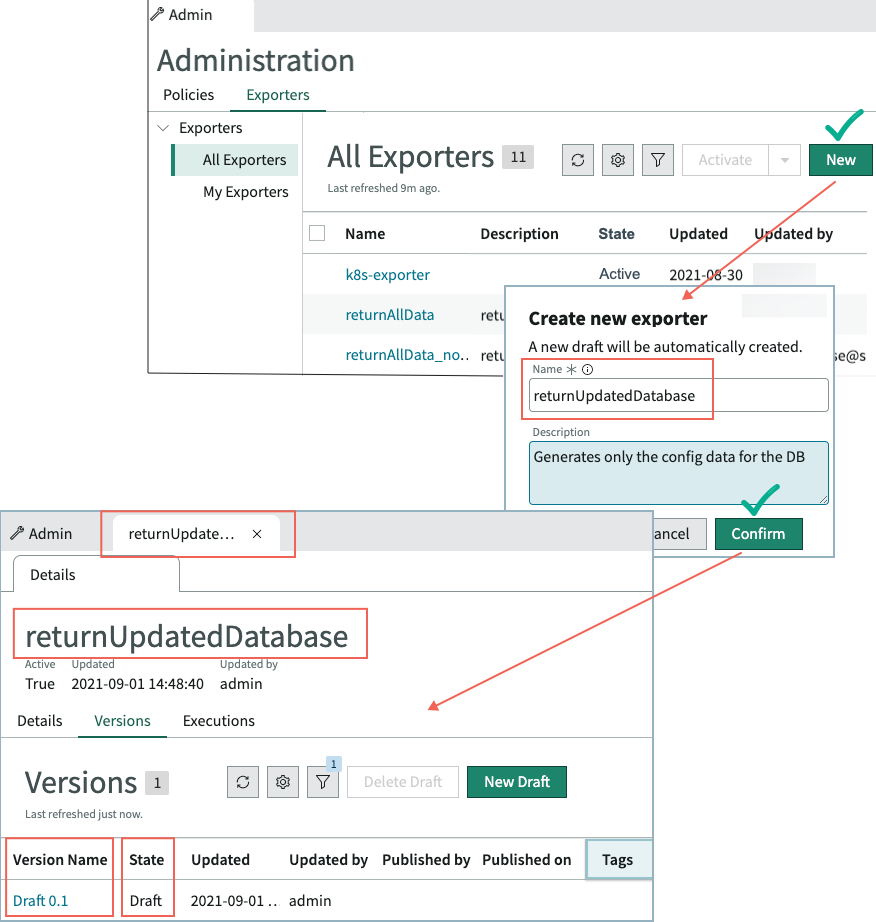
On the Exporters tab, select New,
enter a unique and meaningful name and description, and then select
Confirm.
The first draft version of the exporter is named
Draft
0.1 and is listed on the
Versions
tab.
-
Select the Version name to open default exporter script
on the Exporter builder tab.
The text of the exporter script appears in a view-only panel.
-
On the Exporters tab, select the name of the exporter
that will act as the starting point for the new custom exporter.
-
Select the exporter version to use on the Versions tab
for the exporter.
The exporter opens on the Exporter Builder tab.
The text of the exporter script appears in a view-only panel.
-
Copy the text of the script for use in the new exporter.
- Optional:
To enable users to specify dynamic execution conditions or CDI values when
editing the exporter, create an input argument.
-
On the Input arguments tab, click
New.
-
On the Create argument pop-up window, define the argument.
Table 1. Create argument pop-up window
| Field |
Description |
Name / Description |
Meaningful name and description for the
argument. |
| Default value |
Value that the argument will have when a user
opens the exporter for editing. |
| Mandatory |
Select the check box to require that the argument
value is specified. |
-
Select Create.
The argument now appears in the Input arguments field on the Test Playground panel.