We're reclaiming inactive PDIs to keep them available for active builders. Learn what's changing, who's affected, and how to protect your work. Read More

marcguy
ServiceNow Employee

One of the things that I've been asked for many years is 'How can we report on our CI changes?', i.e. a customer wants to know what is changing on their CIs without having to look at each one individually or create a list of updated CIs and then trawl through that, or trawl through sys_audit which as we know is not recommended.


So I decided to have a look into this and see whether we can use 'History' sys_history_line as a way of reporting those changes, it also looks much better than sys_audit as well as it displays CI names rather than sys_ids.


History is a rotated table and normally those sys_history_lines are generated on the fly when a user views history in a record, that means this table doesn't become another huge sys_audit table, the records are created on-demand and then rotated/dropped off after a set period of time.


So I created a scheduled job to generate History Sets for any CI updated in the last 24 hours and then created a scheduled report to run immediately after that history set generation to query those History lines and voila, we have a CI Change report... steps below


Step 1- update the sys_property 'glide'ui.permitted_tables' to INCLUDE sys_history_line, now this property controls which sys_ tables are reportable, i.e. you can see them as selectable tables in the table drop-down for reporting. (add a 'report_on' ACL if you wish this table to be reportable for anyone else but admin).


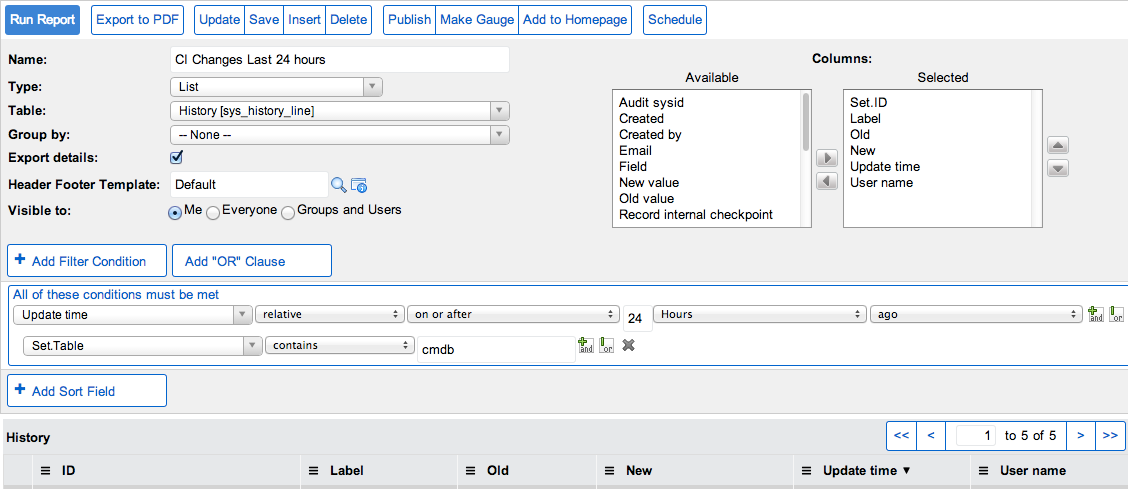
Step 2- create a report on History 'sys_history_line' as per screenshot below:


Report.png

Now this report will initially be empty even if you've just gone and updated a few CIs thinking cool, I will see my updates straight away, but remember the beauty of sys_history_line is that it's generated on-demand, normally when someone goes and looks at history, so now we need to run a little script before we schedule this report to simulate that for the updated CIs...


Step 3 - Create a scheduled report from your report record and add some code in the condition script to a)check we have had some updates and b)to make it generate those history lines we need before actually sending the report empty


Scheduled Report.png


The code in that condition to save you some time:


  1. answer = false;  
  2. var cis = new GlideRecord('cmdb_ci');  
  3. cis.addEncodedQuery('sys_updated_onRELATIVEGE@hour@ago@24');  
  4. cis.query();  
  5. if (cis.hasNext()){  
  6.   answer = true;  
  7. while (cis.next()){  
  8.   var hs = new GlideHistorySet(cis);    
  9. var sys_id = hs.generate();  
  10. }  
  11. }  


So now we have our report, plus the scheduling piece to generate the history lines, I can decide whom gets it, subject, intro, how I want my attachments and hit 'Execute Now'


And here is the report in PDF


Finished Report.png


Disclaimer time now   if you have masses and masses of CI changes coming in via Discovery or some other source, you may want to run this on specific tables only, or spread out the period of time, I guess it's horses for courses though, alternatively if you only want to capture manual changes, filter out the discovery username in the sys_history or in the scheduled job to find updated records by those users, so use the filters to be most effective and only target the things you want to know about.


Any questions please feel free to comment below.


Marc

30 Comments
matthewvillanue
Kilo Explorer

Hello everyone!

Marc, this is extremely helpful and I got it working today!

Question, I would like to add some filters to help me go back further than 24 hours and not have any performance impacts.

I would like to add a filter, to not run history sets on CIs updated by our uCMDB and Troux integration service accounts. I cannot get it working even though I got filters for Class and Date working fine.

Can you please look at my code for mistakes?


Code:

answer = false;
var cis = new GlideRecord('cmdb_ci');
var filterQuery = 'sys_updated_by!=Troux Integration Service';
filterQuery += '^sys_updated_by!=uCMDB Integration PROD Service';
filterQuery += '^sys_class_name!=cmdb_ci_port';
filterQuery += '^sys_class_name!=cmdb_ci_ip_address';
filterQuery += '^sys_class_name!=cmdb_ci_network_adapter';
filterQuery += "^sys_updated_onBETWEENjavascript:gs.dateGenerate('2018-03-01','00:00:00')@javascript:gs.dateGenerate('2018-03-07','23:59:59')";
cis.addEncodedQuery(filterQuery);
cis.query();
if (cis.hasNext()){
answer = true;
while (cis.next()){
var hs = new GlideHistorySet(cis);
var sys_id = hs.generate();
}
}

Sarah15
Tera Expert

Now you can also add the condition based on the last baseline (update time since last baseline). 

find_real_file.png 

debesish
Tera Contributor

This is really helpful!! 

ggarcia1
Mega Guru

First, thanks for this idea, as it appears to have stood the test of time thus far.

In running it, I've noticed that when a record matches our update time frame, the entire history is pulled, not just history within the window.

How might we restrict the history set/lines to being in scope of our update window?

When testing this on workstations, I've generated as much as 1.3 million history lines!

Nickels
Tera Expert

I would recommend refining the encoded query in the script. The example above is written against the entire cmdb_ci table. If possible, I would recommend adding a CI Class type to the query or even navigating all the way to the exact cmdb_ci table. I actually used this idea for the alm_hardware table for the computer model category.

You could also change the system property for the number of history lines generated from 250 to something smaller so each CI would have less entires. 

Wish I had a better recommendation on actually generating the history set for a specific time frame.

-Chris

Shreya2
Giga Contributor

This is really helpful, in this day and age too. 

We still do not have OOB solution from ServiceNow yet. This is very helpful feature to manage CMDB

Nikita40
Tera Contributor

Hi, 

I have followed all the steps mentioned by you, but still changes done in cmdb are not getting captured in sys_history_line table. Will you please suggest me what modifications needs to be done so changes will get in history table or will be updated in report.

Thanks,

Nikita

JerryJ071847183
Tera Sage

Hi Marc,

The article is very good from reporting perspective . But , can you confirm it works on all CI classes.

For example even for the ones that dont give history---> List options

I checked the few classes like

Computer 

Computer Pheriperals 

where I think the option of histroy ---> List is not coming rather only the calendar option. So does this

work on them as well?

ggarcia1
Mega Guru

I've used it for this purpose and it works fine.

I think Calendar/List/Timeline are just views of the sys_history_set.

List/Timeline show up when auditing is enabled for the table + ACLs for sys_history_set + chosen role.

https://docs.servicenow.com/bundle/paris-platform-administration/page/administer/security/reference/r_HistoryList.html


JerryJ071847183
Tera Sage
Thanks ggarcia will check .