Jaspal Singh
Mega Patron

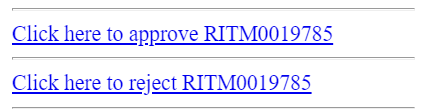
OOB notifications for Approval includes links for approval as below.

find_real_file.png

These seems to be bringing more of standard user interface however, ServiceNow provides us a functionality of mail scripts that can be customized & leverged to an extent so as to display dynamic button/images instead of standard links which is also very simple to build.

find_real_file.png

Steps below can be followed for getting something as above in place.

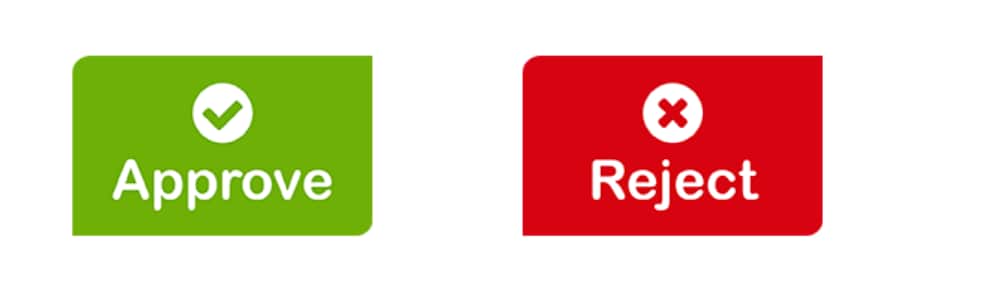
1. Upload images as attached in the Images table from System UI >> Images.

2. Create mail scripts as below for Approve & Reject options.

    a. Approve: email.button.approve.insert

var img = "/Approve.png";

var response = "approve";

var emailbod = "I approve this request.";

template.print(renderMailtoButton(img, response, emailbod));


  b. Reject: email.button.reject.insert

var img = "/Reject.png";

var response = "reject";

var emailbod = "I reject this request.";

template.print(renderMailtoButton(img, response, emailbod));


3. Script include: renderMailtoButton

function renderMailtoButton(image, response, emailbod){
	
	var instance = gs.getProperty("instance_name");
	var link = "https://" + instance + ".service-now.com";
	var mark = email.watermark;
	var number = current.number;
	var emailAddress = instance + "@service-now.com";
	if (current.getTableName().indexOf("sysapproval") != -1){
		number = current.sysapproval.number;
		}
			var mailLink = '<a href="mailto:'+ emailAddress + '?subject=Re:' + number + ' ' + response +'&body=' +  emailbod +  mark + '"><img src="' + link + image + '"></a>';
	return mailLink;
	
}

Script include above will help associating image (approve/reject), subject, body & recipient which is called in the mail script.

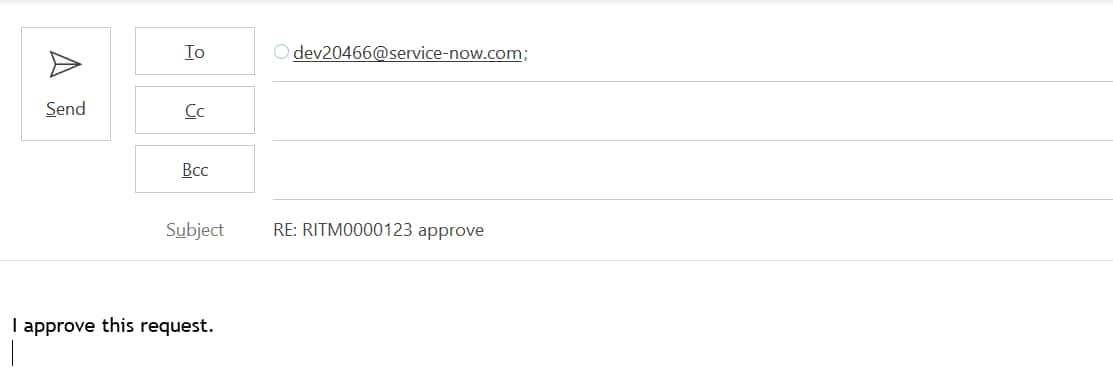
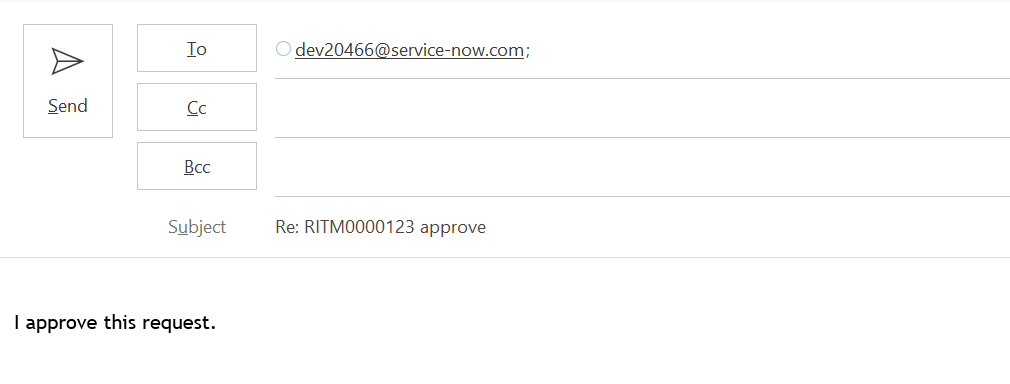
renderMailtoButton is used to set below when Approve button is clicked.

To: (instance mail),

Subject: RE: RITM000000 approve

Body: I approve this request.

find_real_file.png

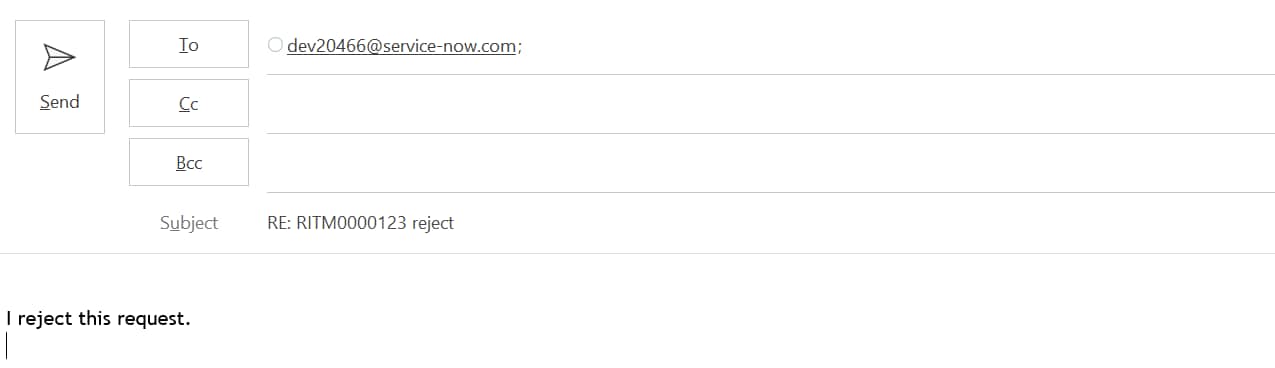
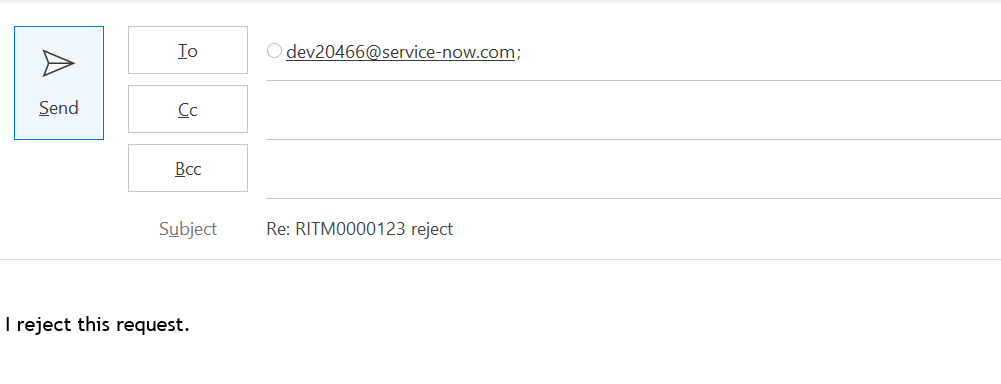
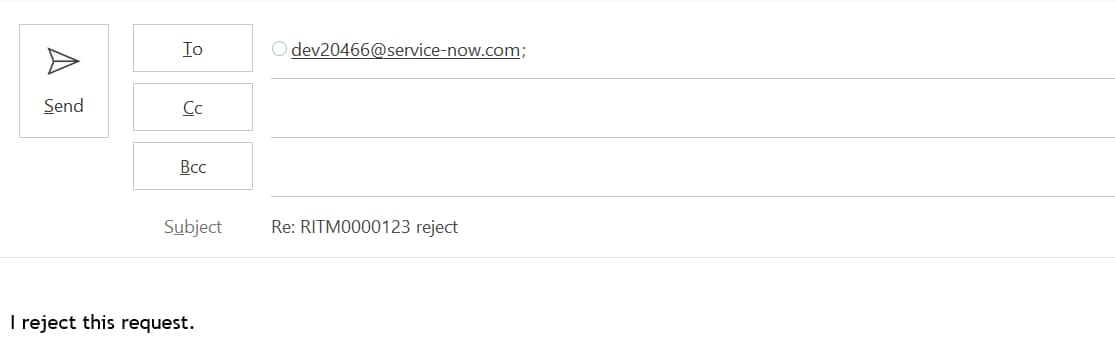
On click of Reject button from Approval mail below is set.

To: (instance mail),

Subject: RE: RITM000000 reject

Body: I reject this request.

find_real_file.pngTo summarize, renderMailtoButton is used to open outlook mail directly with the values being passed in Image, Subject, Body & recipient list.

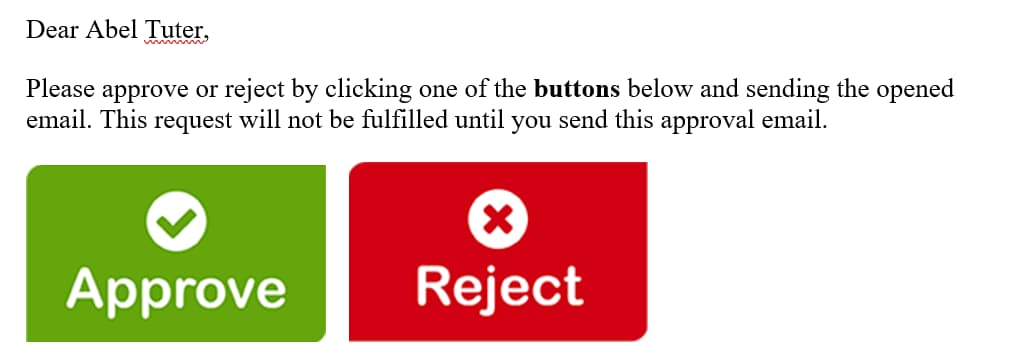
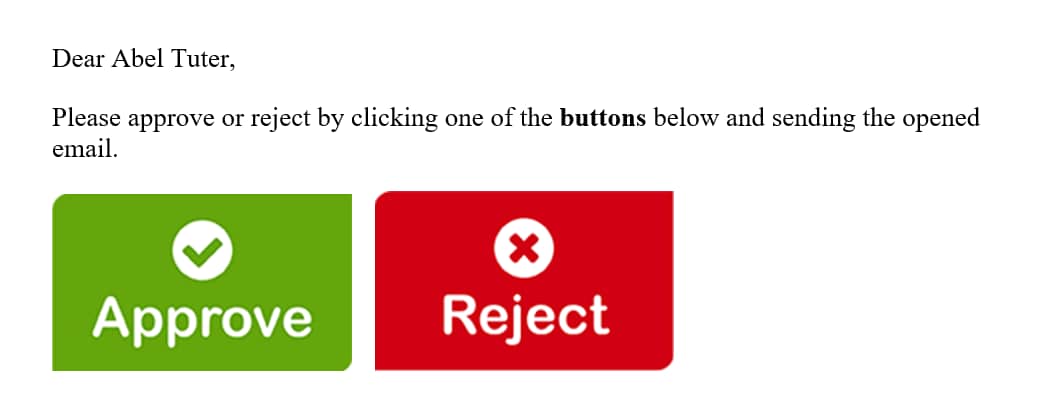
4. Call the mail scripts in the notification body (What it will contain) so as to make it work in the format as below.


Dear ${approver.name},

Please approve or reject by clicking one of the buttons below and sending the email opened after click of any of below button.

${mail_script:email.button.approve.insert} ${mail_script:email.button.reject.insert}

Output as below:

find_real_file.png 


Hope it helps.


Thanks,

Jaspal Singh
Comments
Mega Explorer

Dear Jaspal,

Thanks for sharing code, this is definitely user friendly and customers were looking for. I have replicated on my personal instance and it's working as mentioned in the blog.

Thanks,

Milind

Tera Expert

Hi Jaspal ,


I am not able to get these button on notification .  Here is my code 


find_real_file.png


find_real_file.png


Mega Patron
Mega Patron

Hi Roshani,


Can you make sure if the images are in place in image table with names as 'Approve.png' & 'Reject.png'.


Thanks,

Jaspal Singh


Hit Helpful or Correct on the impact of response.

Tera Expert

Hi Jaspal,


Could you see below:


find_real_file.png

Mega Patron
Mega Patron

Hi Roshani,


Would it be possible for you to reach me on jaspalsingh.chot@gmail.com or +971521227826 for further troubleshooting. As commenting here will not be of use unless we troubleshoot it practically.


Mega Guru

Would it be possible to paste the screen shot of mail script as well

Mega Guru

Issue is with your script include.

You script include name is renderMailtoButton and also the function is named as renderMailtoButton

Removed line 1 2 and word initialze: and comment line 18,19 and remove "," from 16 that should fix the issue for you

Tera Expert

Hi Jo

 i have an requirement to create a database views based on cmdb_rel_ci table.

  • Current relationship records are stored as the following:
    • Parent = Environment, Type = Depends On::Used By, Child = Hardware
    • Parent = Business Application, Type = Depends On::Used By, Child = Environment


  • Create a Database view joining cmdb_ci_applcmdb_ci_business_app, and cmdb_ci_environment based on cmdb_rel_ci relationships.

i have created below Database view.after adding 4th table its giving empty records.


find_real_file.png

do you have any idea how to get all the relationship data means from app to env and env to server. i need to get all the data.

let me know if you have any idea.

Thanks in advance.

Giga Contributor

Hi Jaspal, 


This is great! Thank you for sharing this.  We found one issue however during our testing.  I'm hoping you can correct/update your steps above as it could lead to unintended approvals. 

For step:

    b. Reject: email.button.reject.insert

You have:

    var response = "approve";

Should be:

    var response = "reject";


Thanks, 

Michael

Mega Patron
Mega Patron

Thanks Michael.

Almost a year & hardly ever noticed. Thanks for brining it to attention & glad to know you found it helpful & got it working as expected.

Tera Expert

Hi Jaspal

Very useful solution, thank you for that. One issue I am facing there is only one line in email body. How to achieve multiple lines.

Like

I reject this

Rejection reason:

Ref:MSG******

Thank you in advance.

Mega Patron
Mega Patron

For mail script: email.button.reject.insert

Try using below.

var img = "/Reject.png";

var response = "reject";

var rejectis= "I reject this request.%0D%0A%0D%0A";
var rejectreason='Rejection Reason: %0D%0A%0D%0A';
var emailbod=rejectis+rejectreason+'%0D%0A%0D%0A';

template.print(renderMailtoButton(img, response, emailbod));
Tera Expert

Thank you for prompt response but still it is showing like this.

I reject this request.Rejection Reason: Ref:MSG*****

Mega Patron
Mega Patron

Updated above.

Tera Expert

It worked thank you very much.

Mega Patron
Mega Patron

Great to know. Happy learning.

Tera Contributor

Is there a way to force a carriage return / newline int he email body? It runs the watermark right up against the 'I approve' message in the email body:


find_real_file.png

Tera Contributor

figured it out.. add this to the email link var:


var mailLink = '<a href="mailto:'+ emailAddress + '?subject=Re:' + number + ' ' + response +'&body=' +  emailbod + '%0D%0A' + '%0D%0A' + mark + '"><img src="' + link + image + '"></a>';

Mega Patron
Mega Patron

In addition, you can also use below directly in mail script.

var emailbod = "I reject this request.%0D%0A";

Tera Contributor

Hi, I am trying to update the 'take me to the incident' button email script to be used as a 'reopen incident' button that will open up an email using a href 'mailto' reference. I have it rendering the button fine but I think there is something wrong with the way I am forming the href. Can you look and see what I may be doing wrong here? I am certain it's just a syntax issue but I can't seem to figure it out as I'm not that good with HTML in general. As of now the button does nothing and not 'clickable'

(function runMailScript(current, template, email, email_action, event) {
    var instance = gs.getProperty("instance_name");
    var mark = email.watermark;
    var number = current.number;
    var emailAddress = instance + "@service-now.com";
    var response = "Reopen";
    var emailbod = "Reopen this incident.";
    var link = "'mailto:' + emailAddress + '?subject=Re:' + number + ' ' + response + '&body=' +  emailbod + '%0D%0A'+ '%0D%0A' + mark";
	//var link = '"mailto:" + emailAddress + "?subject=Re:" + number + " " + response + "&body=" +  emailbod + "%0D%0A"+ "%0D%0A" + mark';
    var backgroundColor = 'background-color: #9C1C26;';
    var border = 'border: 1px solid #0368d4;';
    var color = 'color: #ffffff;';
    var fontSize = 'font-size: 14px;';
    var fontBold = 'font-weight: 900;';
    var fontFamily = 'font-family: Segoe UI, Arial, sans-serif';
    var textDecoration = 'text-decoration: none; border-radius: 4px;';
    var webKitBorder = '-webkit-border-radius: 4px;';
    var mozBorder = '-moz-border-radius: 4px;';
    var display = 'display: block;';
    var padding = 'padding: 5px;';
    var width = 'width: 25%;';
    var txtAligh = 'text-align: center;';
    //var margin = 'margin: 0 auto;';
    var margin = 'margin-right:50;';

    var style = backgroundColor + border + color + fontSize + fontFamily + fontBold + textDecoration + webKitBorder + mozBorder + display + padding + width + txtAligh + margin;


    //template.print('<a href="' + link + '"');
	template.print('<a href="' + link + '"');
    template.print('style="' + style + '">');
    template.print(gs.getMessage('Reopen My Incident'));
    template.print('</a>');
    template.print('<br>');
})(current, template, email, email_action, event);

find_real_file.png

Mega Patron
Mega Patron

Hi Robert,


Replace 

var link = "'mailto:' + emailAddress + '?subject=Re:' + number + ' ' + response + '&body=' +  emailbod + '%0D%0A'+ '%0D%0A' + mark";

with

var link = 'mailto:' + emailAddress + '?subject=Re:' + number + ' ' + response + '&amp;body=' +  emailbod + '%0D%0A'+ '%0D%0A' + mark;

In short no need to pass the complete value in quotes.

Tera Contributor

thank you!! this worked perfectly!

Mega Patron
Mega Patron

Great to know you got it working.

Hope you understood the context as well.

Tera Contributor

yes, thanks.. from what I can see it wasn't an html issue at all 😉 just bad variable declaration! thanks for the second set of eyes!

Tera Contributor

Hello Jaspal,

I am also facing the similar issue as above. Even though images are in place they are not visible on the notification.

Could you please let me know hoe this issue can be solved.

Tera Contributor

Please see the screenshot 

find_real_file.png

Tera Expert

Hello Mrunal,


Were you able get the resolution for this, I am also not getting the images in the notification body, Please help me on this if you were able to resolve the issue.


Many thanks in advance.


Mega Patron
Mega Patron

Can you kindly share the script that is being used. Ensure images are in place & you use the script suggested above as is.

Kilo Guru

Hi @Jaspal Singh ,

how can I change the body of the email on this script to use email template?

var emailbod = "I reject this request.";

I want the message as per below to be once the user click approve or reject. Is it possible to do so?

==============================================================

Please do not modify the subject of this email. Click 'Send' to automatically approve this request.
Comments can be added below.


Dear "User"

This request has been approved by:
"Manager"

Comments (Customer visible): 


WHAT HAPPENS NEXT:
Service Desk will be in touch once this request has been actioned.

==============================================================

Tera Expert

Hello, 

were you able to achieve this?

Thank you!

Kilo Guru

Hello, no. We decided to just make a simple response and update the ticket using Flow Designer.

Kilo Guru

Hi @Jaspal Singh , 

Would you know how to get the response email to go to sysapproval_approver table?
When the user reply with subject line Re:creq12323 - Approve, the response goes to the ticket itself.


Thanks so much in advanced.

Mega Sage

Hi, it would be possible to add a third option? Instead or Approve or Reject add a new option Review (This option would re-open a task)

Kilo Guru

Hi Jaspal @Jaspal Singh 


Blog was super supportive, please make the some adjustment in the


2. Create mail scripts as below for Approve & Reject options.

    a. Approve: email.button.approve.insert


var img = "/Approve.png";


please change to : var img = "/Approve.pngx";


SAME FOR : 


 b. Reject: email.button.reject.insert


var img = "/Reject.png";


TO


var img = "/Reject.pngx";


By making this changes  this blog will be totally updated 🙂


Please mark helpfull 🙂

Kilo Contributor

Hi @Jaspal Singh ,

I have followed all the steps its showing output as undefined. Could you please help me.

Kilo Guru

Hi @Edxavier Roberto Caez , why would you want to add third option? If they would like to re-open a task after rejected, they have to discuss it with the approver rather than keep the ticket opened.


You would just keep the ticket open and create Resend approval custom UI button on the form to trigger the approval again once discussed.

Kilo Guru

Hi @Malani Arjun , I have followed the step and able to use this article in my environment. Do you have screenshot or if you are on developer instance , could you give us access? thanks

Kilo Contributor

Hi @amIT,

I have attached the screenshot for your reference, In Notification Preview its showing undefined instead of image. Please help,I m very new to development.

Many thanks in advance.

Kilo Guru

Hi @Malani Arjun ,

You would need to fix the image name or the script. Your script says .pngx but your image stored in servicenow is .png

find_real_file.png

Either remove x so it becomes .png or change the image to be .pngx.

Please click Helpful if this helps you. thank you

Tera Expert

Hi @Jaspal Singh 

I have the similar type of requirement but it don't have any approvals and all.

For a case when an assigned to a Group there a notification will be sending that will contain "Accept" or "Reject" buttons on-click of let's say "Accept" then it should open seperate mail box as shown above by you and that message in the body should get updated in the Additional comments field on the case.

Note : I used your script as is and uploaded images in system ui but it's not displaying the buttons on the notification body?

What changes i should make to get proper output here?

Anyone suggest would help a lot


Thanks in Advance

Balaraju

Kilo Guru

Hi @Balaraju K B , can you please provide the code? any screenshot would be helpful.

Tera Expert

Hi @Freddy 

1) email.button.approve.insert

find_real_file.png

2) email.button.reject.insert

find_real_file.png

3) Script Include

find_real_file.png

Please have a look into this scripts and let me know where i need to change

Kilo Guru

Hi @Balaraju K B , do you have the screenshot of the images stored in your instance?

Kilo Guru

It sounds like your image name is different than what is in your script.

Tera Expert

@Freddy  yes i have stored images in the system ui>images section

Kilo Guru

Do you have the file name? Please provide screenshot.

Kilo Guru

@Balaraju K B , can you put your script include in Script Include under System UI?

like this

find_real_file.png

Tera Expert

@Freddy 

find_real_file.png

find_real_file.png


Kilo Guru

@Balaraju K B  did it work?

Tera Guru
We can do without reply email. When we click Approve and reject button . Incident should be open and close.can we do without reply mail??
Kilo Guru

please use:


var img = "/Approve.png";


Instead of : var img = "/Approve.pngx";

Tera Contributor

Hi Jaspal,

The article is very helpful, but I get output as

Subject :-Re:RITM0010710+reject

Email body :-I+reject+this+request. In both scenario,Can you please tell me why + sign is occure

Kilo Guru

Hi Vijay, could you please provide your email script?

It looks like you did this


var emailbody = "I+reject+this+request"

If that was the case, it should be

"I reject this request."

Tera Contributor

I am not an expert in ServiceNow. I used all information here including every commenter's script and screenshot. 

Following Malani Arjun's Screenshot, the include script is wrong. I wasted 3 hours solving this. 🤣

Conclusion:  

Remove this code that is automatically injected by ServiceNow when you create new Include Script. 

var renderMailtoButton = Class.create();
renderMailtoButton.prototype = {
initialize: function() {
},

type: 'renderMailtoButton'
};


Just directly insert below into the included script.

function renderMailtoButton(image, response, emailbod){
	
	var instance = gs.getProperty("instance_name");
	var link = "https://" + instance + ".service-now.com";
	var mark = email.watermark;
	var number = current.number;
	var emailAddress = instance + "@service-now.com";
	if (current.getTableName().indexOf("sysapproval") != -1){
		number = current.sysapproval.number;
		}
			var mailLink = '<a href="mailto:'+ emailAddress + '?subject=Re:' + number + ' ' + response +'&body=' +  emailbod +  mark + '"><img src="' + link + image + '"></a>';
	return mailLink;
	
}


Tera Guru

Hi Jaspal,

I have created Email script and scrript include as mentined but Buttons are not getting populated in the notification. Error: "Email script render error: email script [ approval_reject_button ] does not exist" is showing in the place of buttons.


Email Script for Approve: email.button.approve.insert

(function runMailScript(/* GlideRecord */ current, /* TemplatePrinter */ template,
/* Optional EmailOutbound */ email, /* Optional GlideRecord */ email_action,
/* Optional GlideRecord */ event) {

var img = "/Approve.png";
var response = "approve";
var emailbod = "I approve this request.";
template.print(renderMailtoButton(img, response, emailbod));
})(current, template, email, email_action, event);


Email Script for Reject:  email.button.reject.insert

(function runMailScript(/* GlideRecord */ current, /* TemplatePrinter */ template,
/* Optional EmailOutbound */ email, /* Optional GlideRecord */ email_action,
/* Optional GlideRecord */ event) {
var img = "/Reject.png";
var response = "reject";
var emailbod = "I reject this request.";
template.print(renderMailtoButton(img, response, emailbod));
})(current, template, email, email_action, event);


Script Include:

var renderMailtoButton = Class.create();
renderMailtoButton.prototype = {
initialize: function renderMailtoButton(image, response, emailbod) {
var instance = gs.getProperty("adibdev");
var link = "https://" + instance + ".service-now.com";
var mark = email.watermark;
var number = current.number;
var emailAddress = instance + "@service-now.com";
if (current.getTableName().indexOf("sysapproval") != -1){
number = current.sysapproval.number;
}
var mailLink = '<a href="mailto:'+ emailAddress + '?subject=Re:' + number + ' ' + response +'&body=' + emailbod + mark + '"><img src="' + link + image + '"></a>';
return mailLink;
},

type: 'renderMailtoButton'
};


Notification:

${mail_script:email.button.approve.insert}  ${mail_script:email.button.reject.insert}


Images:

find_real_file.png

Kindly help.


Regards,

Juganta Kishore Nayak

Community Alums

Dear Jaspal, 

This is a great article and works perfect!! Thank you.


Regards,

Gagan k

Tera Contributor

when i click on approve or reject button it opens new empty tab only.


Tera Expert

Hi, 

I was facing the same issue. After looking around, I figured out that my email application was defaulted to Chrome.

Go to Settings > type "default apps" > Email select "Outlook" or what ever mail application you are using. 

This should pop open a new email window. 


@Jaspal Singh - Thank you for this solution. Works great! 

Mega Patron
Mega Patron

@Abhi Bhimraj good to know it helped. Hope you have marked it helpful as well 🙂

Happy learning.

Mega Sage

Hi all,

Thanks @Jaspal Singh, for sharing the code its really helpful.

I have tried the mentioned code and its showing undefined in the notification.

That is beacuse the script include call in the email script.

Please use below code in the both the email scripts .

  a. Approve: email.button.approve.insert

var img = "/Approve.png";

var response = "approve";

var emailbod = "I approve this request.";

template.print(new global.renderMailtoButton().renderMailtoButton(img, response, emailbod));

b. Reject: email.button.reject.insert

var img = "/Reject.png";

var response = "reject";

var emailbod = "I reject this request.";

template.print(new global.renderMailtoButton().renderMailtoButton(img, response, emailbod));


I hope it helps.

Please mark helpful/correct.

Thanks,

Neha

Tera Contributor

Hi Freddy,
did you find any solution on this? 

Tera Expert

Hi  @Jaspal Singh this is very interesting!
I'm currently working on a solution for the Knowledge - Approval workflow, where I've created a notification e-mail being sent to the approver users.

But what I'm missing is, a way for the approvers, to approve/reject the new Knowledge Article in the e-mail somehow.

Tera Contributor

@Jaspal Singh 


I followed your steps but after the email was sent, it did not change the approval state. It was still "Requested" and not "Approved"


Hope you can help me on this.

Thanks!

Tera Contributor

@ss123and all,

Our company uses MS Outlook as the official email client, so we configured ServiceNow Outlook Actionable Messages (servicenow.com). We have it configured for Service Requests and Change Management. You can customize the play cards presented in the email; it already has out-of-the-box "Approve" and "Reject" buttons and text to enter the reject reason etc.

Cons:

You can not configure it independently; you will need your company's MS Office365 tenant/admin to assist with the integration.

Approvers using another email client will not see these play cards.

Kilo Guru

hi @ss123 ,

Could you please provide what you have configured?

I followed this article and this works.

Tera Contributor

@Kifrez . This is now working on my end. Thanks

Tera Contributor

Hi Joshi,

I hope Your Doing well.

I have one requirement.
When user raise a Service catalogue will send a email (outlook) for manager along with the Approvals button After they got Approved task will be generate How can i Achieve.


Could you please help me.

Thanks   

Mega Sage

Hi @NARASIMHA REDD5 , 


How your approval gets trigger?

Let me give a scenario: I create a catalog item, then using flow designer I use the ask for approval action. You would need to include what happen next when the record gets approved. 

EdxavierRobert_0-1699465361933.png

Also, what happens when the approval gets rejected

EdxavierRobert_1-1699465500350.png


Tera Contributor

Hi Edxavier Robert,


Thanks for your Answer. But i want to send email to line manager Along with Approvals and rejection buttons. after line manager Approved task will created.

Note: In Outlook will give approval and rejections buttons


Mega Sage

Hi @NARASIMHA REDD5 ,


In the Ask for Approval action you will add the person that would receive the approval. 


Can you provide more info, maybe I don't understand the requirements. 

Tera Contributor

Hi Edxavier Robert,


Thanks for your replay. I want to send email(outlook)  to line manager like below when user raised a service request. After he chosen approve then will create a task in the flow. 

NARASIMHAREDD5_0-1699873920260.png


Mega Sage

Hi @NARASIMHA REDD5 

For this, you would have to do a couple of things: 

1. Create the image buttons - You can use an online https://www.photopea.com/ to create those buttons

EdxavierRobert_0-1699884867979.png


2. Upload the images to the System UI -- Images

3. Create the 2 mail script to call those buttons

to Approve: 

(function(smtpAddress, approvalFor, watermark) {
	var instance = gs.getProperty('instance_name');
	var emailaddy=instance+"@service-now.com";
    var href = 'href="mailto:'+ emailaddy +'?subject=Re%3A%20'+ approvalFor +'%20-%20approve&amp;body= I approve this request'+ watermark +'"';
    var anchor = '<a '+ href +'> <img src="button_approver.png" width="182" height="66" alt="Approve"/></a>';
       template.print(anchor);
})(gs.getProperty('glide.email.user'), current.sysapproval.getDisplayValue(), email.watermark);

To Reject: 

(function(smtpAddress, approvalFor, watermark) {
var instance = gs.getProperty('instance_name');
var emailaddy=instance+"@service-now.com";
var href = 'href="mailto:'+ emailaddy +'?subject=Re%3A%20'+ approvalFor +'%20-%20reject&amp;body='+ watermark +'"';
var anchor = '<a '+ href +'> <img src="button_reject.png" width="182" height="66" alt="Reject"/></a>';
       template.print(anchor);
})(gs.getProperty('glide.email.user'), current.sysapproval.getDisplayValue(), email.watermark);

Then from the notification you called those mail script: 

${mail_script:Custom-Approve}   ${mail_script:Custom-Reject}

Tera Contributor

Thanks you so much Edxavier Robert.


NARASIMHAREDD5_0-1700021621403.png


Can i mention it is in Workflow notification activity.

Mega Sage

Hi @NARASIMHA REDD5 , 


Yes. 


Can you mark my response as helpfuls?

Tera Contributor

Hi @Edxavier Robert ,

Thanks for email I am getting error In notification Activity on Workflow


NARASIMHAREDD5_0-1700464489603.png


Mega Sage

@NARASIMHA REDD5 


You need to use those mail script on the notification.

Tera Contributor

Hello @Jaspal Singh ,


Thank you for this very useful article. I have a further requirement with this. The requirement is that when the user will click on approve/reject button then there should be an html form with basic details like name, email id and a submit button too on the email body that is opening automatically in outlook.


Can you help me with this?


Tera Contributor

How can someone add ALT Text to the images? For those that utilize screen readers, I would like the ALT Text to say "Approval Button" or something of the sort. Screen readers should catch the images and say the ALT Text title.

Tera Contributor

@Jaspal Singh  i test this, but i have a little problem, when i clic on approuve or reject but the the state of the RITM still waiting for approuval.

Mega Sage

Hello Jaspal,


Can you please share the thing where should i get approval and the reject button in OAM definition.


Prataps135_0-1709720879890.png


Tera Contributor

Can someone please provide me inbound amil action to update the record rest above is working fine but records are not updating. Appreciate all of your help.

Tera Contributor

@Jaspal Singh Thank you so much for making it easier for us.

Just one question here: what if someone is not using Outlook as an email client? We're using Google, and it didn't work with a Gmail user.


The buttons in the emails are taking no action.

Regards,

Burhan Shah

Tera Contributor

Hi @Jaspal Singh 

I need to update wording for body of approval email response message:

'On successful receipt of this email, your approval record will be captured within ServiceNow, and the workflow will continue.'

So when the approver clicks the link, OOB the reply email already has subject, I want to add some text in Body as well

Ashu_8871_1-1754006151366.png


Any suggestions?
Thanks!