- Mark as New
- Bookmark
- Subscribe
- Mute
- Subscribe to RSS Feed
- Permalink
- Report Inappropriate Content
04-16-2021 09:35 AM
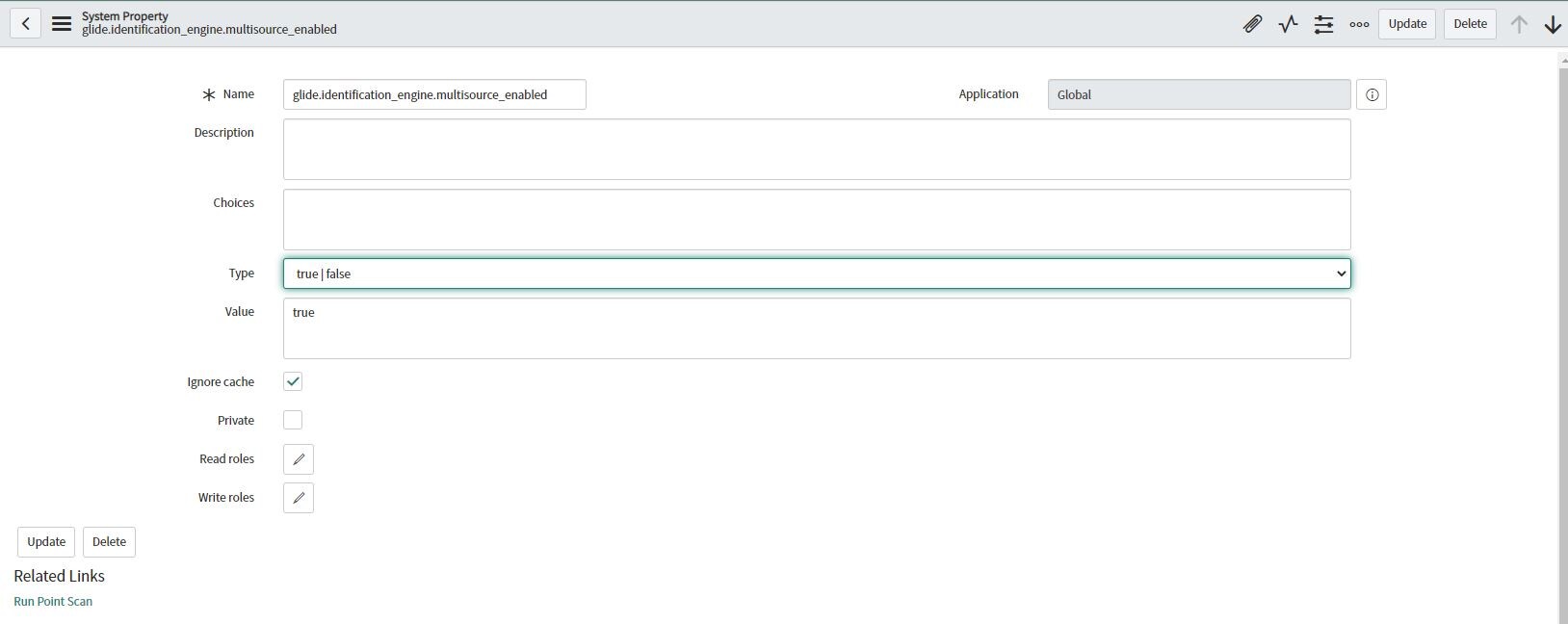
Exact and Correct Answer --- Navigate to System Properties List [sys_properties.list] and add new Property – glide.identification_engine.multisource_enabled and value should be true. And Type should be True/False.
Also Activate the ITOM Discovery License (com.snc.itom.discovery.license) plugin.
Regards,
Nikhil Bajaj
ServiceNow Rising Star-2025

- Mark as New
- Bookmark
- Subscribe
- Mute
- Subscribe to RSS Feed
- Permalink
- Report Inappropriate Content
02-22-2022 04:29 AM
THANK YOU!
- Mark as New
- Bookmark
- Subscribe
- Mute
- Subscribe to RSS Feed
- Permalink
- Report Inappropriate Content
03-14-2023 04:55 PM
Thank you very much for sharing your knowledge. I was lost for several days and your comment helped me to solve my problem.


- Mark as New
- Bookmark
- Subscribe
- Mute
- Subscribe to RSS Feed
- Permalink
- Report Inappropriate Content
05-04-2021 08:02 AM
I know what you mean. Go to sys_properties.list. Add new. Name is glide.identification_engine.multisource_enabled and Value is true. Type is true false. Submit. It should work then.
*Just what I said above. My id has changed since I'm now a Servicenow employee.

- Mark as New
- Bookmark
- Subscribe
- Mute
- Subscribe to RSS Feed
- Permalink
- Report Inappropriate Content
06-17-2021 10:59 PM
Go to sys_properties.list
Add new --> Name -- glide.identification_engine.multisource_enabled
Value -- true.
Type -- true/false

It is a dummy plugin that allows activation of any store applications that require ITOM Discovery licensing and for multi source CMDB to work, it is required.
For multisource CMDB to work, this plugin is required.