- Mark as New
- Bookmark
- Subscribe
- Mute
- Subscribe to RSS Feed
- Permalink
- Report Inappropriate Content
05-21-2015 12:19 PM
Conan Lloyd My company is currently using a report like that.

Is this what you are looking for? each color represents a group.
- Mark as New
- Bookmark
- Subscribe
- Mute
- Subscribe to RSS Feed
- Permalink
- Report Inappropriate Content
02-26-2016 08:25 AM
Can you send the instructions on how you created this "Workload Incident Aging (By Team)" report/chart?
Thanks,
Karl

- Mark as New
- Bookmark
- Subscribe
- Mute
- Subscribe to RSS Feed
- Permalink
- Report Inappropriate Content
03-24-2012 02:13 PM
I believe the problem is you are not actually querying any records, nor updating them. This is what I have done.
I have a Scheduled Job...
...that calls a function in a Script Include:

function u_updateAgingCategoryField() {
  var elapsedTime = 0;
  var aging = '';
  var currentTimeNow = gs.nowDateTime();
  var gr = new GlideRecord('incident');
  gr.addEncodedQuery('u_aging_category!=>28^ORu_aging_category=');
  gr.query();
  while(gr.next()) {
    elapsedTime = (gs.dateDiff(gr.opened_at, currentTimeNow, true)) /60/60/24;

    //check to see when the item was created
    if (elapsedTime <= 2) aging = '0_2';
    if (elapsedTime > 2)  aging = '3_7';
    if (elapsedTime > 7)  aging = '8_14';
    if (elapsedTime > 14) aging = '15_21';
    if (elapsedTime > 21) aging = '22_28';
    if (elapsedTime > 28) aging = '>28';

    gr.setWorkflow(false);    //skip any Business Rules
    gr.autoSysFields(false);  //do not update system fields
    gr.u_aging_category = aging;
    gr.update();
  }
}
Notice in the function that I am excluding incidents >28 days because we do not want to keep updating them with ">28 Days" all the time.
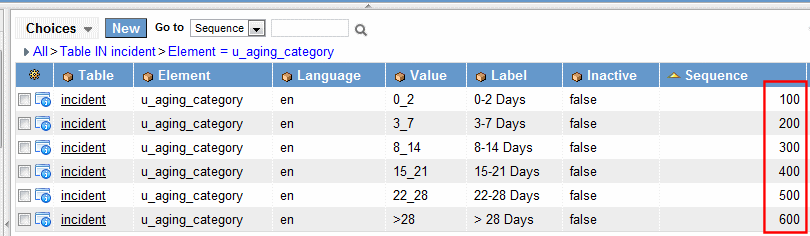
Now for the trick so that the Pivot Table orders the columns properly - on the Aging Category dictionary record, set the Default value to be "0_2" and the Choice field to "Dropdown without -- None --" and create some Choice entries:

Otherwise the report will sort the columns alphabetically. And so you should end up with the following report:

It is setup in https://demo23.service-now.com/ at the moment. I've also attached an update set that will re-create it for you if you do not get a change to look at demo23 today.
- Mark as New
- Bookmark
- Subscribe
- Mute
- Subscribe to RSS Feed
- Permalink
- Report Inappropriate Content
03-25-2012 07:27 PM
You are a rockstar. Thank you so much!
- Mark as New
- Bookmark
- Subscribe
- Mute
- Subscribe to RSS Feed
- Permalink
- Report Inappropriate Content
10-15-2013 06:51 AM
Hi JIM, Can you help me on this. I have tickets that are only one day old but they are showing as 28. Please see Attach.
Thanks in advance
text
 ******Scheduled Script Execution************
u_updateAgingCategoryField(); // calls script include

************ Script Include ******************
Name : u_updateAgingCategoryField

function u_updateAgingCategoryField() {
 var elapsedTime = 0;
 var aging = '';
 var currentTimeNow = gs.nowDateTime();
 var gr = new GlideRecord('incident');
 gr.addEncodedQuery('u_aging_category!=>28^ORu_aging_category=');
 gr.query();
 while(gr.next()) {
 elapsedTime = (gs.dateDiff(gr.opened_at, currentTimeNow, true)) /60/60/24;

 //check to see when the item was created
 if (elapsedTime <= 2) aging = '0_2';
 if (elapsedTime > 2) aging = '3_7';
 if (elapsedTime > 7) aging = '8_14';
 if (elapsedTime > 14) aging = '15_21';
 if (elapsedTime > 21) aging = '22_28';
 if (elapsedTime > 28) aging = '>28';

 gr.setWorkflow(false); //skip any Business Rules
 gr.autoSysFields(false); //do not update system fields
 gr.u_aging_category = aging;
 gr.update();
 }
}