- Mark as New
- Bookmark
- Subscribe
- Mute
- Subscribe to RSS Feed
- Permalink
- Report Inappropriate Content
11-05-2020 01:17 PM


- Mark as New
- Bookmark
- Subscribe
- Mute
- Subscribe to RSS Feed
- Permalink
- Report Inappropriate Content
11-05-2020 01:45 PM
This'll need two metrics, one to record assignment group "touches" and one to do the secondary logic.
1. Create a simple assignment group field value duration metric

2. Create a second metric with the below script.

This script checks to find if an assignment metric exists (it should) and returns the time the metric was created. It then creates a metric with the duration calculated on the difference of the assignment group metric start time and the current time.
var mi = new MetricInstance(definition,current);
var start = groupMetric();

if(start != null && !mi.metricExists()){
	var gr = mi.getNewRecord();
	gr.start = start;
	var now = new GlideDateTime();
	gr.end = now;
	gr.duration = gs.dateDiff(start, now);
	gr.value = current.getDisplayValue('assigned_to');
	gr.calculation_complete = true;
	gr.insert();
}


function groupMetric(){
	var metricGR = new GlideRecord('metric_instance');
	metricGR.addQuery("definition","06f9db6d2f94a8101c43bed72799b6c2"); //sys_id of assignment group touch metric (store in sys property);
	metricGR.addQuery("id",current.sys_id);
	metricGR.addQuery("value",current.getDisplayValue("assignment_group"));
	metricGR.query();
	metricGR.next();
	return metricGR.start;
}
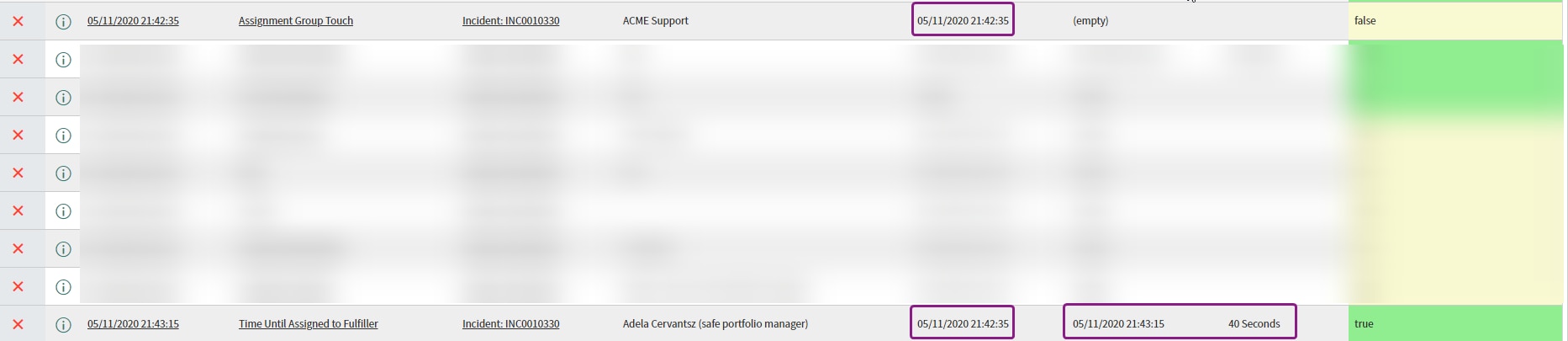
Result: We can see the incident was assigned to ACME Support at 21:42:35 and then an assignee allocated at 21:43:15. This shows a 40 second window between the assignment group being set and then actually being assigned to a user to fulfill.

- Mark as New
- Bookmark
- Subscribe
- Mute
- Subscribe to RSS Feed
- Permalink
- Report Inappropriate Content
11-05-2020 02:01 PM
Hello again Kieran,
I think I may have found a simpler solution. Because the metric I'm using is capturing the duration separate from the value field, I modified the script to set the value to current.assignment_group.name.
function createMetrice(value) {

  var gr = mi.getNewRecord();

  gr.value = current.assignment_group.name;
  gr.start = current.sys_updated_on;
  gr.end = gs.nowDateTime();
  gr.duration = gs.dateDiff(gr.start.getDisplayValue(), gr.end.getDisplayValue());
  gr.calculation_complete = true;
  gr.insert();
With this addition, I'm now able to filter the instances based on the value to exclude assignment groups I don't need to count the metric instance for...

I know it's not very elegant because to filter the report requires a perfect match of the assignment group name to but if I could get away with just one metric I'd prefer this method.
What do you think?
Kevin
- Mark as New
- Bookmark
- Subscribe
- Mute
- Subscribe to RSS Feed
- Permalink
- Report Inappropriate Content
11-05-2020 02:08 PM
What field has that metric been set to? That metric doesn't look like it would capture a duration as the start time is sys_updated_on and the end is nowDateTime() which will be no more than a few seconds apart.
- Mark as New
- Bookmark
- Subscribe
- Mute
- Subscribe to RSS Feed
- Permalink
- Report Inappropriate Content
11-05-2020 04:52 PM
You are correct sir. When I first started playing around with it I thought it was calculating correctly but in the subsequent tests it only recorded a duration of 2-4 seconds.
I created the two metrics per your instructions and it's working wonderfully. The only problem is that I need to create a metric instance for the duration for each assignment group that touches it. Right now, there is only once instance being created (the first team).
I tried removing
!mi.metricExistsfrom the if statement in the 'Time Until Assigned to Fulfiller' script but now I'm getting two records...

I'm not sure what I need to do to remove the duplicate with no duration...
Thanks so much for your help Kieran!
Kevin