- Mark as New
- Bookmark
- Subscribe
- Mute
- Subscribe to RSS Feed
- Permalink
- Report Inappropriate Content
10-05-2021 08:14 AM
I could see custom tables in my Choice table field.
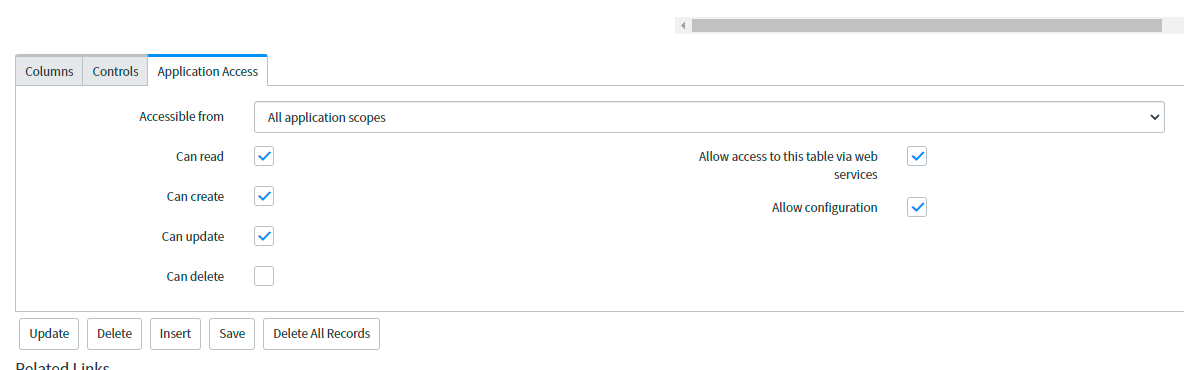
Is your table in another scope?
Mark it helpful if this helps you to understand. Accept solution if this give you the answer you're looking for
Kind Regards,
Rohila V
5x ServiceNow MVP

- Mark as New
- Bookmark
- Subscribe
- Mute
- Subscribe to RSS Feed
- Permalink
- Report Inappropriate Content
10-05-2021 08:22 AM

- Mark as New
- Bookmark
- Subscribe
- Mute
- Subscribe to RSS Feed
- Permalink
- Report Inappropriate Content
10-05-2021 09:01 AM
Okay Got It,
Remove all the configuration for your Product field dictionary.(Remove Choice Table and field,Remove dependent values too)
You should use GlideAjax in your client script and populate options
Below is sample code, Modify accordingly and let us know if You're stuck.
Script Include:
var HelloWorld = Class.create();
HelloWorld.prototype = Object.extendsObject(AbstractAjaxProcessor, {
    helloWorld: function() {
        var res = [];
        var a = this.getParameter('sysparm_user_name');
        var grIncident = new GlideRecord('incident');
        grIncident.addEncodedQuery("active=true");
        grIncident.query();
        while (grIncident.next()) {

            res.push(grIncident.caller_id.title.toString());
        }
        return res.join(",");
    },
    type: 'HelloWorld'
});
Client script:
function onLoad() {
    //Type appropriate comment here, and begin script below
  //  g_form.clearOptions('u_integer_f');
//    g_form.addOption('u_integer_f', "hey", "hey");

    var ga = new GlideAjax('HelloWorld');
    ga.addParam('sysparm_name', 'helloWorld');
    ga.addParam('sysparm_user_name', "Bob");
    ga.getXML(HelloWorldParse);

    function HelloWorldParse(response) {
        var answer = response.responseXML.documentElement.getAttribute("answer");
        //  alert(answer);
        var x = answer.split(",");
        for (var i = 0; i < x.length; i++)
            g_form.addOption('u_integer_f', x[i], x[i]);

    }
}
If my response helped you in any way, mark it as helpful.
Mark it helpful if this helps you to understand. Accept solution if this give you the answer you're looking for
Kind Regards,
Rohila V
5x ServiceNow MVP
- Mark as New
- Bookmark
- Subscribe
- Mute
- Subscribe to RSS Feed
- Permalink
- Report Inappropriate Content
10-05-2021 09:56 AM
This is working fine,
I want it to onchange value of Product Line.Please give some guidance on that
- Mark as New
- Bookmark
- Subscribe
- Mute
- Subscribe to RSS Feed
- Permalink
- Report Inappropriate Content
10-05-2021 10:18 AM
Use the same code in OnChange script
Sample code:
function onChange(control, oldValue, newValue, isLoading) {
if (isLoading || newValue == '') {
return;
}
g_form.clearOptions('u_integer_f');
//your code here
var ga = new GlideAjax('HelloWorld');
    ga.addParam('sysparm_name', 'helloWorld');
    ga.addParam('sysparm_user_name', newValue);
    ga.getXML(HelloWorldParse);

    function HelloWorldParse(response) {
        var answer = response.responseXML.documentElement.getAttribute("answer");
        //  alert(answer);
        var x = answer.split(",");
        for (var i = 0; i < x.length; i++)
            g_form.addOption('u_integer_f', x[i], x[i]);

    }
}
Mark it helpful if this helps you to understand. Accept solution if this give you the answer you're looking for
Kind Regards,
Rohila V
5x ServiceNow MVP