- Mark as New
- Bookmark
- Subscribe
- Mute
- Subscribe to RSS Feed
- Permalink
- Report Inappropriate Content
06-09-2020 05:33 AM


- Mark as New
- Bookmark
- Subscribe
- Mute
- Subscribe to RSS Feed
- Permalink
- Report Inappropriate Content
06-09-2020 07:29 AM
sn_change_cab_notify_all_attendees is action name being used in Notify All Attendees Ui action and which is getting called from Send meeting request to attendees via that action name. Events are getting triggered by Notify All Attendees UI action. See screenshot below.


Above Ui action is calling CABMeeting() script include and that script include calling another script include.
I would recommend not to go that deep into the script as you are not very into scripting so will be lost.
If you know how to script a scheduled job, just wrap two server side functions I explained in the first UI action into the Script include and call from the job with minor tweaks. It will do the job.
Please mark this accepted & helpful, if it helps.
Thanks & Regards,
Sharjeel
- Mark as New
- Bookmark
- Subscribe
- Mute
- Subscribe to RSS Feed
- Permalink
- Report Inappropriate Content
06-09-2020 07:34 AM

- Mark as New
- Bookmark
- Subscribe
- Mute
- Subscribe to RSS Feed
- Permalink
- Report Inappropriate Content
06-09-2020 06:47 PM
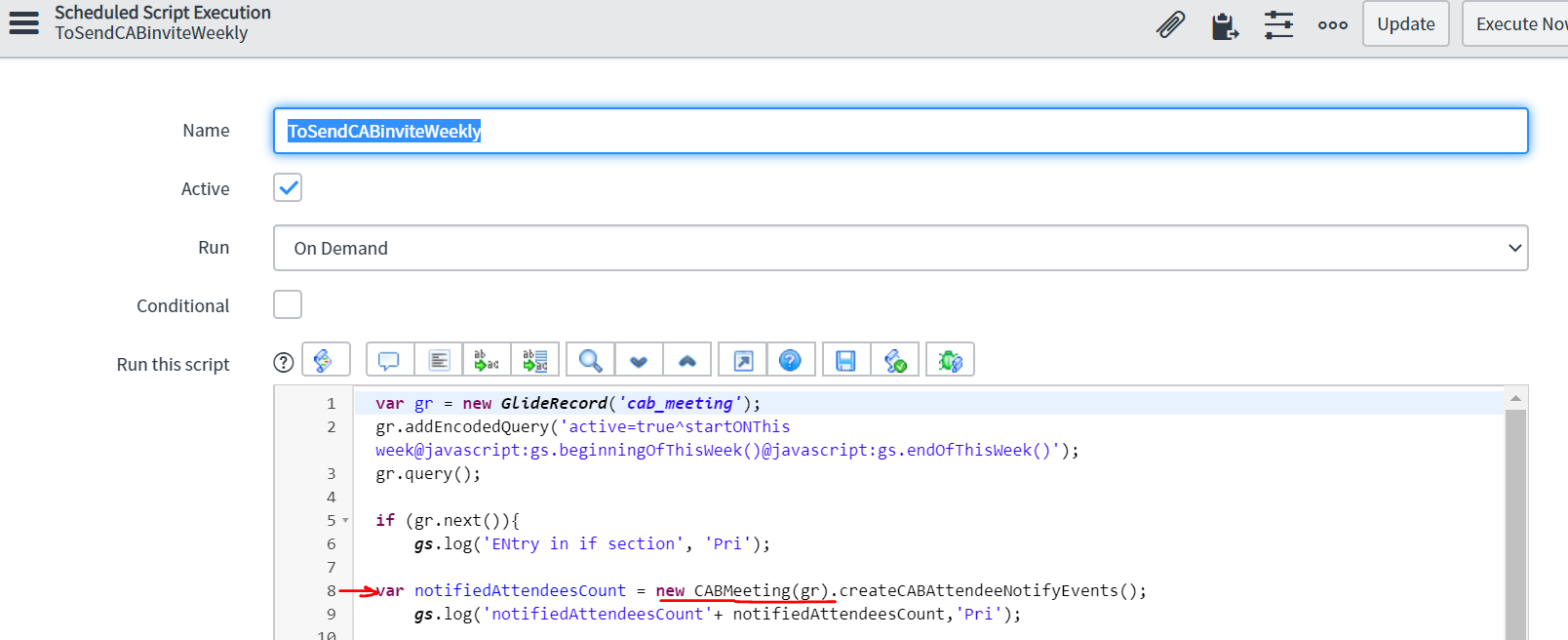
CABMeeting script include is in scoped app so you have to give fully qualified name domain + script include name.
sn_change_cab.CABMeeting(gr)
Also, here is the sample code I just ran for quick testing in the background script and its working fine.
var gr = new GlideRecord('cab_meeting');
gr.addQuery('sys_id', <sys_id>); // replace sys_id with any Cab meeting sys id.
gr.query();
gr.next();
gs.print(gr.getRowCount());

var notifiedAttendeesCount = new sn_change_cab.CABMeeting(gr).createCABAttendeeNotifyEvents();
var infoMessage = notifiedAttendeesCount > 0 ? gs.getMessage("Notifications sent to all attendees") : gs.getMessage("No notifications sent as there are no attendees");
gs.print(infoMessage);
Replace <sys_id> with one of your Cab meeting sys ID in the above code and test in background script and see the output for reference. after that you can modify this as per your need
Let me know if you face any issues.
Please mark this accepted & helpful, if it helps.
Thanks & Regards,
Sharjeel
- Mark as New
- Bookmark
- Subscribe
- Mute
- Subscribe to RSS Feed
- Permalink
- Report Inappropriate Content
06-09-2020 11:35 PM