- Mark as New
- Bookmark
- Subscribe
- Mute
- Subscribe to RSS Feed
- Permalink
- Report Inappropriate Content
04-08-2022 04:30 AM
There is No data for me in Orphan graph. Can you suggest anything here ?
- Mark as New
- Bookmark
- Subscribe
- Mute
- Subscribe to RSS Feed
- Permalink
- Report Inappropriate Content
05-06-2022 03:11 AM
Very helpful, completed and task validation successful!
Thank you

- Mark as New
- Bookmark
- Subscribe
- Mute
- Subscribe to RSS Feed
- Permalink
- Report Inappropriate Content
06-30-2022 10:39 PM


- Mark as New
- Bookmark
- Subscribe
- Mute
- Subscribe to RSS Feed
- Permalink
- Report Inappropriate Content
07-05-2022 10:36 AM
Thanks Omarali, since this is a workflow with some script logic, there are multiple ways to achieve the same result. For our purposes, we try to display using scratchpad and a run script, only for scalability by setting all variables in the first activity. In large workflows, having all the variables captured in one activity can help for maintenance or update purposes. But what you show is perfectly acceptable. Thanks.

- Mark as New
- Bookmark
- Subscribe
- Mute
- Subscribe to RSS Feed
- Permalink
- Report Inappropriate Content
08-19-2022 05:23 AM
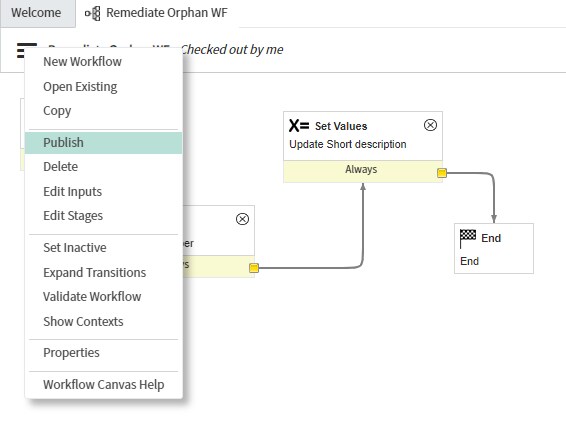
Here is what I tried
Created a workflow
- Name: Remediate Orphan WF
- Table: Orphan CI Remediation [orphan_ci_remediation]

Added 2 Core actions:
- Run Script
- Set Values

Connect the actions
- Begin
- Run Script
- Set Values
- End

Action: Run Script
workflow.scratchpad.currentnumber = current.number;
Action: Set Values
Short description
Workflow launched for task number ${workflow.scratchpad.currentnumber}
Finish your workflow
Do not forget to Publish your workflow!

After the workflow is finished Create a CMDB Remediation Rule.
Create a CMDB Remediation Rule

- Name: Remediate Orphans
- Task type: Orphan CI Remediation
- Execution: Manual
- Workflow: [Your workflow name] "Remediate Orphan WF"

Set Health Preferences

In the category "Health Metrics" select "Orphan" Metric and activate "Create Task"

Last steps
Follow the steps 4 & 5 in the learning course and your task will be updated as following:

Happy learning!
If my answer helped you, please mark it as Helpful/Solution.
Thanks & many Regards - Manuel