Interested in a ServiceNow event built for developers? Registration for now[dev]26 is officially open!

dylan_lindgren
ServiceNow Employee

Most fields in ServiceNow store a single inputted text value. To view previous values one needs to go into the record's audit history. Journal fields are different, in that all previous values of this field are shown as distinct posts within the Activity Stream timeline. This allows them to be used as a method of communication with users and coworkers about the current record, and also as a log of the history of the record.


With journal fields, the content of notifications are commonly based on the newly updated value of the journal fields, and that they only accept input as plain-text. Out of box, there are two journal fields on the task table:


  • Additional comments [comments]
  • Work notes [work_notes]


Adding HTML code in Journal fields

As with most fields, if the new value contains HTML code it is escaped. For example, if you were to type the below valid HTML code in a journal field:

html code journal fields.jpg

It would appear in the Activity Stream as follows:

INC0010056___ServiceNow.png

The way this is done is by replacing any characters in a journal field that could be interpreted by a browser as HTML with it's HTML entity code.


For example, HTML tags make use of < and > to declare the start and end of a tag. ServiceNow replaces these with their HTML entity code &lt; (less than) and &gt; (greater than), meaning that when the browser reads the code it doesn't get processed as a literal < and >, and therefore does not mistakenly become a HTML element.


Using the [code] tag in Journal Fields

Text wrapped in [code] tags bypasses the escaping process described above, and will instead be rendered as HTML. For example, the same input used above, but wrapped in [code] tags:

INC0010056___ServiceNow.png

Will appear in the Activity Stream as follows:

INC0010056___ServiceNow.png

Note that the <blockquote> tags are now being interpreted as HTML elements, and are not being escaped. Also note that you can use multiple sets of [code] tags within a single journal entry.


Formatting styles in Journal entries

There are a number of HTML elements that you can use to add styles to your journal updates. Some examples are shown below:


Style
Tag(s)
Example Journal Entry
Italic <em> [code]This text is <em>italic</em>[/code]

INC0010056___ServiceNow.png

Strikethrough <strike> [code]This text is <strike>strikethrough</strike>[/code]
INC0010056___ServiceNow.png
Code (inline) <code> [code]Check the script include <code>KBKnowledgeBase</code>[/code]

INC0010056___ServiceNow.png

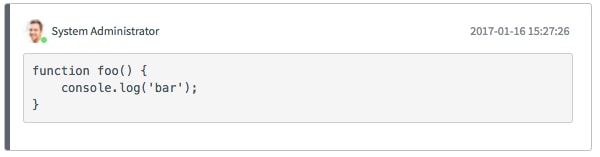
Code (block) <pre><code>

[code]<pre><code>function foo() {<br/>

      console.log('bar');<br/>

}</code></pre>[/code]

INC0010056___ServiceNow.png
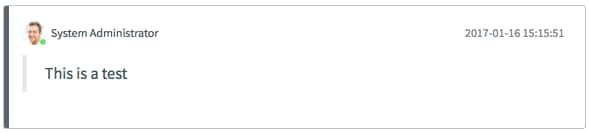
Blockquote <blockquote> [code]<blockquote>This is a quote</blockquote>[/code]
INC0010056___ServiceNow.png
Hyperlink <a> [code]<a href="https://www.servicenow.com">ServiceNow.com</a>[/code]
INC0010056___ServiceNow.png
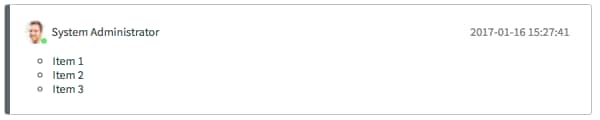
Bullet points <ul><li> [code]<ul><li>Item 1</li><li>Item 2</li><li>Item 3</li></ul>[/code]
INC0010056___ServiceNow.png
Numbered lists <ol><li> [code]<ol><li>Item 1</li><li>Item 2</li><li>Item 3</li></ol>[/code]
INC0010056___ServiceNow.png
Header <h3> [code]<h3>This is a header</h3>This is normal.[/code]
INC0010056___ServiceNow.png


The HTML elements shown above do not contain any styling information - that is left up to ServiceNow's CSS stylesheets, and the browser's user agent stylesheet. Therefore, as the styles rely on ServiceNow CSS, the way they are presented to users may change after future user interface upgrades.


The above examples show how the HTML elements are displayed in the Istanbul release of ServiceNow, running UI16. See kobby.adu-nti demo in Formatting the Journal Field with the [code] tag

48 Comments
chadlockwood
Mega Sage

@M_87 

First, click on the 3 dots to the right and expand the toolbar. See what else is already there. Then, if you still need addition features, look for system properties starting with glide.ui.html.editor and this doc will show you the options.

M_87
Tera Contributor

@chadlockwood 

I already tried to update these sys_properties, but it is not reflecting towards.
It does on the description field, but not on the comments/work notes field:
Capture_20240423_Comments.PNG
chadlockwood
Mega Sage

@M_87 

It appears that your Comments field is coming from a configurable workspace. You would need to look into editing that. Here are a couple of articles to get you started:

Customize your Workspace 

Using Compose

tim_treacy
Tera Contributor

Something seems to have occurred recently with the use of code blocks and the a URL tags.

I'm not sure if it's the HTML Sanitizer, or some change to the journal fields, but it appears to be modifying the href portion of the tag such that it no longer functions as a clickable hyperlink.

We don't see the typical evidence of the sanitizer removing the HTML code (in the journal & audit logs, it's still present), and clickable URLs added through code tags to Comments and Work Notes, prior to whatever has changed still function as expected.  So it's only new tags added that are impacted in this way.

It's not clear from the journal/audits what's causing this, but we do see an odd return, or line break, between the syntax of the tag (below).
Screenshot_0000120.png


It's unclear if this is what's causing this, or just another symptom of whatever is.  I'm hoping someone here can shed some light on what might be happening here.

mike510a
Tera Explorer

@dylan_lindgren 

One issue/bug that i have come across with the [code] [/code] blocks is that when you try to export to Excel format by right-clicking on the headers in the list view on a report / query and selecting Export to Excel, the [code][/code] blocks are not converted into an excel-readable format (stripping out the code blocks or converting MIME type to HTML and then removing the [code][/code] blocks from the journal entry. 


I think it should be one or the other, but not exported as plaintext complete with the code blocks into excel since the result is unreadable which totally makes having code blocks useless to anybody who wants to create a report in Excel containing journal entries (or multiple journal entries).  


I am unsure if the other formats also have this issue (keeping code blocks as plaintext instead of conversion to the correct MIME type or stripping out the HTML before exporting)

It seems like it would be fairly trivial to fix just repurpose this code and have the conversion happen client side for just converting the code into plaintext... I guess things like tables would end up a bit weird, but there is a way to convert those too with a little TLC into something useful.. Would be even better to have it convert into excel format, but thats probably way more difficult of a problem then just grabbing plaintext from HTML content and maybe converting it into a much simpler form. 


<!DOCTYPE html>
<html lang="en">
<head>
  <meta charset="UTF-8">
  <title>Extract [CODE] Text and Replace</title>
  <script src="https://cdnjs.cloudflare.com/ajax/libs/xlsx/0.18.5/xlsx.full.min.js"></script>
</head>
<body>
  <h1>Excel [CODE] Text Extractor</h1>
  <input type="file" id="uploadFile" accept=".xlsx, .xls" />
  <button id="downloadFile" disabled>Download Extracted File</button>

  <script>
    const uploadInput = document.getElementById('uploadFile');
    const downloadButton = document.getElementById('downloadFile');
    let formattedWorkbook;

    uploadInput.addEventListener('change', (event) => {
      const file = event.target.files[0];
      if (!file) return;

      const reader = new FileReader();

      reader.onload = (e) => {
        const data = new Uint8Array(e.target.result);
        const workbook = XLSX.read(data, { type: 'array' });
        const sheetNames = workbook.SheetNames;

        sheetNames.forEach(sheetName => {
          const sheet = workbook.Sheets[sheetName];
          const rows = XLSX.utils.sheet_to_json(sheet, { header: 1, raw: true });

          rows.forEach((row, rowIndex) => {
            row.forEach((cell, colIndex) => {
              if (typeof cell === 'string') {
                // Replace all [CODE]...[/CODE] blocks with their plain text
                const updatedCell = cell.replace(/\[CODE\]([\s\S]*?)\[\/CODE\]/gi, (match, codeContent) => {
                  // Use DOMParser to parse the HTML inside [CODE]
                  const parser = new DOMParser();
                  const doc = parser.parseFromString(codeContent, 'text/html');
                  return doc.body.textContent || ''; // Extract and return plain text
                });
                rows[rowIndex][colIndex] = updatedCell;
              }
            });
          });

          workbook.Sheets[sheetName] = XLSX.utils.aoa_to_sheet(rows);
        });

        formattedWorkbook = workbook;
        downloadButton.disabled = false;
      };

      reader.readAsArrayBuffer(file);
    });

    downloadButton.addEventListener('click', () => {
      if (!formattedWorkbook) return;

      const originalFileName = uploadInput.files[0].name;
      const newFileName = originalFileName.replace(/(\.xlsx|\.xls)?$/, '-extracted.xlsx');
      XLSX.writeFile(formattedWorkbook, newFileName);
    });
  </script>
</body>
</html>


Prakhar26
ServiceNow Employee

Thanks for the detailed post @dylan_lindgren 

I played around with this more and made:

Github Social Preview - Markdown-SN.png


Daniel Oderbolz
Mega Sage
glideFather
Tera Patron

I wish I could see more posts like this in 2026 💚