kim_purcell
Kilo Explorer
Options
- Subscribe to RSS Feed
- Mark as New
- Mark as Read
- Bookmark
- Subscribe
- Printer Friendly Page
- Report Inappropriate Content
11-12-2014
10:34 AM
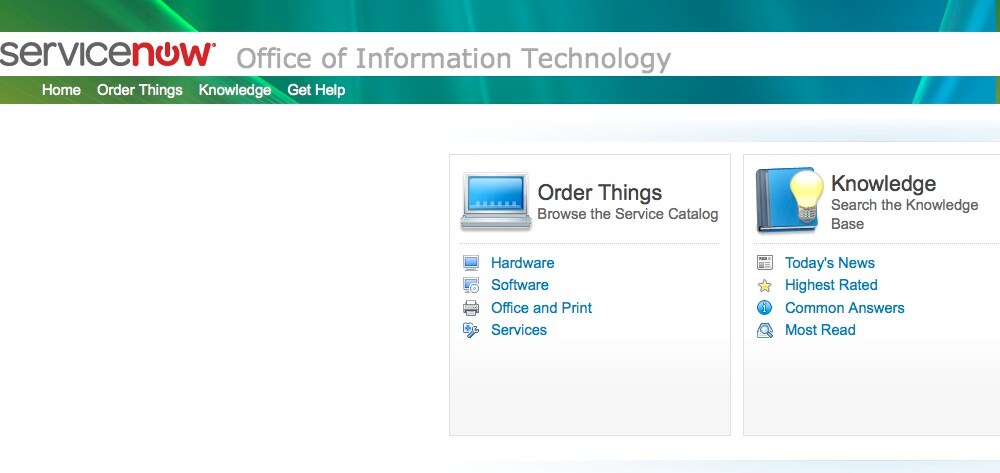
If you are trying to add a background image to your CMS header, you will likely encounter an issue when you change your Portal Header setting from Colored Bars to Gradient/Image in versions prior to Eureka:
Not only will your background image not show up, but this will also cause your portal page header to go blank. You won't see any of your menu items unless you hover over them (yep, they are still there):
There are a couple of ways to fix this. You can adjust the Default CSS or the UI Macro:
To fix in Default CSS:
- In the navigation filter, enter Design.
- Go to Style Sheets > Default CSS > Gray CSS Header.
- Add style:
div.cms_header table.cms_header_table{
background: transparent;
}
To fix in UI Macro:
- In the navigation filter, enter UI Macro.
- Go to render_content_block_header.
- Add style:
<table class="cms_header_table" cellpadding="0" cellspacing="0" border="0" width="100%" style="background: transparent;">
You should now be able to enjoy your header and image background on your portal page:
For more information, see: Headers not displaying when background is set to Gradient/Image
You must be a registered user to add a comment. If you've already registered, sign in. Otherwise, register and sign in.