Dan Martinez
Tera Expert
Options
- Subscribe to RSS Feed
- Mark as New
- Mark as Read
- Bookmark
- Subscribe
- Printer Friendly Page
- Report Inappropriate Content
07-03-2020
03:00 AM
Sometimes Knowledge Articles may include scripts but those scripts won't be properly displayed in the out of the box KB articles. For instance, there's no line number in each line and the script is plain with no colour at all, making it really difficult to be read.
Fortunately, there are many libraries out there. In this example I use Prettify for no special reason. It is a library that can be added to the "kb_view" page so whatever their documentation reflects can be used in a KB article too. You can check out its possibilities here:
https://github.com/google/code-prettify/blob/master/docs/getting_started.md
The only thing that needs to be edited in the "kb_view" UI page to add this library is the HTML line below. As you can see it points directly to their site, thus in case there's a new version it'll be already applied in your side too.
In order to use it, it is as simple as adding the script into a pre HTML tag with the classes "prettyprint" and "linenums". These two classes will do the rest, let's see an example:
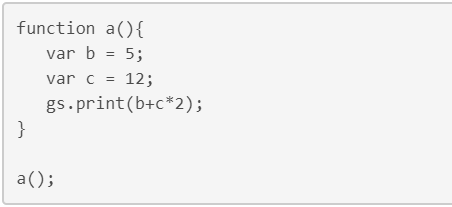
Your code will look like this OOB:

From the HTML editor you will see the following:
<pre>
function a(){
var b = 5;
var c = 12;
gs.print(b+c*2);
}
a();
</pre>
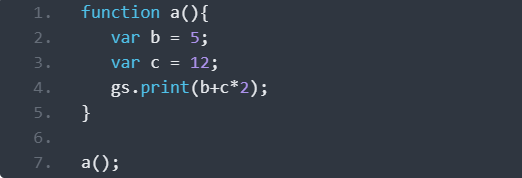
However, prettify -or any other similar library- would make your code look like this:
From the HTML editor you must do the following to achieve this:
<pre class="prettyprint linenums">
function a(){
var b = 5;
var c = 12;
gs.print(b+c*2);
}
a();
</pre>
Notice that Prettify will only make your KB Articles be pretty when using the "View Article" link from either the portal or the tool, but it won't look that way when editing the KB Article itself.
Conclusion
The "kb_view" UI page -as any other- can be combined with any JS library to achieve all those things that aren't there OOB. Especially things that aren't demanded by most of the companies. We have to understand that many companies won't need to display scripts, although some others will. By using libraries we can make KB Articles go beyond what was expected of them initially.
Nonetheless, the more libraries that are included, the longer the KB article will take to display. One needs to be cautious not to overengineer solutions. As an advice, remember the 80/20 rule.
Don't use a sledgehammer to crack nuts!
If this blog article was useful to you, please click on “Helpful”
Other blog articles created by me:
Labels:
- 1,418 Views
You must be a registered user to add a comment. If you've already registered, sign in. Otherwise, register and sign in.