SimonMorris

ServiceNow Employee
Options
- Subscribe to RSS Feed
- Mark as New
- Mark as Read
- Bookmark
- Subscribe
- Printer Friendly Page
- Report Inappropriate Content
12-21-2011
04:07 AM
I read an interesting article at The SNC Blog about how to build a Incident Management state model
It's a nice article, and having done a lot of work on this recently I thought I could contribute to the discussion. Unfortunately my response was too large for their comments section 🙂
The state model is absolutely critical to making the process simple and easy to follow. It's a tool that drives process workflow, understanding of where an individual record is and of course the Service Level Agreement data that confirms the value that we provide to the customer.
It also drives Key Performance Indicator information to ensure that the process is healthy by answering questions such as:
- What percentage of my open incidents are in Resolved state
- How many incidents have been closed this month
- How many first time fixes have I achieved
- And so on...
So, in summary it really matters that the state model is correct.
The Active flag
In the context of ServiceNow it's also worth pointing out that there is an additional active flag on every record which summarises the state in a Boolean way. If you are looking at changing your state model I'd really recommend researching the TaskStateUtil function which keeps the task.state and task.active information consistent.
Reuse existing states if possible
Additionally it's worth looking at the numerous different processes that you have in ServiceNow and understanding the various states and values that are available. If you want to extend the default Incident Management state model, for example, try and see if there are existing values for the states that you might use.
To do this go to System Definition > Choice Lists and use the filter "Element = state" (and also "Table = task AND Element = state")
If you need an additional state of, say, Closed Skipped it would be better to use the existing numerical value, rather than add an additional one to express the same state.
Be extensible
The sub-state (or if you prefer status) field is helpful to further describe where the Incident is in its lifecycle.
When designing the state model try to group similar states into a sub-state.
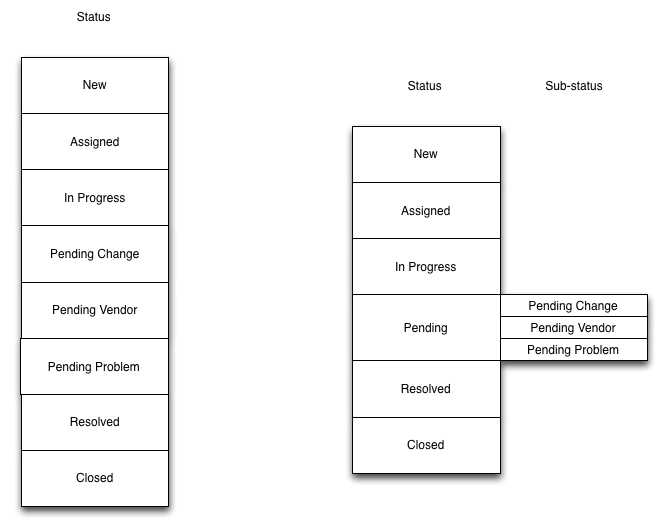
Consider the 2 state models below. With the left one you are forced into extending the base state model with every additional Pending state (Pending User for example). This might mean rewriting of SLA definitions, reports, dashboards and so on.

The state model on the right allows you to add additional sub-states without changing the base state model, which is useful
Keep the state model as simple as possible
And lastly - the best state model is a simple one. You should consider the states that a record might be in (and sub-states help with further descriptions) but do all of this with a maximum of two fields.
One valid, but in my opinion BAD method of expressing the state of Pending Problem might be to say "The status is Work In Progress, but there is a value in the Problem ID field... that's how we'll express Pending Problem".
That works on the whiteboard, but you are now using three fields to express the state, and all of a sudden accurate reporting becomes very, very hard. To express "Pending Change" with a value in the Change ID field you are using four states and you can see where this will end up 🙂
Users, customers, engineers, managers and everyone else will use the state model for their list, reports, dashboards and so on. If your state model requires building complex queries to express the state the complexity will only grow as you add more queries and filters to build the report.
So there is my contribution to the discussion - great subject started by the guys at SNC Blog.
1 Comment
You must be a registered user to add a comment. If you've already registered, sign in. Otherwise, register and sign in.