Suzanne Smith

ServiceNow Employee
Options
- Subscribe to RSS Feed
- Mark as New
- Mark as Read
- Bookmark
- Subscribe
- Printer Friendly Page
- Report Inappropriate Content
10-08-2014
12:10 PM
"Life is really simple, but we insist on making it complicated"
-Confucius
We like making things simpler for our customers. For example, in the Eureka release that debuted earlier this year, we introduced simple reference qualifiers. A reference qualifier controls the data that can be selected for a reference field. Prior to Eureka, reference qualifiers could only be created using a static encoded query string or JavaScript. Now, there's an easier way.
Build your Simple Reference Qualifiers:
- Navigate to the form containing the reference field you want to edit.
For example, navigate to Incident > Create New or Software Asset Management > Software Models. - Right-click the label of the field you want to edit and select Personalize Dictionary.
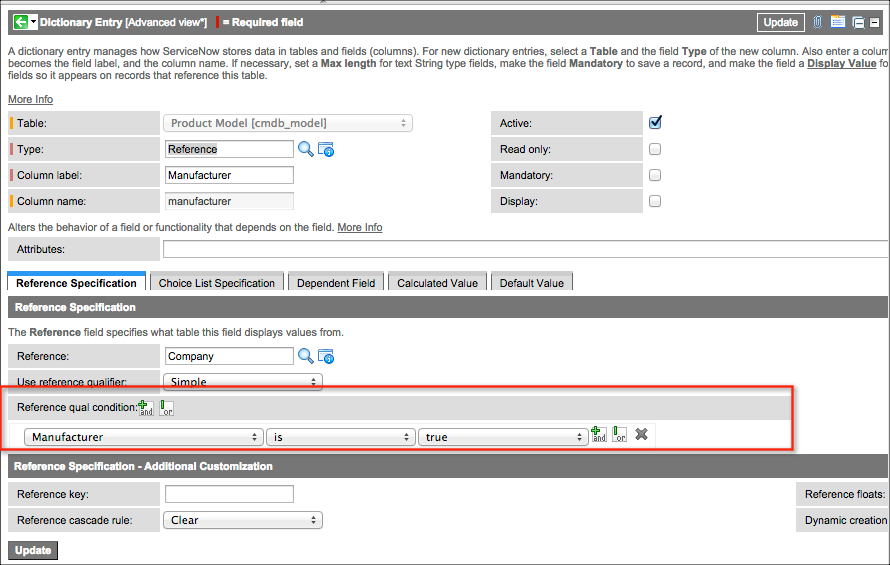
For example, on the Software Model form, right-click on the Manufacturer field label and select Personalize Dictionary. - In the Reference Specification section, check that the Reference field contains the correct table. Select another table, if necessary.
- In the User reference qualifier choice list, select Simple.
- In Reference qual condition, build the reference qualifier condition. For example, [Manufacturer] [is] [true]. This qualifier restricts the companies you can select for this field to companies with the Manufacturer field set to true.
- Click Update.
Think about the different ways you can strategically use simple reference qualifiers to limit the values for reference fields in your instance.
ServiceNow offers more information about reference qualifiers.
In the product documentation:
In the community:
Only show groups with "assignment group" ticked
Parent table to get an access to child table column
Reference qualifier required to limit Project list by state
6 Comments
You must be a registered user to add a comment. If you've already registered, sign in. Otherwise, register and sign in.