Deepa Srivastav
Kilo Sage
Options
- Subscribe to RSS Feed
- Mark as New
- Mark as Read
- Bookmark
- Subscribe
- Printer Friendly Page
- Report Inappropriate Content
10-13-2016
02:30 AM
This module/feature was newly introduced from Geneva release. I did a small POC to learn about it which I am going to share with you all. It has all the detailed steps for those who want to get hands on this.
Use case : We want to update few fields in our service now table with the values from some trusted source and validate them if they are in correct format before updating
them to the record.
Step 1: Go to 'Scripted REST APIs' module and create a new one. The API ID will be automatically populated based on the Name. Save the form. Make note of 'Base API path', we will be using it later.
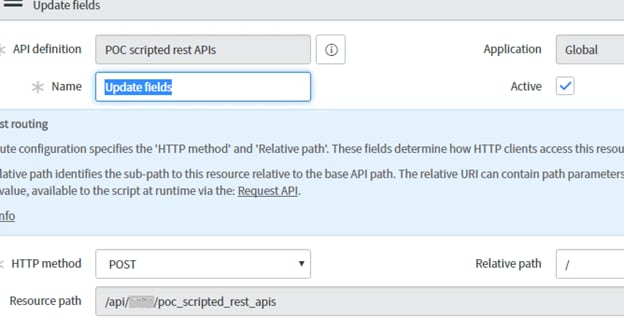
Step 2: Next we have to create a new Resource (see related list). Provide a name, select the HTTP method this resource implements. For our case as we have to update the data, so used
POST Method. Save the resource.
----------------------------------------------------
Step 3: To fetch the values from the source and validate it we have to write script in the 'Script' part in the resource. Request.body.data (RESTAPIRequestBody) object allows you to access the body content of a scripted REST API request in scripts. The highlighted part gives the response whether update was successful or not.
Step 4: To test this I created a REST message. Create a new REST message, provide the name , endpoint as instanceurl/Base API path (this base API path we got in step1). Save the
form.
Step 5: HTTP methods (GET,POST,PUT,PATCH) will appear at the bottom. Open the POST and configure as below.
Step 6: Goto the HTTP Request tab and Enter the data to be tested in the 'Content' field. Various request and response format are supported for this like JSON,XML,test/XML. I used JSON format for request and response. We need some unique field (as INC number) so as to identify the record to be updated.
Step7: Now time to Test the connection (click test as shown in above screenshot).

You can see the HTTP status as 200 which means that connection was successful. But as I provided the year in wrong format I got the customized response which I gave in the script.
We may get different HTTP status if there is some or the other connection errors. Check below link for more details.
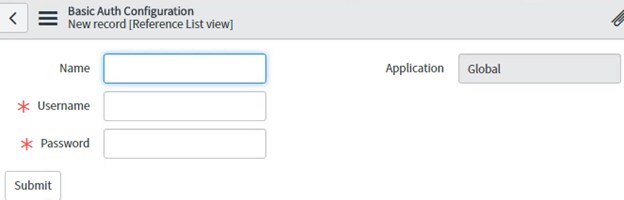
If you want resource to require authentication and not be public, check 'Require Authentication' in the resource. Then in the REST message in the 'Authentication' Tab select the 'Authentication type' as basic. Create a new Basic Auth Profile with some Name, username and password of a user from User(sys_user) table.
I hope this blog will help you to give an idea about Scripted REST APIs. There are still many areas in this which needs to be explored. I will write once I have them explored.
Will be coming up with GET example on this soon...
Please encourage me to write more by hitting on like/share/bookmark (on the top right corner)
Labels:
- 22,995 Views
10 Comments
You must be a registered user to add a comment. If you've already registered, sign in. Otherwise, register and sign in.