Gurpreet07
Mega Sage
Options
- Subscribe to RSS Feed
- Mark as New
- Mark as Read
- Bookmark
- Subscribe
- Printer Friendly Page
- Report Inappropriate Content
01-19-2018
02:47 AM
It's been asked multiple times and there is not an easy way to implement a tabbed list. We can find out smiler widget in HI Portal under My Issues link. If you are still looking for the solution then you are at right place.
Steps to be followed
1. create a new page
2. add the widget(List Tabbed) to the page using page designer (attached XML)
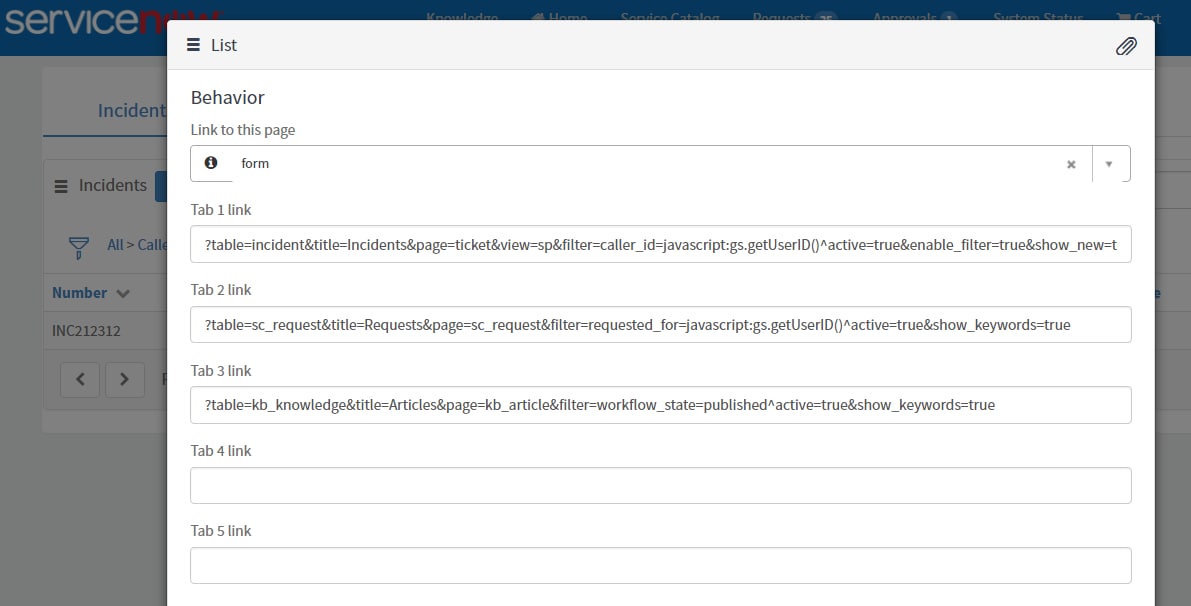
3. configure instance options for the widget
Options
1. Tab Links:
Tab 1 Link, Tab 2 Link, Tab 3 Link, Tab 4 Link, Tab 5 Link
Each of the tab links defines from where/how the data to be picked in respective tabs.
Mandatory parameters to be passed for each of tab links
I. table: Name of the table from which data to be picked.
II. title: Label to display on tab
Optional Parameters:
III. Instance options supported by OOB list page (Widget: Data Table from URL Definition) could be passed as parameters to each of the Tab Links.
Supported parameters: o, d, view, p, filter, enable_filter, show_new, show_keywords, show_breadcrumbs
IV. page (ticket/ sc_request/ form): Records from the tab will open in mentioned page.
2. Link to this page:
if parameter page not passed in the link tab then the records will open in this page. if its blank too then links will open in 'form' page.'
Configuration for Incidents, Requests, Knowledge
Tab 1 Link:
?table=incident&title=Incidents&page=ticket&view=sp&filter=caller_id=javascript:gs.getUserID()^active=true&enable_filter=true&show_new=true&show_keywords=true&show_breadcrumbs=true&o=number&d=desc&p=1
Tab 2 Link:
?table=sc_request&title=Requests&page=sc_request&filter=requested_for=javascript:gs.getUserID()^active=true&show_keywords=true
Tab 3 Link:
?table=kb_knowledge&title=Articles&page=kb_article&filter=workflow_state=published^active=true&show_keywords=true
How it looks like
Edit [20/09/2018]
Known Issues:
1. Using same table in more than one tabs then filter is working in one tab and not working second tab
Labels:
- 34,368 Views
70 Comments
You must be a registered user to add a comment. If you've already registered, sign in. Otherwise, register and sign in.