Christopher_Mal

ServiceNow Employee
Options
- Subscribe to RSS Feed
- Mark as New
- Mark as Read
- Bookmark
- Subscribe
- Printer Friendly Page
- Report Inappropriate Content
08-17-2015
08:22 AM
This blog post will be short.
Problem:
You create a new VM in VMWare and you have Guest Customization Rules created in ServiceNow to add this newly minted VM to the domain and fails to do so.
Answer:
After some research I found this article that tells you why this is the case:
Symptoms:
- When performing guest customization via the vCenter Server, the Windows Guest Operating Systems (Guest OS) fail to join Active Directory. The affected Guest OS-s are as follows, but not limited to:
- Windows Server 2008
- Windows Server 2008 R2
- Windows Server 2003
- Windows Server 2003 R2
- Windows 7
- Windows 8/8.1
- When deploying a virtual machine from a Windows template and using a guest customization, it fails to join to the Active Directory (AD) domain
Resolution:
Guest customization of a Windows Server 2008/Windows 7 operating systems and later uses the sysprep functionality built into the Windows operating system. Using a NETBIOS name when joining a Windows Server 2008/Windows 7 to an AD domain is no longer supported.
If the NETBIOS name of the AD domain is specified in guest customization, the virtual machine does not join the AD domain.
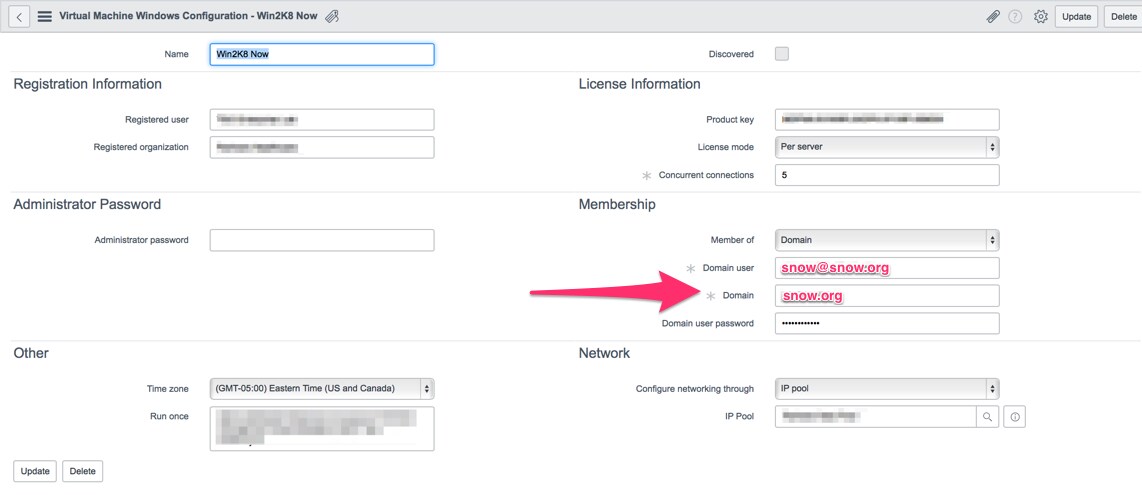
To resolve this issue, use the fully qualified domain name (FQDN) of the AD domain in guest customization and switch the domain login from down-level style log-on (domain\user) to user principal name (user@FQDN_of_domain.local).
In ServiceNow the configuration page should look like this:
Hope this helps.
Labels:
You must be a registered user to add a comment. If you've already registered, sign in. Otherwise, register and sign in.