SimonMorris

ServiceNow Employee
Options
- Subscribe to RSS Feed
- Mark as New
- Mark as Read
- Bookmark
- Subscribe
- Printer Friendly Page
- Report Inappropriate Content
02-14-2012
01:32 AM
I had an interesting challenge set to me by Paul Hardy of Informa recently.
He has a CMDB in his ServiceNow instance which defines his applications and its dependancies on his Infrastructure.
His request was fairly simple:
I'd like to see all of the tasks (Incidents, Problems and Changes) that are currently open for an Application and all of it's dependancies
That would be a good list to see - take an Enterprise Application and get a quick view on all of the ITSM activity that is currently affecting or scheduled for that Configuration Item (CI).
It led to a moment of head scratching, but here is one method of getting what he wants.
To do this we used 3 objects - a Script Include that does all of the heavy lifting, a couple of Business Rules that provide a easy-to-use wrapper around that script and a Record Producer as an optional nice User Interface.
The Script Include
Lets have a look at the Script Include first.
The purpose of the Script Include is to output a list of all the sys_id values for every CI that the Application is dependant on.
If my example below I'm using the demo data we ship with ServiceNow and concentrating on a Rack CI named "NY-01-02"
You can see its relationships here.

To use the script you simply pass in the name of the Application and the direction that you want to walk the relationships in: either "parent" or "child".
var x = new CIEnum();
gs.print(x.go("NY-01-02", "parent"));

*** Script: CIEnum.go: No more CIs to check. Stopping
*** Script: e7a094f40a0a0aa7006c0f702c1b75fd,d8565cac1b1110009141928f3d071365,d055d4ac1b1110009141928f3d0713e3,4157da14ef1010002d4274341b225680,8cc17ba0ef1010002d4274341b2256db,bec0fba0ef1010002d4274341b22566c,b45610ec1b1110009141928f3d0713b2,d8565cac1b1110009141928f3d071365,9dc2bfa0ef1010002d4274341b22560a,5f9ba346c0a8010e00158183aaa1eb24,5fd1aa38c0a8010e014f2ef246f3eba3
The output is a comma separated list of sys_id values that we can use in list filters, reports and so on.
The guts of the script include is an iterator that eats Configuration Items until it runs out. At that point it returns the string value for us.
Lets have a look at the script
var CIEnum = Class.create();

CIEnum.prototype = {

   initialize : function() {
   },

   go: function(ci_name, direction) {

      // Take a  ci_name and return a comma
      // separated list of sys_ids.
      //
      // The sys_ids represent all of the CIs that have a
      // dependancy on ci_name
      // @param {String} ci_name   The name of the root CI
      // @param {String} direction either "parent" or "child" - which direction to walk the relationship tree

      this.direction = direction;
      if (this.direction != 'parent' && this.direction != 'child') {
         gs.log("FATAL: CIEnum: Invalid choice of direction. Exiting");
         return "ERROR";
      }

      this.maximum_iteration_count = 1000;
      this.seen_cis = [];
      this.need_to_check = [];

      // Get the initial object
      var gr = new GlideRecord('cmdb_ci');
      gr.addQuery('name', ci_name);
      gr.query();

      if (gr.getRowCount() > 1) {
     gs.log("WARN: CIEnum: Multiple CIs with the name"  + ci_name);
     //return "ERROR"; Maybe if we have multiple CIs at this stage we should return nothing?
      }

      // If there are multiple records with the name ci_name we just logged an error.
      // Only work on the first one in the recordset
      gr.next();

      // Here we go!
      // Add the root CI sys_id to need_to_check and get the next level down.
      // Add those CIs to seen_cis and keep going until we hit the end, or start to see duplicates

      this.need_to_check.push(gr.getValue('sys_id'));
      var keep_on_looping = true;
      var x = 0;

      while (keep_on_looping) {
         if (x>this.maximum_iteration_count) {
            gs.print('CIEnum.go: maximum_iteration_count exceeded. Stopping');
            break;
         }
         x++;

         sys_id = this.need_to_check.pop();

         if (!sys_id) {
            gs.print('CIEnum.go: No more CIs to check. Stopping');
            break;
         }

         this.get_next_level_cis(sys_id);
      }

      return this.seen_cis.toString();

   },
   get_next_level_cis: function(sys_id){

      // Given a CI get the list of downstream CIs
      // @param {String} sys_id   The sys_id of the object to check up or down

      var gr = new GlideRecord('cmdb_rel_ci');

      if (this.direction == 'parent') {
         gr.addQuery('child', sys_id);
      } else if (this.direction == 'child') {
     gr.addQuery('parent', sys_id);
      }
      gr.query();


      // Loop through the relationship records
      while (gr.next()){

         // Have we seen this CI before? If not we can explore the relationships and add
         // it to the return value

         if (this.seen_cis.toString().search(sys_id) == -1) {

            // Add this CI into the queue to be explored
            this.need_to_check.push(gr.getValue(this.direction));
          }
      }

      this.seen_cis.push(sys_id);

   },
   type: CIEnum
};
Couple of things to note:
- This is a fairly expensive operation at the database level. Although it runs quickly on the instances we tested it on I wouldn't recommend using it as part of a chart or homepage widget. Depending on how many CIs you have you might end up doing a fair bit of data crunching that isnt suitable for a chart on a 1 minute refresh
- The script should protect itself against looping relationships (CI A depends on CI B depends on CI A), but there is a safety check in there that stops after 1000 loops. You don't have a relationship structure 1000 levels deep right??
- We typically use the list of sys_id values to generate a filter in a URL. Depending on how many sys_id values you are going to return I suppose you might end up confusing some browsers that don't handle very very long URLs. This shouldn't be a problem for most people
The Business Rule
The Script Include does all of the working out for us, but it requires a few lines of code to kick it into action. We created a Global Business Rule that can be used in filters that is a little more convienent
var GetParentRelationships = function(ci_name) {
   var x = new CIEnum();
   var ret = x.go(ci_name, 'parent');
   return ret;
};

var GetChildRelationships = function(ci_name) {
   var x = new CIEnum();
   var ret = x.go(ci_name, 'child');
   return ret;
};
Having these wrappers around the CIEnum script include means that we can generate list filters and reports easily.


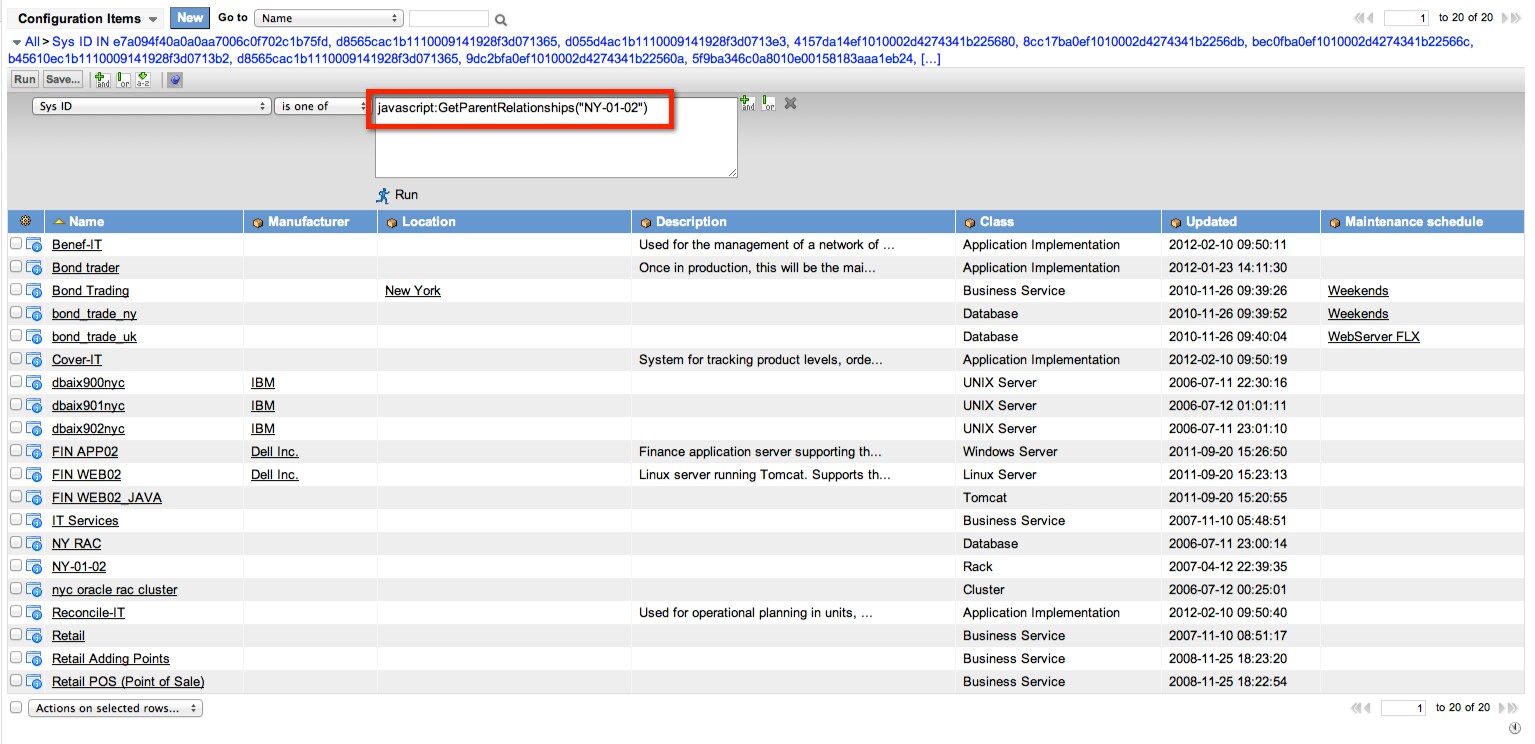
To use the Business Rule in a list filter you construct a filter like ""Sys ID" "is one of" "javascript:GetChildRelationships("NY-01-02")"
You can also filter the Task table using a filter like ""Configuration item.Sys ID" "is one of" "javascript:GetChildRelationships("NY-01-02")"

The Record Producer
And lastly we wanted an easy way to generate a list of tasks that are open against a CI. We created a Record Producer to take the CI name from the user with the direction and to redirect to a list of tasks that are currently open against that CI.

In summary
When managing Configuration Items, especially within the Change Management process, it is great to be able to easily get a list of all CIs that have an upstream or downstream dependancy on a given CI.
You might want to know what Incidents are open that might affect a Business Service or what Change Requests are pending against it.
The Update Set attached to this blog post contains some example code to help you do that.
2012-05-11 Update: Both the Business Rules need to be configured to run Globally - that is the table should be set to Global. Additionally both the Business Rules and the Script include should be "Client Callable"
Photo Credit
7 Comments
You must be a registered user to add a comment. If you've already registered, sign in. Otherwise, register and sign in.