- Post History
- Subscribe to RSS Feed
- Mark as New
- Mark as Read
- Bookmark
- Subscribe
- Printer Friendly Page
- Report Inappropriate Content
on 03-24-2020 11:01 AM
In my previous article Change Management - Lead Times I was explaining a generic way to calculate Lead Time for a Change, in terms of calendar days; however you may want to skip Weekends and/or Holidays in some cases.
Schedules
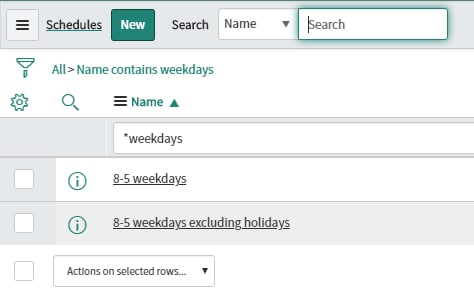
Navigate to System Scheduler -> Schedules -> Schedules
The schedules play a very important part when calculating two dates difference when we want to avoid Weekends and Holidays.
OOTB you have two schedules:

The first it's a schedule of work weekdays only from 8am to 5pm; the second one excludes holidays.
If Change Management or CAB is strongly strict with schedules then 8am-5pm should be fine to run the dates difference calculation, however I've seen customers that use schedules where a working day = 24hr instead of the normal 8hr.

The Formula
Here is an example of how to calculate the Lead Time (use Scripts - Background module):
var changeCreatedDate = "2020-05-15";
var changeStartDate = "2020-06-20";

/*****************************************/
/*         START REUSABLE CODE           */
/*****************************************/

/* set initial date as Change Created Date */
var dt1 = new GlideDate();
dt1.setDisplayValue(changeCreatedDate);

/* set start date from change; ideally this is a future date beyond current date-time */
var dt2 = new GlideDate();
dt2.setDisplayValue(changeStartDate);

/* '8-5 weekdays' schedule used to calculate date difference */
var schedule = new GlideSchedule('08fcd0830a0a0b2600079f56b1adb9ae');
/* get duration between the two dates */
var duration= (schedule.duration(dt1,dt2).getDurationValue());
/* obtain the number of days */
var daysDiff = parseInt(duration.split(' ')[0]);

/*****************************************/
/*         END REUSABLE CODE             */
/*****************************************/

gs.print(daysDiff);
The Lead Time for the example above is 9 working days difference.
If you run the same code but using "8-5 weekends excluding holidays" schedule, the result is also 9 working days difference.
How many days would be calculated if you change the schedule to be 24hr day instead of 8am-5pm (skipping just weekends)? The answer is 26 working days of 24hr/day.
- 2,745 Views

- Mark as Read
- Mark as New
- Bookmark
- Permalink
- Report Inappropriate Content
Thank you! Worked like a charm.