- Post History
- Subscribe to RSS Feed
- Mark as New
- Mark as Read
- Bookmark
- Subscribe
- Printer Friendly Page
- Report Inappropriate Content
on 05-28-2019 12:02 PM
Lets say you have a source instance as (https://source.servicenow.com)
And a target instance as (https://target.servicenow.com)
Step#1: To create a Clone Target, Login into your instance which needs to be cloned.
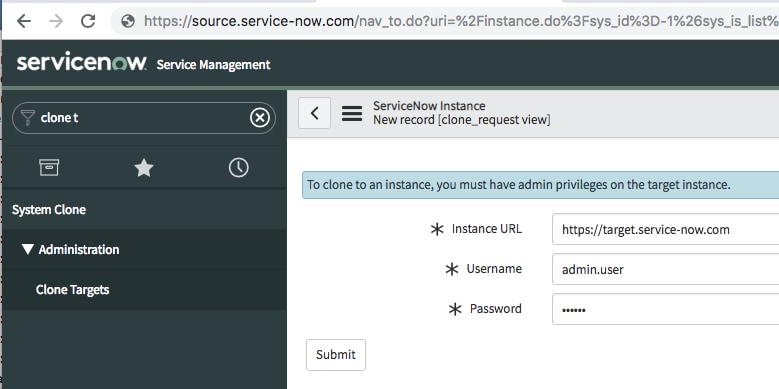
Navigate to System Clone > Clone Targets. Click New.
Create a new record like:

Step#2: To start the clone process
Navigate to System Clone > Request Clone.
Select a Target instance to receive the cloned data.

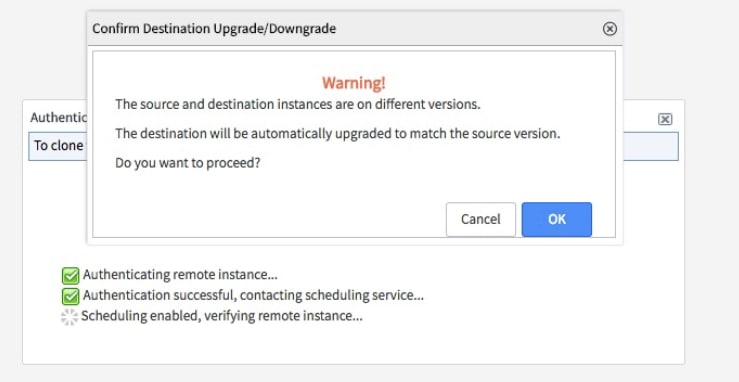
Step#3: Confirmation message you would see:


Step#4: Check the clone progress (System Clone > Active Clones and select a request):

MOST IMPORTANT: Be careful about your source & target instance, you would always go to sourcing instance to make a clone instance.
For More Information:
https://docs.servicenow.com/bundle/madrid-platform-administration/page/administer/managing-data/task/t_StartAClone.html
- 33,887 Views

- Mark as Read
- Mark as New
- Bookmark
- Permalink
- Report Inappropriate Content
Well Explained @Manjul Katare