tiagomacul

Tera Sage
Options
- Post History
- Subscribe to RSS Feed
- Mark as New
- Mark as Read
- Bookmark
- Subscribe
- Printer Friendly Page
- Report Inappropriate Content
on 10-01-2019 09:19 AM
How to set the short Description field on an group approval
| Image | Description |
 | 01. ServiceNow Login |
 | 02. >> System Definition > Business Rules |
 | 03. New |
 |
04. Type name, for example
"set Short Description App grp" |
 | 05. Select Group approval table sysapproval_group |
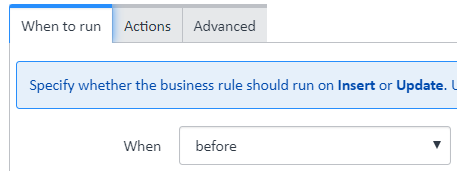
 | 06. on the "When to run" tab, select before |
 | 07. select "insert" |
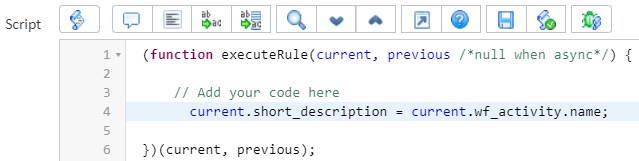
 | 08. Select Advanced |
 |
09.
current.short_description = current.wf_activity.name; |
|
10. Click Save/update |


Governance: Technical Best Practices eBook
Labels:
- 3,689 Views
Comments

Marcus Andrade
Mega Explorer
- Mark as Read
- Mark as New
- Bookmark
- Permalink
- Report Inappropriate Content
11-25-2019
07:42 AM
Thanks to share