- Post History
- Subscribe to RSS Feed
- Mark as New
- Mark as Read
- Bookmark
- Subscribe
- Printer Friendly Page
- Report Inappropriate Content
on 08-08-2022 01:06 AM
The current "Embed link" option in ServiceNow results in having a link which does not use the Portal look & feel which is somewhat dissapointing as portals are branded, styled and optimized at most customers.
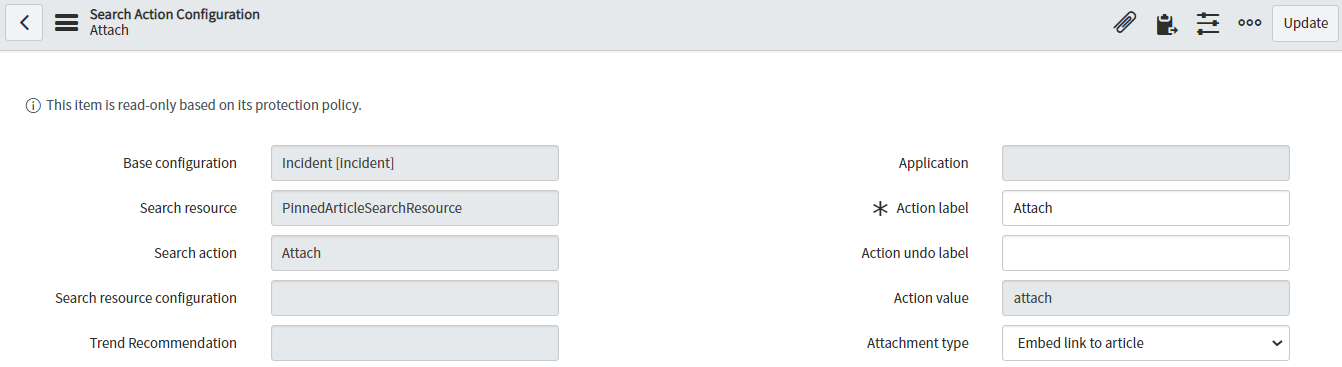
The embed functionality is configured in below "Search Action configuration (cxs_ui_action_config)", notice the "Attachement type" attribute:

The link however is defined in the script include "cxs_Knowledge" which is unfortunately protected.However there is a way to override this by creating a custom "cxs_Knowledge" script include. Below see the one I have created, which works perfect. The queryParameter is amended.
Recommended; Make a note in the Description field with a clear explanation.

The result link is now a truly portal link:
https://xxxxx.service-now.com/esc?id=kb_article&table=kb_knowledge&sys_kb_id=xxxx
Out of the box a classic link is generated, which is somehing like:
https://xxxxx.service-now.com/kb_view.do?sys_kb_id=xxxx
Please mark Helpful when you believe it is worthfull!
regards, Peter
#Attach #Knowledge #ContextualSearch #cxs_Knowledge #cxs_ui_action_config
- 4,262 Views

- Mark as Read
- Mark as New
- Bookmark
- Permalink
- Report Inappropriate Content
I've tried implementing this in a non-prod instance and also in a PDI. I copied the oob script include, and updated the query parameter and the inserted article link is still pointing to kb_view.do. Can you tell me were there any additional steps required for the embed link action to utilize the custom script include rather than the oob script include?
Thanks,
George
- Mark as Read
- Mark as New
- Bookmark
- Permalink
- Report Inappropriate Content
When you need to override a script include you need to extend it.
Here is the link with the how to:
https://developer.servicenow.com/dev.do#!/learn/courses/xanadu/app_store_learnv2_scripting_xanadu_sc...
- Mark as Read
- Mark as New
- Bookmark
- Permalink
- Report Inappropriate Content
Upvote the fix in the idea portal: This should not have to be a customization, rather a configuration: https://support.servicenow.com/ideas?id=view_idea&sysparm_idea_id=856bc22093df5610c2513f986cba10a5&s...

- Mark as Read
- Mark as New
- Bookmark
- Permalink
- Report Inappropriate Content
It is now more than 3 years later and this issue has still not been fixed by ServiceNow (not even in the latest version of the Service Operations Workspace).
I checked on my PDI and it still provides the customer with an "ugly" link which does not use the Portal look & feel when a knowledge article is attached to an incident.
We were also puzzled why the link contains the sys_id of the knowledge article instead of the KBnumber (permalink)?
If the customer saves the link and wants to use it later (when a new revision of the article has been created) the link will result in an outdated version or an error if the older version is no longer available.
- Mark as Read
- Mark as New
- Bookmark
- Permalink
- Report Inappropriate Content
ServiceNow Support suggested that we should create an Idea for this issue as the Idea listed above by @jference25 seems to be about something else (allthough it does look similar to me).
The Idea can be found here:
https://support.servicenow.com/ideas?id=view_idea&sysparm_idea_id=2876b08e47aef25077748d01426d437c&s...
Please leave a comment and/or upvote it if you also have this issue.