- Post History
- Subscribe to RSS Feed
- Mark as New
- Mark as Read
- Bookmark
- Subscribe
- Printer Friendly Page
- Report Inappropriate Content
on 08-14-2021 04:18 AM
While reviewing community questions, I decided to write an article having some common useful scripts.
1. How to get duplicate records.
/*
Below script will return all the duplicate records sys_id and display name except the oldest one.

Due to below condition
grR.orderByDesc('sys_created_on');
grR.setLimit(grCIs.getAggregate('COUNT','name')-1);

*/

var grCIs = new GlideAggregate("cmdb_ci_rack");
	grCIs.addAggregate('COUNT','name');
	grCIs.groupBy('name');
	grCIs.addHaving('COUNT', 'name', '>', '1');
	grCIs.query();
	var listOfDupes = [];
	while(grCIs.next()){
		var grR=new GlideRecord('cmdb_ci_rack');
		grR.addEncodedQuery('name='+grCIs.name);
		grR.orderByDesc('sys_created_on');
		grR.setLimit(grCIs.getAggregate('COUNT','name')-1);
		grR.query();
		gs.print(grCIs.name+':'+grCIs.getAggregate('COUNT','name'));
		while(grR.next()){
			listOfDupes.push({'sys_id':grR.getUniqueValue(),'Name':grR.getDisplayValue()});
		}
	}
	gs.print(JSON.stringify(listOfDupes));
2. Replace HTML tags from a string
var htmlString='<td class="played">How are you</td>';
	var output= htmlString.replace(/<\/?[^>]+(>|$)/g, "");
	gs.print(output);
3. Sort and unique values from an array
var sArray=['a','c','b','z','y','y'];
	var arrayUtil = new ArrayUtil();
	sArray=arrayUtil.unique(sArray);
	gs.print(sArray);
	gs.print(sArray.sort());
For more details check ArrayUtilAPI
3. Add record link in the email body
Below will add the record link with 'LINK' text.
${URI}Below will add the record link with link text as the display true column of the table.
${URI_REF}OR
${REF}for custom text use below email script and add in the notification using ${email_script:script_name}
var link = '<a href="' + gs.getProperty('glide.servlet.uri') + current.getLink() + '">Your Custom Text</a>';
template.print(link);4. Email address validation
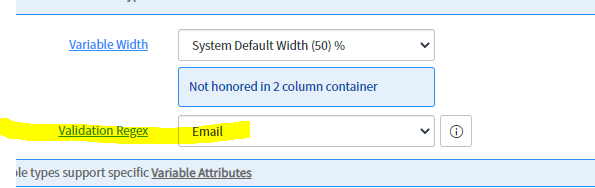
There is an OOB email validation script is available

Assign the above script to your control.

5. Email address validation for some specific domain.
Create a duplication validation expression from the above script and replace the below script and make changes as per your requirement.
Make changes in the below regex expression after last @(. First test your expression in background-script.
var reges=/^(([^<>()[\]\\.,;:\s@\"]+(\.[^<>()[\]\\.,;:\s@\"]+)*)|(\".+\"))@(dlh.de|ads.dlh.de|lht.dlh.de|lhind.dlh.de|lat.dlh.de|lhsystems.com)$/
var str='abc@dlh.de'
gs.print(reges.test(str))
I hope this article will help you.
- 1,407 Views
- Mark as Read
- Mark as New
- Bookmark
- Permalink
- Report Inappropriate Content
Thanks you. Please provide some Portal scripts also.