
- Subscribe to RSS Feed
- Mark as New
- Mark as Read
- Bookmark
- Subscribe
- Printer Friendly Page
- Report Inappropriate Content
Hello All,
This Blog covers a quick and hopefully a useful solution to a commonly asked requirement, i.e., how can we show all the filled in variables in the email body in a structured tabular format?
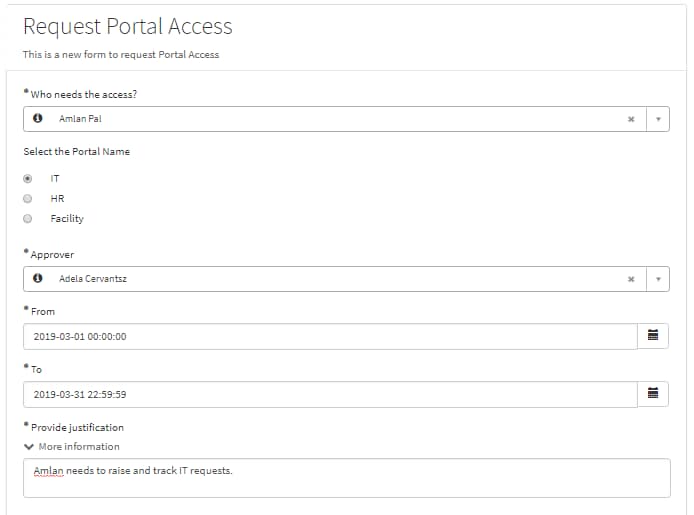
A common answer to the above scenario is via using an Email Script. Now, let's jump into the resolution here. For demonstration purpose I have created a mock-up catalog item which looks like the below image. On submission of which the approver will be expecting to get an email with all the filled details in a structured format.

To achieve the same, we need to write the Email Script which will fetch all the variables and then show them with the details being fetched dynamically in a tabular format. Then all we need to do, is to call the Email Script in your Email body (in the field 'Message HTML') as ${mail_script:email_script_name}.
Below is the code snippet to be embedded in Email Script which you can always modify/tweak as per your requirement. Please note that the below script is defined to be worked in Global Scope.
var table = current.getTableName();
var count = 0;
if (table == 'sysapproval_approver') {
	count = 1;
} else {
	for(vars in current.variable_pool){
		count++;
		break;
	}
}

if(count > 0){
	var mvalue = '';
	var list = [];
	var display = [];
	template.print('<table border="1">');

	//Query for the non-empty variables for this record
	//Catalog item and task variables pull from 'sc_item_option_mtom' table
	if(table == 'sc_req_item' || table == 'sc_task' || table == 'sysapproval_approver') {
		var itemVars = new GlideRecord('sc_item_option_mtom');

		if(table == 'sc_req_item'){
			itemVars.addQuery('request_item', current.sys_id);

		}
		if(table == 'sc_task'){
			itemVars.addQuery('request_item', current.request_item.sys_id);

		}
		if(table == 'sysapproval_approver'){
			itemVars.addQuery('request_item', current.sysapproval.sys_id);
		}
		itemVars.addNotNullQuery('sc_item_option.value');

		//Exclude Label and Container variables
		itemVars.addQuery('sc_item_option.item_option_new.type', '!=', 11);
		itemVars.addQuery('sc_item_option.item_option_new.type', '!=', 19);
		itemVars.addQuery('sc_item_option.item_option_new.type', '!=', 20);
		itemVars.addQuery('sc_item_option.item_option_new.type', '!=', 24);
		itemVars.orderBy('sc_item_option.order');

		itemVars.query();
		while(itemVars.next()){
			template.print("<tr>");
			template.print("<td>"+itemVars.sc_item_option.item_option_new.question_text+"</td>");
			mvalue = itemVars.sc_item_option.value;

			// Check if the value is from the reference field
			if (itemVars.sc_item_option.item_option_new.type == '8') {
				var grRefTable = new GlideRecord(itemVars.sc_item_option.item_option_new.reference);
				grRefTable.addQuery('sys_id',mvalue);
				grRefTable.query();
				if (grRefTable.next()) {
					mvalue = grRefTable.getDisplayValue();
				}
				template.print("<td>"+mvalue+"</td>");
				template.print("</tr>");
			}

			// Check if the type is List Collector
			if(itemVars.sc_item_option.item_option_new.type == '21') {
				list = itemVars.sc_item_option.value.split(',');
				for(var i=0; i<list.length; i++){
					var grListTable = new GlideRecord(itemVars.sc_item_option.item_option_new.list_table);
					grListTable.addQuery('sys_id',list[i]);
					grListTable.query();
					if (grListTable.next()) {
						display.push(grListTable.getDisplayValue());
					}
				}
				template.print("<td>"+display+"</td>");
				template.print("</tr>");
			}

			// Check if the type is Select Box
			if(itemVars.sc_item_option.item_option_new.type == '5') {
				var grQuestion = new GlideRecord('question_choice');
				grQuestion.addQuery('question', itemVars.sc_item_option.item_option_new);
				grQuestion.addQuery('value', itemVars.sc_item_option.value.toString());
				grQuestion.query();
				if(grQuestion.next()){
					mvalue = grQuestion.getValue('text');
				}
				template.print("<td>"+mvalue+"</td>");
				template.print("</tr>");
			}

			//For rest of the types
			if(itemVars.sc_item_option.item_option_new.type != '21' && itemVars.sc_item_option.item_option_new.type != '8' && itemVars.sc_item_option.item_option_new.type != '5' )
				{
				template.print("<td>"+mvalue+"</td>");
				template.print("</tr>");
			}
		}
	}
	template.print("</table>");
}
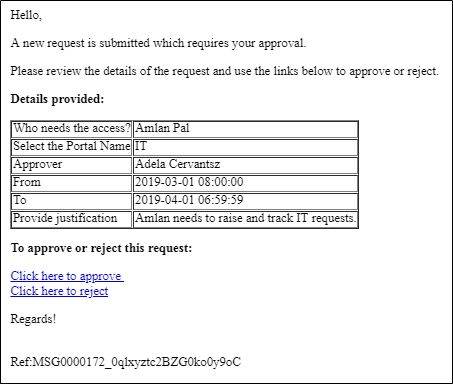
So, as per my demo requirement the approver will get an email notification once the item is submitted successfully. And that email should contain the filled questionnaires in a tabular format. Here is the snapshot how this will look like.

Any suggestions/improvement recommendations/feedback on this blog are welcomed!
Cheers!
Amlan



- 10,453 Views
You must be a registered user to add a comment. If you've already registered, sign in. Otherwise, register and sign in.