- Mark as New
- Bookmark
- Subscribe
- Mute
- Subscribe to RSS Feed
- Permalink
- Report Inappropriate Content
04-01-2026 08:37 AM
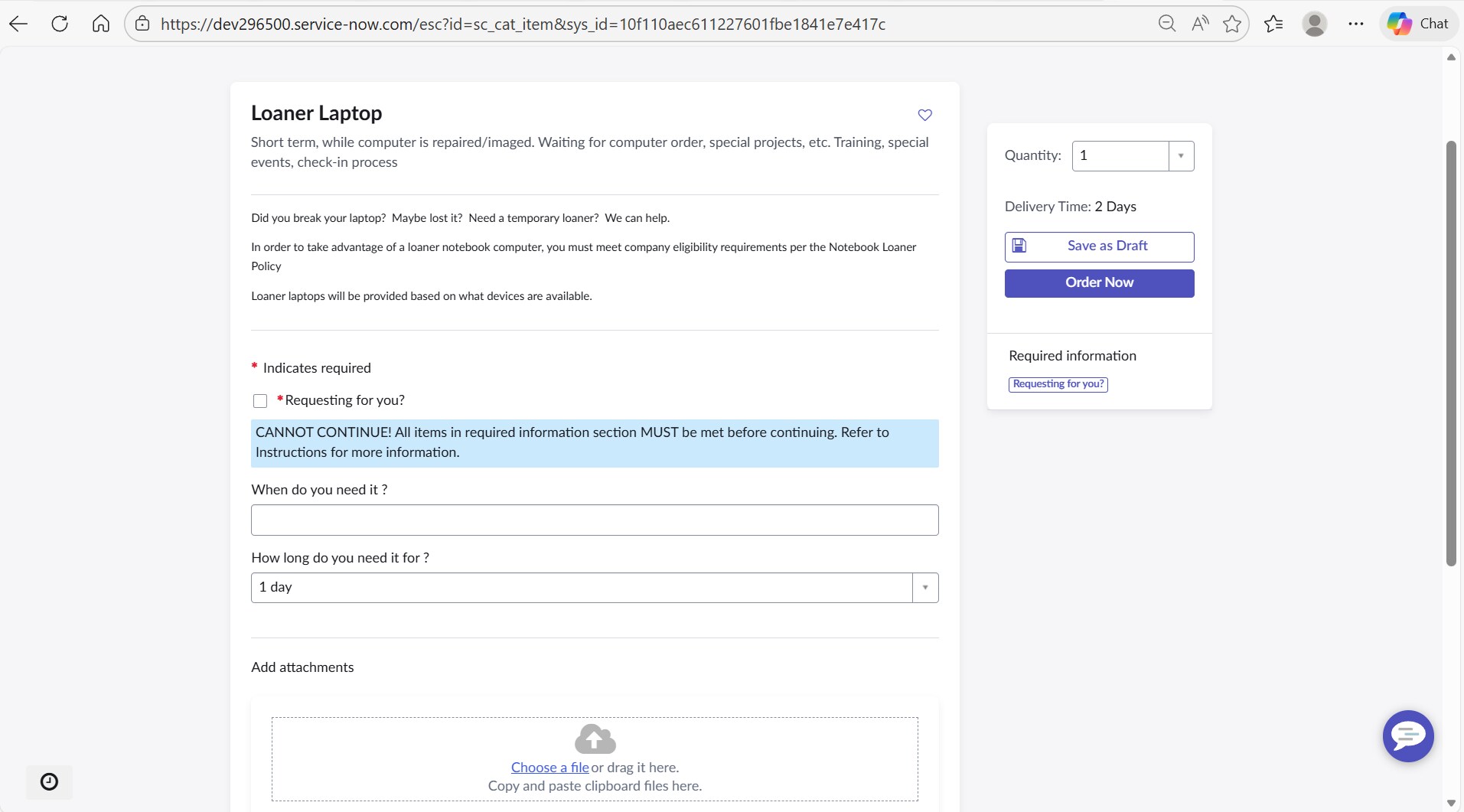
Hello, I have a catalog client script that should display a message when a check box is unchecked after being checked.
When the box is unchecked, the error message should show


This is the script I have so far:

Any help is greatly appreciated
Solved! Go to Solution.

- Mark as New
- Bookmark
- Subscribe
- Mute
- Subscribe to RSS Feed
- Permalink
- Report Inappropriate Content
04-01-2026 09:07 AM
Hi @DreDay3000 ,
There are no quotes for variable/field you used in the script. Please use below updated script:
function onChange(control, oldValue, newValue, isLoading) {
if (isLoading || newValue === '') {
return;
}
if (newValue === 'false') {
g_form.showFieldMsg(
'has_call_activation_number_for_this_tree_been_added',
'CANNOT CONTINUE! All items in required information section MUST be met before continuing. Refer to Instructions for more information.',
'error'
);
}
}
If your goal is to block submission until the checkbox is true, you might also want to use an onSubmit client script instead of just onChange. That way, you can prevent the form from being submitted until the condition is met.
- Mark as New
- Bookmark
- Subscribe
- Mute
- Subscribe to RSS Feed
- Permalink
- Report Inappropriate Content
04-01-2026 09:06 AM
Hi @DreDay3000 , Try adding condition like this.
if (oldValue == 'true' && newValue == 'false') {
g_form.showFieldMsg('has_call_activation_number_for_this_tree_been_added',
'CANNOT CONTINUE! All items in required information section MUST be met before continuing. Refer to Instructions for more information.',
'info');
The script that you are currently using does not check what the current or previous value of the field is. The above script should work.
If this response helped resolve your issue or question, please consider marking it as Accepted Solution and giving it a 👍.
This helps others in the community find useful answers more easily.
Regards,
Saurabh V.
- Mark as New
- Bookmark
- Subscribe
- Mute
- Subscribe to RSS Feed
- Permalink
- Report Inappropriate Content
04-01-2026 09:07 AM
Hi @DreDay3000 ,
There are no quotes for variable/field you used in the script. Please use below updated script:
function onChange(control, oldValue, newValue, isLoading) {
if (isLoading || newValue === '') {
return;
}
if (newValue === 'false') {
g_form.showFieldMsg(
'has_call_activation_number_for_this_tree_been_added',
'CANNOT CONTINUE! All items in required information section MUST be met before continuing. Refer to Instructions for more information.',
'error'
);
}
}
If your goal is to block submission until the checkbox is true, you might also want to use an onSubmit client script instead of just onChange. That way, you can prevent the form from being submitted until the condition is met.

- Mark as New
- Bookmark
- Subscribe
- Mute
- Subscribe to RSS Feed
- Permalink
- Report Inappropriate Content
04-01-2026 09:19 AM
Hello @DreDay3000 ,
the mistake I'm able to see is only with the variable name as it is not quoted as a 1st parameter(<field_name>)..
replace this :
if (newValue === 'false') {
g_form.showFieldMsg(
'has_call_activation_number_for_this_tree_been_added',
'CANNOT CONTINUE! All items in required information section MUST be met before continuing. Refer to Instructions for more information.',
'info'
);
}
Note : To provides a "hard stop" consider adding onSubmit catalog client script..
If my response helped mark as helpful and accept the solution.
- Mark as New
- Bookmark
- Subscribe
- Mute
- Subscribe to RSS Feed
- Permalink
- Report Inappropriate Content
04-01-2026 09:37 AM
Hi @DreDay3000,
As @pavani_paluri mentioned you have missed to add quotes to the variable.
Please try with below code, I have done it in the PDI.