- Post History
- Subscribe to RSS Feed
- Mark as New
- Mark as Read
- Bookmark
- Subscribe
- Printer Friendly Page
- Report Inappropriate Content
on 04-25-2020 07:59 AM
One of my many favourite introductions back with the Madrid release was the user criteria diagnostics tool that made working out why an user couldn't see a catalog item so easy! Previous customer I worked with had nearly 100+ user criteria that would overlap so could be a real nightmare to work out an issue.
One Drawback
The script include (UserCriteriaDiagnosticsUtil) that is called by the tool has a function to check if the current user is authorised to use the application. The script include is read only so there is no getting around the requirement of having either the catalog_admin or catalog_manager role. So even if you change the module permissions, the script won't run!

Now I saw all sorts of posts informing how to remove the read only policy using a background script but I'd much rather remain compliant and do things out of the box.
The Solution
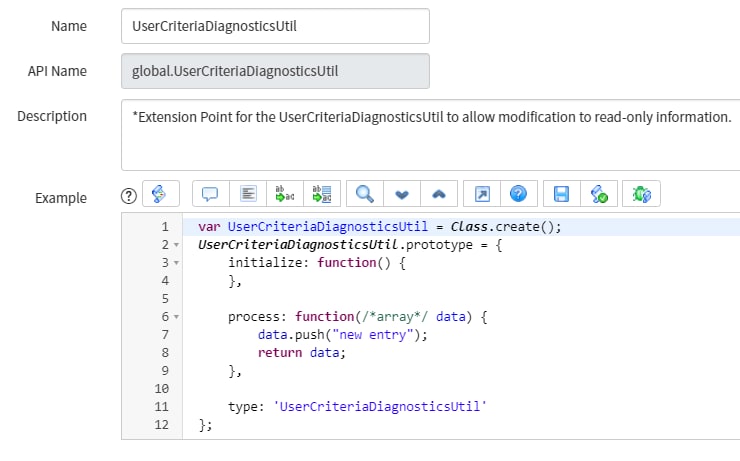
Extension Points - If only I knew about these sooner. These allow you to extend existing functionality of an application without altering the original application code. To create an extension point for the UserCriteriaDiagnosticsUtil:
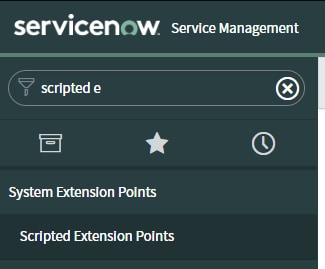
1. Navigate to Scripted Extension Points

2. Create a new record and set the name to match that of the script include being extended, in our case UserCriteriaDiagnosticsUtil.

3. Use the Create Implementation UI Action to create a new extension instance.

4. Navigate back to the sys_script_include table and you'll now see a duplicate script include. This is where you can make your modifications!

5. Copy over the entire contents of the original script include and overwrite the content in the new script include. Add the necessary role(s) to the function. I also added a note in the description box of what modification was made.
Note: Normal practice of an extension point is to use getExtensions() however this isn't possible with the original being read-only.

6. Edit the ACL uc_item_diagnostics and add in the new role.
7. Done! Don't forget the module will need the roles changing to.

Benefits
This allowed us to open up who could use the user criteria tool without needing to grant catalog_admin or catalog_manager and risk changes being made in places they shouldn't. We gave our service desk the newly created user_criteria_diagnostic role to allow them to re-route users to catalog items they can see rather than providing a link and hoping they can see it. This lead to a better customer journey and often an increase in incident deflection.
P.S - If all that was a little confusing, I've added the work as an update set below which will make the necessary changes and add the 'user_criteria_diagnostic' role to your instance.
- 8,516 Views

- Mark as Read
- Mark as New
- Bookmark
- Permalink
- Report Inappropriate Content
Hi, I wonder if you are still using this? I can access the module, but nothing executes. Do you know if there is more than one ACL to change? Many thanks
- Mark as Read
- Mark as New
- Bookmark
- Permalink
- Report Inappropriate Content
Hi,
I just tested this solution as admittedly I've not used it since writing this article. It worked in my PDI without an issue.
- Mark as Read
- Mark as New
- Bookmark
- Permalink
- Report Inappropriate Content
Thanks again, I must have screwed something up, so I used your update set. Seems good now.
- Mark as Read
- Mark as New
- Bookmark
- Permalink
- Report Inappropriate Content
Thank you for this solution! Had this need come up just recently.
Somehow also missed adding the ACL 😄
- Mark as Read
- Mark as New
- Bookmark
- Permalink
- Report Inappropriate Content
Kieran,
I'm not sure my situation is related to this article (great article by the way), or not.
When I use the UC Diagnostic tool, it shows the user meets the Available For criteria (bottom part), but still cannot view the catalog item (middle part).
I can't figure out why a use would match a criteria, but still not view the item.
Can you point me in the right direction?
Thanks in advance,
Mathew
- Mark as Read
- Mark as New
- Bookmark
- Permalink
- Report Inappropriate Content
@MBMRED hi there,
This is odd. This could be because someone implemented an ACL (you can use ACL analyser to test that) or a before query to restrict access. The latter two aren't ideal solutions and may have been added by someone who didn't understand the behaviour of user criteria's
- Mark as Read
- Mark as New
- Bookmark
- Permalink
- Report Inappropriate Content
Kieran,
Thanks for the response.
Discussed with our primary Admin and he couldn't figure it out either. I logged out at the end of the day and the next day was fine. We think it was a cache issue.
Now it's working, though I'm keeping an eye on it.
Thanks,
Mathew.