Report not displaying variables in database view.

- Mark as New
- Bookmark
- Subscribe
- Mute
- Subscribe to RSS Feed
- Permalink
- Report Inappropriate Content
03-26-2026 07:12 PM
Hi all,
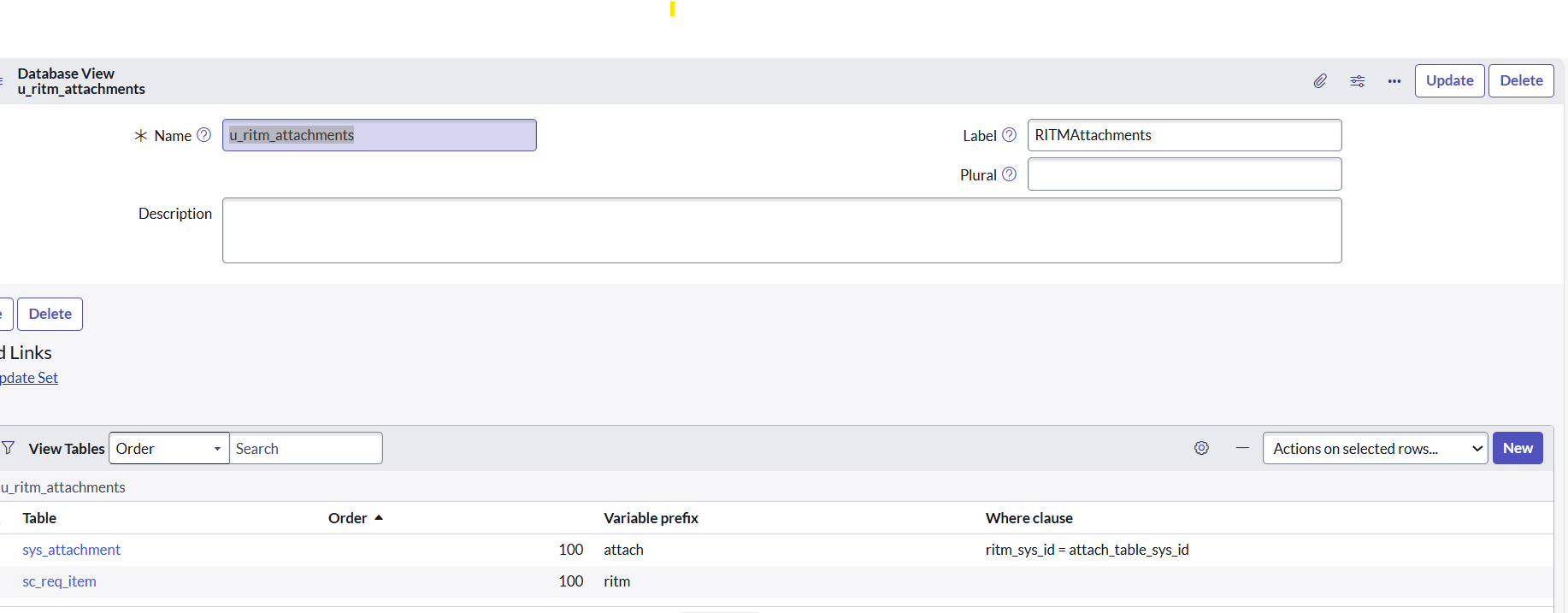
I am trying to create a report on RITM and Attachment table by creating a database view.
Iam able to view the attachments and RITM number, but unable to select the variables.
Do i need add another table to database view to get variables information.
or is there any other way to get the following fields in the report.
(Attachment link, Ritm #, variables1, variable2, variable 3.)
please help me if there is any possible ways to get this requirement done.

- Mark as New
- Bookmark
- Subscribe
- Mute
- Subscribe to RSS Feed
- Permalink
- Report Inappropriate Content
03-26-2026 08:42 PM
For variable , you need to add another 2 tables in your database view (joining sc_req_item with sc_item_option & sc_item_option_mtom)
sample
Table Variable prefix Where clause
sc_req_item ritm
sc_item_option_mtom mtom mtom.request_item = ritm.sys_id
sc_item_option option options.sys_id = mtom.sc_item_option
Regards
Tanushree Maiti
ServiceNow Technical Architect
LinkedIn: https://www.linkedin.com/in/tanushreemaiti
- Mark as New
- Bookmark
- Subscribe
- Mute
- Subscribe to RSS Feed
- Permalink
- Report Inappropriate Content
03-27-2026 06:27 AM
- Mark as New
- Bookmark
- Subscribe
- Mute
- Subscribe to RSS Feed
- Permalink
- Report Inappropriate Content
03-29-2026 03:52 PM - edited 03-29-2026 03:53 PM
What you are doing is actually pretty complicated. I know the RTIM looks like one record, but behind the scenes (my understanding) ServiceNow stores variables like the following
'Row' RITM Variable Name Answer
-----------------------------------------------------------
1 RIMT001 Color Silver
2 RIMT001 RAM 16GB
3 RIMT001 Storage 512GB
Each answer is its own row in a separate table. So when you try to build the report it looks kind of like
RITM Color RAM Storage
---------------------------------------------------
RITM0001 Silver 16GB 512GB
So the database would have to flip three rows into 3 columns and that s a transformation (A pivot for all you Excel fans out there).
I would try (make sure) to join 'sys_attachment.table_sys_id' to the 'sc_req_item.sys_id', then add a condition in the report filtering 'sys_attachment.tablen_name = sc_req_item'
Its possible you might be able to also just build a report on the sys_attachment and then filter 'table_name = sc_req_item' and then you can dot-walk to the RITM fields (this avoids a database view)
If neither of these approaches work and if someone doesn't provide a solution that works for you, I would open a case with ServiceNow and 'ask a question' as the type of case. See what the experts say.


- Mark as New
- Bookmark
- Subscribe
- Mute
- Subscribe to RSS Feed
- Permalink
- Report Inappropriate Content
03-29-2026 08:04 PM
you have not given the proper order for the view tables, your where clause is proper
Just ensure the sequence is proper
💡 If my response helped, please mark it as correct ✅ and close the thread 🔒— this helps future readers find the solution faster! 🙏
Ankur
✨ Certified Technical Architect || ✨ 10x ServiceNow MVP || ✨ ServiceNow Community Leader