Report not displaying variables in database view.

- Mark as New
- Bookmark
- Subscribe
- Mute
- Subscribe to RSS Feed
- Permalink
- Report Inappropriate Content
03-26-2026 07:12 PM
Hi all,
I am trying to create a report on RITM and Attachment table by creating a database view.
Iam able to view the attachments and RITM number, but unable to select the variables.
Do i need add another table to database view to get variables information.
or is there any other way to get the following fields in the report.
(Attachment link, Ritm #, variables1, variable2, variable 3.)
please help me if there is any possible ways to get this requirement done.
- Mark as New
- Bookmark
- Subscribe
- Mute
- Subscribe to RSS Feed
- Permalink
- Report Inappropriate Content
04-01-2026 11:51 PM
Hi @Ankur Bawiskar ,
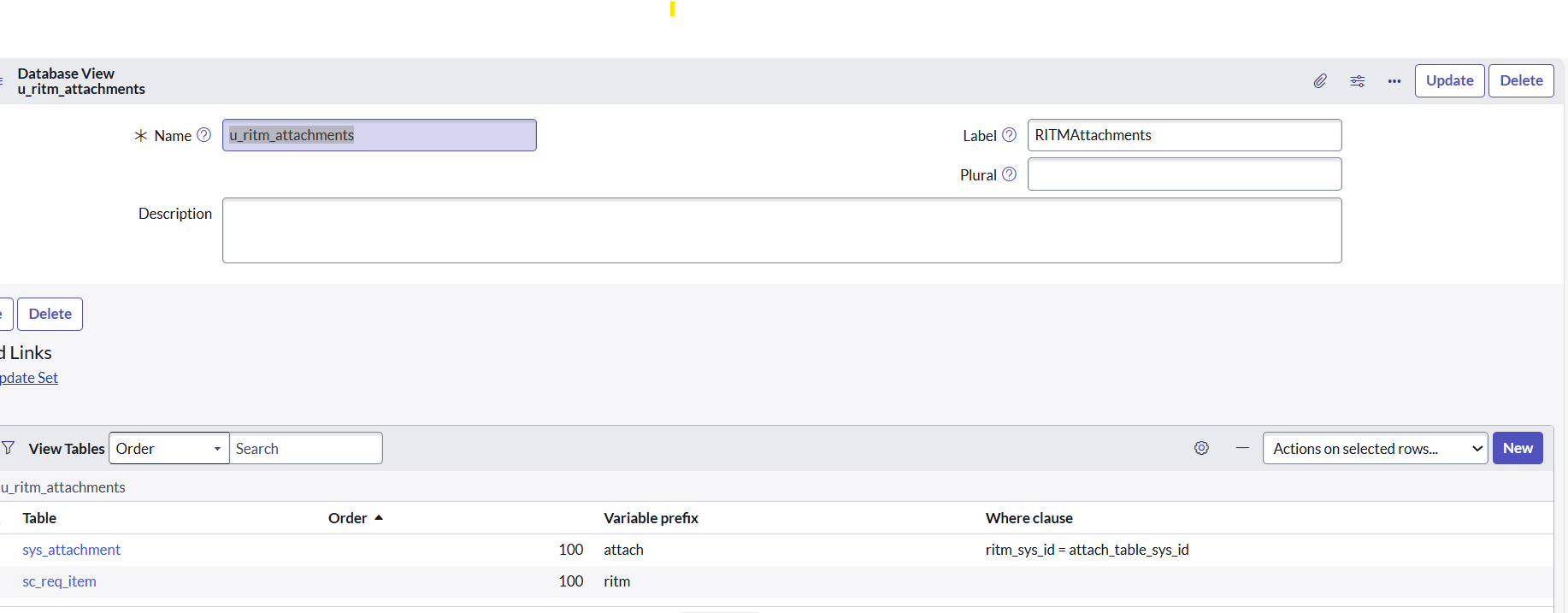
Thanks for your response, i updated the order for tables, still getting the same. Am i missing anything here, please guide me.
Best Regards,
P.Balaram.


- Mark as New
- Bookmark
- Subscribe
- Mute
- Subscribe to RSS Feed
- Permalink
- Report Inappropriate Content
04-02-2026 01:34 AM
share your latest database view screeshots
Ankur
✨ Certified Technical Architect || ✨ 10x ServiceNow MVP || ✨ ServiceNow Community Leader

- Mark as New
- Bookmark
- Subscribe
- Mute
- Subscribe to RSS Feed
- Permalink
- Report Inappropriate Content
04-02-2026 12:28 AM
Hello @Balaram7 ,
First change order as suggested by @Ankur Bawiskar and then change clause like attach_table_sys_id=ritm_sys_id .
Please refer below photo which is for sc_task and ritm database view (just for refference of where clause )


- Mark as New
- Bookmark
- Subscribe
- Mute
- Subscribe to RSS Feed
- Permalink
- Report Inappropriate Content
04-02-2026 02:44 AM
Hi @Balaram7
Can you try this:
Table Order Variable prefix Where clause
sys_attachment 100 attachment
sc_req_item 200 item attachment.table_sys_id=item.sys_id
Regards
Tanushree Maiti
ServiceNow Technical Architect
LinkedIn: https://www.linkedin.com/in/tanushreemaiti