- Mark as New
- Bookmark
- Subscribe
- Mute
- Subscribe to RSS Feed
- Permalink
- Report Inappropriate Content
08-01-2026 09:45 AM
Folks,
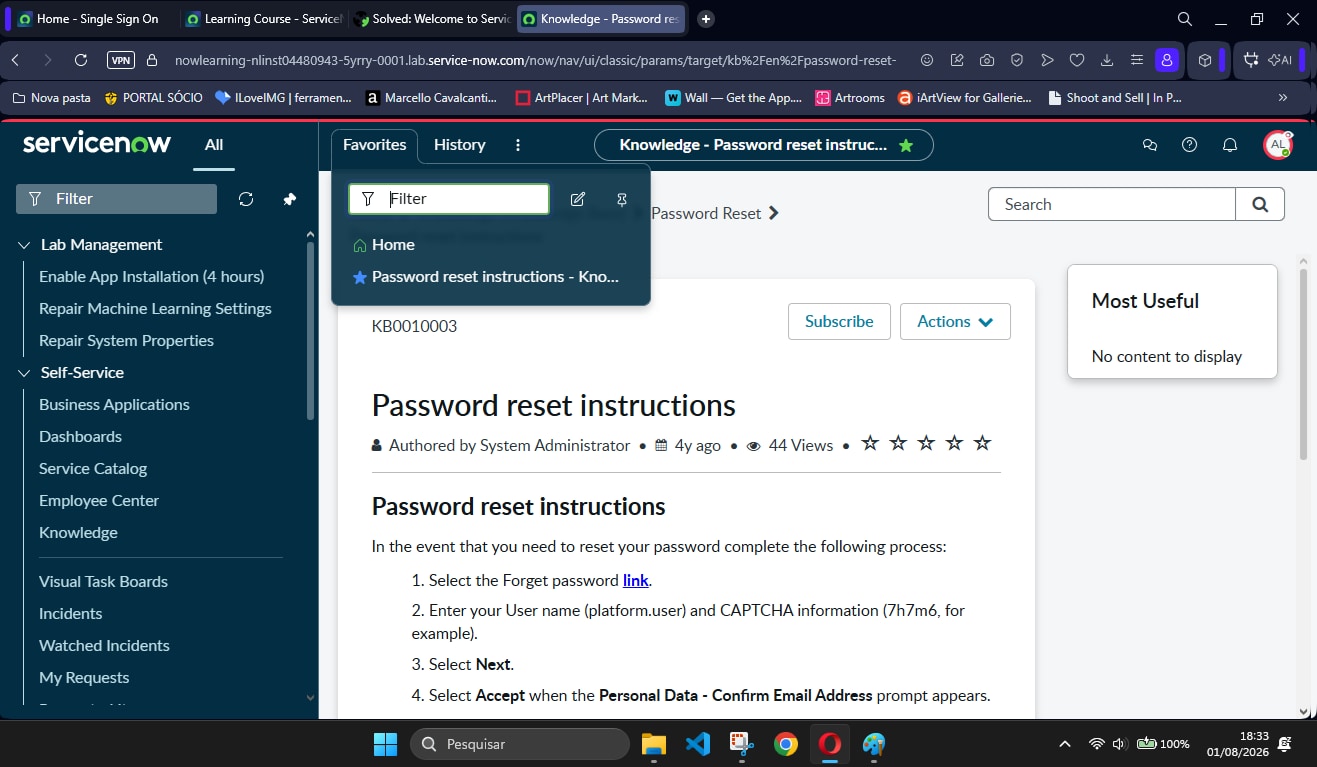
Did any of you have problems validating the task in Welcome to ServiceNow - Task of Next Experience? Because I am following exactly the steps given and placing the MODULE as favorites and not the Knowledge page. And every time I go to validate it shows the message: "Did you perform these tasks as Platform User [platform.user], make sure you are not Admin user? Did you successfully pin the 'All' menu and create a favorite for Self-Service > Knowledge? Are you sure you favorited the Knowledge MODULE and NOT the homepage or article itself?"
1. Navigate to the User Menu (Select the System Administrator (System Administrator) avatar in the upper right corner).
2. Select Impersonate user (Represent a user).
3. Locate and select Platform User (Platform user) [platform.user].
4. Complete the user impersonation request by selecting the button Impersonate user (Represent a user).
5. Select and set the menu 'All' so that it is always visible while you perform the tasks. (Important tip: if you collapse or resize the browser window, the All (All) menu may be hidden. Simply expand the browser so that the set All (All) menu is displayed again.)
6. Navigate to Self-Service > Knowledge and explore the homepage.
7. Favorite the Knowledge module to easily locate you in the future.
8. Ask yourself: what applications are available to you as Platform User (Platform User)?
Does anyone got this issue?
TKS
Solved! Go to Solution.

- Mark as New
- Bookmark
- Subscribe
- Mute
- Subscribe to RSS Feed
- Permalink
- Report Inappropriate Content
08-02-2026 06:28 AM
Hi @AdrianoPioM
Ensure your are performing instruction /Task activities impersonating Platform User.
Validate your steps checking this video
https://www.youtube.com/watch?v=eF_BTSOWyeg
https://www.youtube.com/watch?v=Jn9_9opCrUI
Regards
Tanushree Maiti
ServiceNow Technical Architect
LinkedIn: https://www.linkedin.com/in/tanushreemaiti


- Mark as New
- Bookmark
- Subscribe
- Mute
- Subscribe to RSS Feed
- Permalink
- Report Inappropriate Content
08-02-2026 06:28 AM
Hi @AdrianoPioM
Ensure your are performing instruction /Task activities impersonating Platform User.
Validate your steps checking this video
https://www.youtube.com/watch?v=eF_BTSOWyeg
https://www.youtube.com/watch?v=Jn9_9opCrUI
Regards
Tanushree Maiti
ServiceNow Technical Architect
LinkedIn: https://www.linkedin.com/in/tanushreemaiti