More inaccessible elements in Now Learning

- Mark as New
- Bookmark
- Subscribe
- Mute
- Subscribe to RSS Feed
- Permalink
- Report Inappropriate Content
11-27-2025 04:48 AM - edited 11-27-2025 05:16 AM
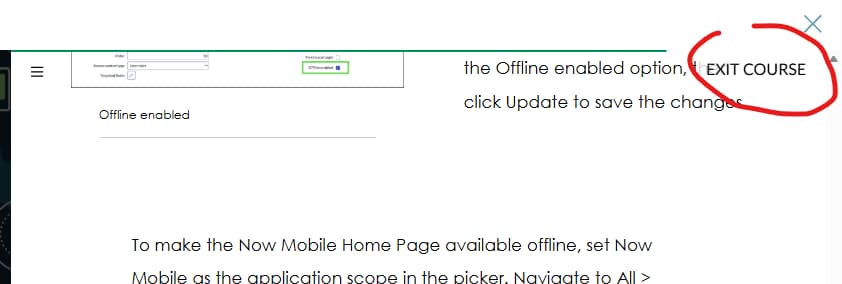
Sorry, more accessibility issues in Now Learning. This is in the Health & Safety training, course ID 6d68191a87ce6a90e53afc48cebb3593.
I have attached two screenshots. One of them shows the Exit Course button hovering over the course content. It's distracting, reduces the amount of space available for content and isn't consistently located with the rest of the course interface such as request an instance and request expiry extension.
The other screen show shows the first of 3 images. There are 3 dots underneath the image to indicate that there is more than one but those dots don't appear until you scroll halfway down the image. Clicking to the left and right of the image moves to the previous and next image but there is no on-screen element to indicate this. The alt tag also doesn't describe the image, it just repeats the caption.

- Mark as New
- Bookmark
- Subscribe
- Mute
- Subscribe to RSS Feed
- Permalink
- Report Inappropriate Content
12-01-2025 09:31 AM
Hello Stuart, thank you for letting us know about these issues. For the Exit Course button, does the text appear when the pointer hovers over the button or keyboard focused and goes away when it moves off? Or is it consistent?
The second issue I am not completely understanding the issue based on image you submitted. Was there additional images that were going to be attached?
We are back from the US Thanksgiving holiday and I'll huddle up with the team on this for resolutions.
- Mark as New
- Bookmark
- Subscribe
- Mute
- Subscribe to RSS Feed
- Permalink
- Report Inappropriate Content
12-04-2025 07:48 AM
Hi Michael,
The Exit Course button is persistent.
The second screenshot (Now Learning Right Button) is demonstrating the problem by omission. The image shown in the screenshot is one of a carousel of 3 images. Underneath the image (out of the screenshot) are three dots to show you that it's a carousel. The three dots aren't visible unless you scroll half of the image off the page. There are no left or right navigation buttons next to the image but the areas to the left and right of the image are clickable to navigate left and right.
- Mark as New
- Bookmark
- Subscribe
- Mute
- Subscribe to RSS Feed
- Permalink
- Report Inappropriate Content
12-09-2025 12:45 AM
Here's some additional information. There are left and right buttons on the carousel but they're not visible unless you click the icon to expand the viewing area for the course.
- Mark as New
- Bookmark
- Subscribe
- Mute
- Subscribe to RSS Feed
- Permalink
- Report Inappropriate Content
12-09-2025 08:22 AM
Thank you so much again for the feedback. This is important to us to know where issues are at. Will review these additional issues with our internal team for remediation.