Reference field sowing org.mozilla.javascript.InterpretedFunction

- Mark as New
- Bookmark
- Subscribe
- Mute
- Subscribe to RSS Feed
- Permalink
- Report Inappropriate Content
05-20-2026 02:59 AM
Hi,
I am creating a custom application called SaddlePass in ServiceNow PDI.
I created a Student table and used it as the reference field in another table. Bute instead of showing the student name its shows:
org.mozilla.javascript.InterpretedFunction
I already checked:
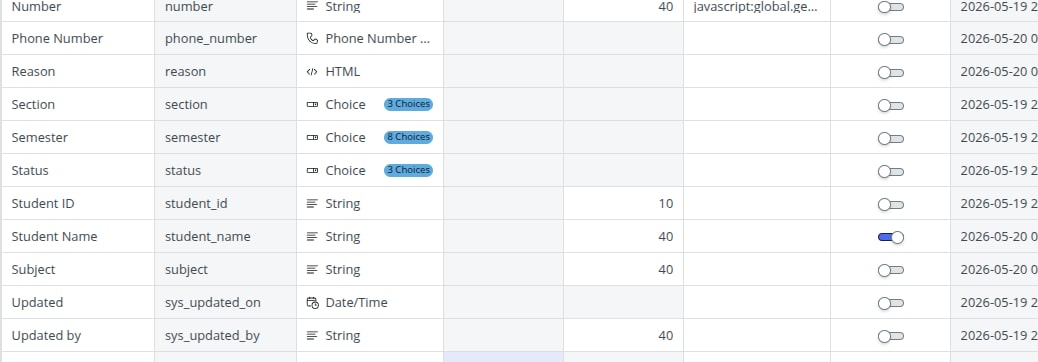
- Student Name field is type of string
- Display = true
- Records saved correctly where the record data is showing but while reference its showing this org.mozillajavascript one
Can someone help me fix this issue.
Thank you


- Mark as New
- Bookmark
- Subscribe
- Mute
- Subscribe to RSS Feed
- Permalink
- Report Inappropriate Content
05-20-2026 03:56 AM
is that table task extended?
PDIs are highly un reliable so I will suggest to clear cache using cache.do and then logout and login again
if doesn't work then get new PDI
💡 If my response helped, please mark it as correct ✅ and close the thread 🔒— this helps future readers find the solution faster! 🙏
Ankur
✨ Certified Technical Architect || ✨ 10x ServiceNow MVP || ✨ ServiceNow Community Leader
- Mark as New
- Bookmark
- Subscribe
- Mute
- Subscribe to RSS Feed
- Permalink
- Report Inappropriate Content
05-27-2026 03:04 AM
Thank you, I haven't checked the task table extension yet, but I'll verify it and also try clearing the cache/logout if needed.

- Mark as New
- Bookmark
- Subscribe
- Mute
- Subscribe to RSS Feed
- Permalink
- Report Inappropriate Content
05-20-2026 05:02 AM
Hi @23781A05C5
If you want the referenced table to display the name instead of the number on every form where it’s used as a reference, update the display attribute for the name and number fields in the dictionary.
If the table extends the Task table, make the change through a dictionary override instead of modifying the base dictionary entries directly.
- Navigate to System Definition > Dictionary.
- Find the record for the Number field on your target table and set Display to false
- Find the record for the Name field on your target table and set Display to true
Let me know what result you are getting after this change.
Regards
Tanushree Maiti
ServiceNow Technical Architect
LinkedIn: https://www.linkedin.com/in/tanushreemaiti
- Mark as New
- Bookmark
- Subscribe
- Mute
- Subscribe to RSS Feed
- Permalink
- Report Inappropriate Content
05-27-2026 03:06 AM
Thank you, I recreated the table by deleting the previous one, and I'm currently checking the issue again.