Reference field sowing org.mozilla.javascript.InterpretedFunction

- Mark as New
- Bookmark
- Subscribe
- Mute
- Subscribe to RSS Feed
- Permalink
- Report Inappropriate Content
05-20-2026 02:59 AM
Hi,
I am creating a custom application called SaddlePass in ServiceNow PDI.
I created a Student table and used it as the reference field in another table. Bute instead of showing the student name its shows:
org.mozilla.javascript.InterpretedFunction
I already checked:
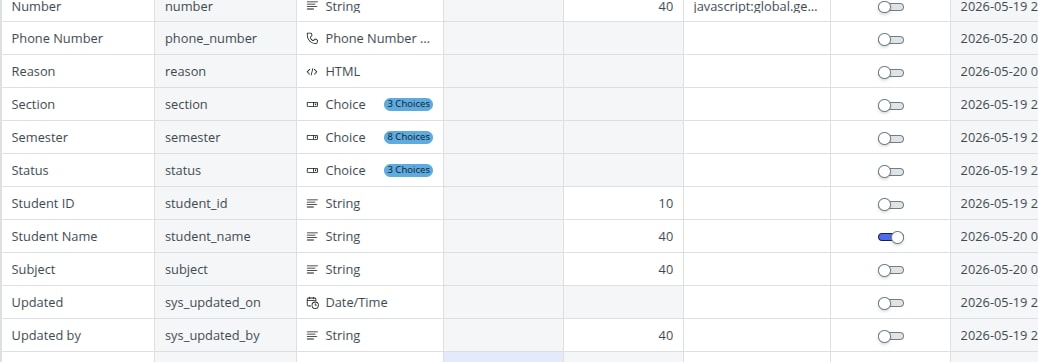
- Student Name field is type of string
- Display = true
- Records saved correctly where the record data is showing but while reference its showing this org.mozillajavascript one
Can someone help me fix this issue.
Thank you


- Mark as New
- Bookmark
- Subscribe
- Mute
- Subscribe to RSS Feed
- Permalink
- Report Inappropriate Content
05-20-2026 03:56 AM
is that table task extended?
PDIs are highly un reliable so I will suggest to clear cache using cache.do and then logout and login again
if doesn't work then get new PDI
💡 If my response helped, please mark it as correct ✅ and close the thread 🔒— this helps future readers find the solution faster! 🙏
- Mark as New
- Bookmark
- Subscribe
- Mute
- Subscribe to RSS Feed
- Permalink
- Report Inappropriate Content
05-27-2026 03:04 AM
Thank you, I haven't checked the task table extension yet, but I'll verify it and also try clearing the cache/logout if needed.

- Mark as New
- Bookmark
- Subscribe
- Mute
- Subscribe to RSS Feed
- Permalink
- Report Inappropriate Content
05-20-2026 05:02 AM
Hi @23781A05C5
If you want the referenced table to display the name instead of the number on every form where it’s used as a reference, update the display attribute for the name and number fields in the dictionary.
If the table extends the Task table, make the change through a dictionary override instead of modifying the base dictionary entries directly.
- Navigate to System Definition > Dictionary.
- Find the record for the Number field on your target table and set Display to false
- Find the record for the Name field on your target table and set Display to true
Let me know what result you are getting after this change.
- Mark as New
- Bookmark
- Subscribe
- Mute
- Subscribe to RSS Feed
- Permalink
- Report Inappropriate Content
05-27-2026 03:06 AM
Thank you, I recreated the table by deleting the previous one, and I'm currently checking the issue again.
