Reference field sowing org.mozilla.javascript.InterpretedFunction

- Mark as New
- Bookmark
- Subscribe
- Mute
- Subscribe to RSS Feed
- Permalink
- Report Inappropriate Content
05-20-2026 02:59 AM
Hi,
I am creating a custom application called SaddlePass in ServiceNow PDI.
I created a Student table and used it as the reference field in another table. Bute instead of showing the student name its shows:
org.mozilla.javascript.InterpretedFunction
I already checked:
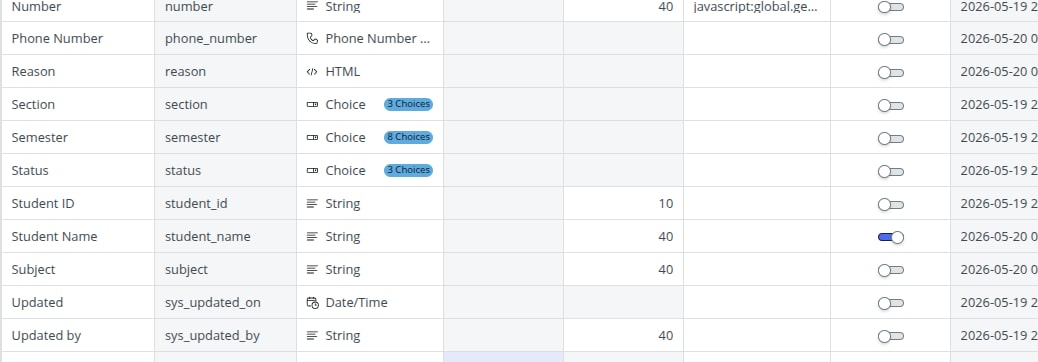
- Student Name field is type of string
- Display = true
- Records saved correctly where the record data is showing but while reference its showing this org.mozillajavascript one
Can someone help me fix this issue.
Thank you
- Mark as New
- Bookmark
- Subscribe
- Mute
- Subscribe to RSS Feed
- Permalink
- Report Inappropriate Content
05-20-2026 05:14 AM
Hi @23781A05C5 ,
Can you check if you are using the correct javascript code for the student ID field in your custom table to autoincrement the value.
Please mark this response as Helpful & Accept it as solution if it assisted you with your question.
Regards
Pankaj Kumar
- Mark as New
- Bookmark
- Subscribe
- Mute
- Subscribe to RSS Feed
- Permalink
- Report Inappropriate Content
05-27-2026 03:08 AM
Thank you. I haven't added any javascript code for the student ID field. Currently the student ID is entered manually.
- Mark as New
- Bookmark
- Subscribe
- Mute
- Subscribe to RSS Feed
- Permalink
- Report Inappropriate Content
05-27-2026 03:30 AM
Hi,
This issue usually happens when the Display field on the Student table is not configured correctly.
The value "org.mozilla.javascript.InterpretedFunction" appears when ServiceNow is trying to display something that is being returned from a script/function instead of a normal string field value.
Please check the following:
Go to Student table dictionary
Make sure only ONE field has Display = true
The display field should be a normal String field like:
Student Name
Student ID
Verify that the display field is NOT:
Calculated
Scripted
Formula based
Also check if there is any Script Include, Business Rule, or Client Script updating the display value.
Most commonly this happens when:
A scripted field is marked as Display
Multiple display fields exist
A function/object is accidentally being returned instead of text
After correcting the display field, clear cache and reload the form.
System Diagnostics > Cache > Clear Cache
Then test the reference field again.
Thanks.
Please Mark Helpful if it helped.