drjohnchun
Tera Guru

The new Automated Test Framework (ATF) in the Istanbul release is a long-awaited feature that I'm sure many people are excited about. Test automation has been a focus area of mine for some time, especially in highly regulated industries under SOX (financial) and GxP (life sciences) regulations where testing is a critical part of compliance. So I decided to take it for a test drive when it first became available (using glide-istanbul-09-23-2016__patch0-10-05-2016); my understanding may be lacking at this point, so any feedback/clarification/correction would be greatly appreciated. Congratulations to the team that delivered this, whom I had the pleasure of meeting during K16!

ATF and TEST MANAGEMENT

The Test Management application has been available since the Fuji release. It has test cases and suites for tracking manual test activities for ServiceNow or any other applications. First thing I noticed was ATF and Test Management are two separate applications. This means those who've been using Test Management for ServiceNow testing will need to keep track of testing in two separate places. The same applies to those who have a mix of manual and automated tests, which is a common scenario. I wish that ATF was an extension of Test Management, so all tests can be managed in one place; manual tests then can be progressively converted to automated tests without losing continuity and a single dashboard can provide progress for all tests.

ROLES

ATF comes with two predefined roles: atf_test_admin with all permissions and atf_test_designer who can create tests in addition to other things. I think two additional roles might be useful, similar to those predefined in Test Management: atf_test_manager and atf_test_tester. The atf_test_manager role would manage creation and execution of tests whereas the atf_test_tester role can only run tests.

I created two users with each of the predefined roles and here's what they see in the Navigator:

atf_test_adminatf_test_designer
find_real_file.pngfind_real_file.png

TESTS AND SUITES

ATF was already activated in the Istanbul instance but it didn't have any demo data loaded, except one template. So I logged in with admin role and navigated to System Definition > Plugins to open Automated Test Framework and clicked on Related Links > Load Demo Data Only as shown in the screenshot below:

find_real_file.png

The demo data adds 14 Tests and 14 Suites.

ENABLE TEST EXECUTION

Before executing tests, the feature must be explicitly enabled. Login with the atf_test_admin role and navigate to Automated Test Framework > Administration > Properties. Here you'll find two checkboxes as shown in the screenshot below. Make sure to check at least the first checkbox to be able to execute tests.

find_real_file.png

TEST EXECUTION

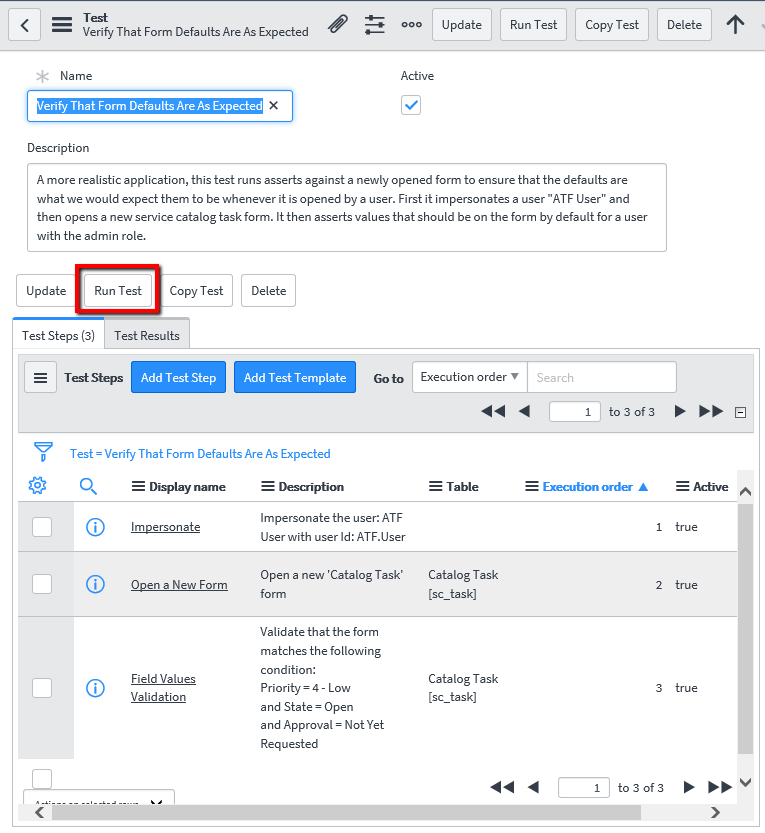
Using Internet Explorer 11, I logged in as a user with the atf_test_designer role and opened one of the simplest demo tests. This read-only test, named "Verify That Form Defaults Are As Expected", has only three steps that check for default values on a Catalog Task form, impersonating "ATF.User"; this user doesn't have either atf_test_admin or atf_test_designer role.

find_real_file.png

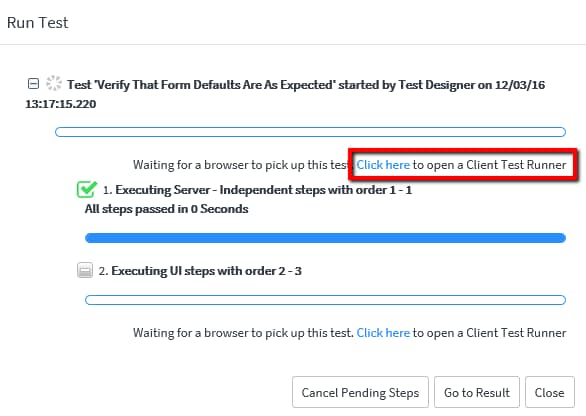
When Run Test was clicked, a dialog box showed up with status as in the screenshot below (I noticed the time displayed here is in PST, the system time zone, although I set the user's time zone to EST):

find_real_file.png

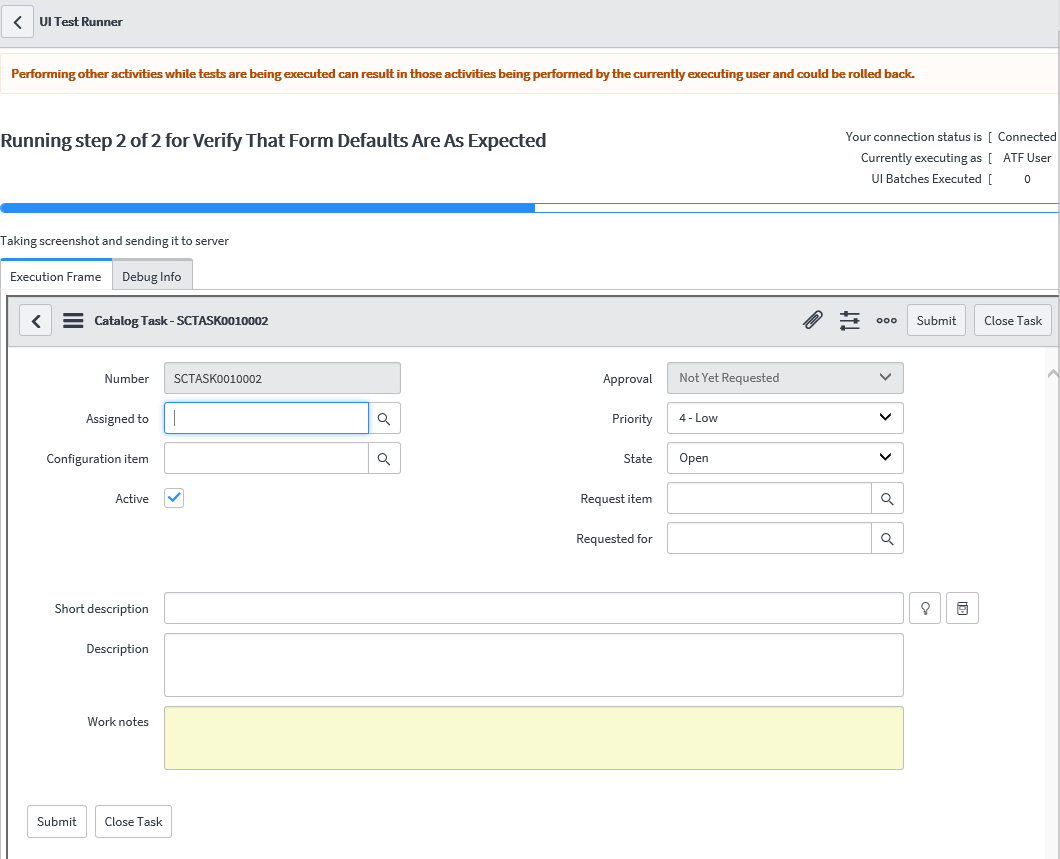
When Click here of "Click here to open a Client Test Runner" was clicked (see the screenshot above), a new Client Test Runner window opened (if it's not opened, the Test won't proceed). At the top of the window, it showed the progress with a blue progress bar for each step. In the Execution Frame tab, the form was displayed inside an iframe (more on this later), as shown in the screenshot below:

find_real_file.png

When the execution was completed, the status dialog box was updated with the results, as shown in the screenshot below:

find_real_file.png

TEST RESULTS

When the Close button was clicked, the Test form showed the test result in the Test Results tab as shown below:

find_real_file.png

When clicked on the test result link, the Test Result page opened up showing the details of the test as shown below:

find_real_file.png

The test result page showed step-by-step results in the Step Results tab and included two screenshots as attachments. Below is one of the screenshots from the attachments; notice it doesn't quite look the same as what we saw from the Client Test Runner window previously and the top is obscured by the tall gray header section and there are missing buttons and icons in the header, indicating the screenshots were not captured directly from the screen (more on this later):

find_real_file.png

The Test Log tab contains quite a bit of information; for a three-step test, it produced 43 test log entries as shown below:

find_real_file.png

When each log entry was clicked, the Test Result Item form showed more details as below:

find_real_file.png

The simple read-only test ran with flying colors with no major issues.

Next time, let's take a look at some more complex tests.

UPDATES

2016-12-07 added ENABLE TEST EXECUTION section.

Please feel free to connect, follow, post feedback / questions / comments, share, like, bookmark, endorse.

John Chun, PhD PMP see John's LinkedIn profile

visit snowaid

ServiceNow Advocate
Comments
Kilo Contributor

Hi John,


How can we use ATF to test notifications? For example, if I have to test incident submission or closure notifications, how to write a test step using ATF?


Thanks.


Tera Guru

I'd suggest looking at the OOB sample test "Multi-Batch Test", which submits a form and runs a server-side script. In your case, you'd look for the notification in the Outbox or Sent folders in the sys_email table using a server-side test step.


Mega Expert

Hi John,


I have a requirement as part of DevOps. Whenever my update set is committed, I want the related test case to run automatically. I know ATF requires manual intervention but just wanted to know can I automate it so that it will trigger as soon as my update set is committed and bring me the results without any manual click on any button. Is this possible?


Regards,


Surya Nair


Tera Guru

The TestExecutorAjax Script Include has some useful methods for executing tests, such as runUserTest() and runUserTestSuite(). These are called from the client-side UI Actions Run Test and Run Test Suite.


Reviewing the scripts from these should provide you with a good starting point.


Tera Contributor

Excellent blog John - objective, informative and thorough!


You might find a white paper I've published interesting, which provides 10 factors to consider when selecting an automated testing platform for ServiceNow -   White Papers


Keep up the great work!


Paul


Tera Guru

Thanks, Paul, for the feedback and the link to the White Paper.


Community Alums

Hi Mayur, did you got the answer regarding the notification testing using ATF? Can we test them in the activity log too with the progress of ticket?


Kilo Contributor

drjohnchun


Hi John,


Can you please guide of how to navigate to the related list section in any submitted form. Further on how to click on any linked item in that related list.


For example, considering Problem module, I want to attach any RFC to the problem ticket related list at the bottom of the problem form. Can this be done or if any workaround is there ?


Thanks,


Apoorv


Tera Guru

Hi Apoorv - there are some challenges with creating a custom Step Configurations for UI, which you'll need for your test; please see my reply in my other blog and the thread for details.


Tera Explorer

Hi John,


Is it possible to create a test for submitting a service catalog request?   This doesn't appear to be available through the 'open new form' or 'open existing record'.  


Thanks in advance


Cliff


Tera Guru

Hi Cliff - that'll require client-side steps but there are challenges with creating UI Step Configurations. Please see this thread for more discussions. I'll post back if I find any workaround.


John


Kilo Contributor

Hi,


Can we automate change management using Automated Test Framework(ATF)? If yes, please explain how can we open change form via interceptor. I tried to open the change form using test step "Open a New Form" for change table but it opens the default RFC type change(which is Major change in my scenario). How can we open any other RFC type change form(not default) which are mentioned on the change interceptor?


Thanks,


Harsh Kaushik


Kilo Contributor

Hi John,


It was really helpful. Though I am facing some issue while implementing it. Can you look into it and provide me your valuable suggestion.


I am exploring the Automation test framework running with an issue  


Tera Expert

Hello John,


I am trying automate Problem Management process using ATF, I have multiple questions related to same


Looking for your suggestions and work around on these scenarios :


- I do not see option to provide Date like, tomorrow/yesterday/current day+7 day etc.


  I can only see calendar option in input value form.


could you please provide more information on this


I am trying to create a Task for particular Problem record.


We have a UI action button on related list tab 'Task'


- I am unable to Validate the presence/click UI action button 'New' under related list tab to create Problem Task


Could you please help with these queries?


Tera Contributor

I'm having a go at trying to query the email log (on Istanbul) - I can't get a query test of sys_email to return emails where "Target = <my record's SysID>" and the Target field doesn't allow dot walking... any shortcuts, or do I need to get some code happening?


Mega Guru

What happens when we insert a record from ATF?

I see it is inserting a record and deleting it mean while, how can I stop servicenow from deleting the record.

I want to see the result in the target table, any help would be appreciated.


Thanks & Regards,
Sathish 

Tera Contributor
Tera Contributor

Hi John,

Finding your ATF notes really useful and informative.


Thank you,

Wendy

Mega Sage
Mega Sage

Hi


Just saw this article here.

No would have imagined that ATF can come this far.

Earlier I heard people saying that it will not be compatible with todays automation tool but know everyone wants ATF. 🙂

So proud of being a ServiceNow QA.


Regards

Shaqeel