ryanpalmer
ServiceNow Employee

Introduction

Sometimes it may be desirable to inspect a record or records created as part of an ATF test after that test is complete. Since all data created within an ATF test will be rolled back upon completion, this data will not be available for review once the test is finished. However, it is possible to trick the ATF into giving you some extra time (up to about 10 minutes) to review this data before rolling it back. The trick is to add a validation step at the end of your test that will fail, and give it a timeout suitable for your needs. As long as the validation evaluates to false, the test will wait patiently until the timeout. By default, you can set the timeout to a maximum of 590 seconds (9.83 minutes). When you are done evaluating the record, you can simply update it so that the validation will succeed, and the test will proceed to completion.

Example Steps

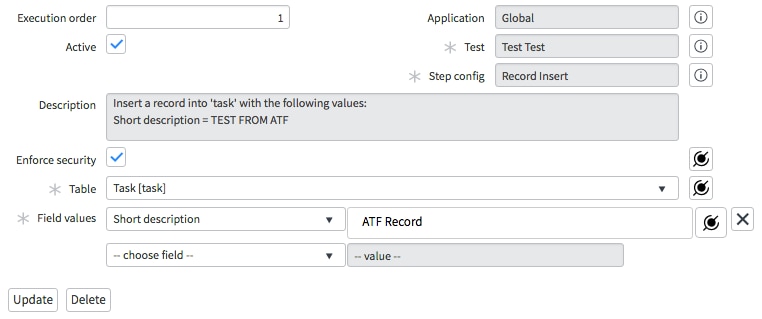
  1. Create a new ATF test.
  2. Add a new "Record Insert" test step with the following values:
    • Table: Task
    • Field values: Short Description = "ATF Record"

    find_real_file.png

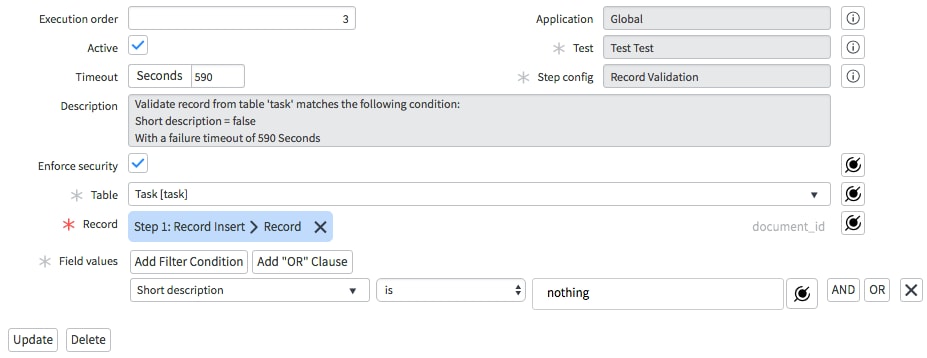
  3. Add a new "Record Validation" test step with the following values:
    • Timeout: 590 seconds
    • Table: Task
    • Record: Step 1: Record Insert > Record
    • Field values: Short Description is "nothing"

    find_real_file.png

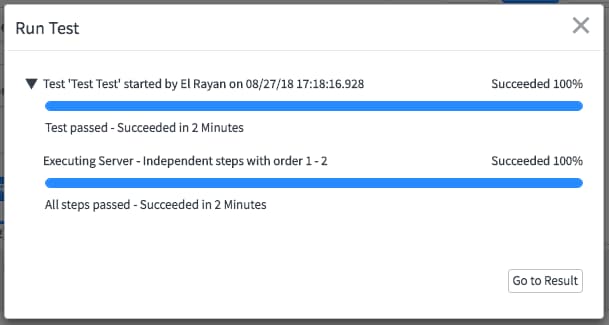
  4. Run the test.
    find_real_file.png

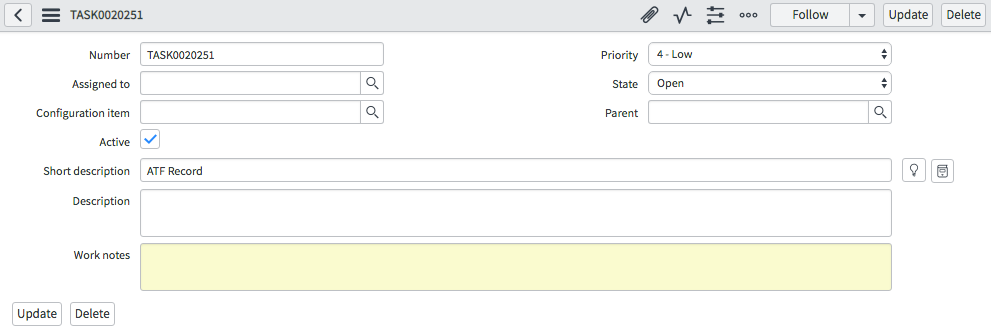
  5. Once the test reaches the validation step, search the Task table for your record by searching for the "ATF Record" short description. find_real_file.png

  6. Open the record and inspect it.
    find_real_file.png

  7. When you're finished inspecting, simply update the short description to "nothing" to satisfy our validation and dismiss the record.
    find_real_file.png

  8. Observe the test completes successfully.
    find_real_file.png

Notes

You can set up multiple validations to inspect multiple records created by the same test. Technically, you could use a single validation step to inspect all records, but creating a different validation for each record allows you to inspect and dismiss them one by one, each with their own timeout of up to 590 seconds. If using multiple validations, make sure to dismiss them in the same order that you configured the steps. That way, the test can pass each validation in sequence. If you spend too much time inspecting, the validation may timeout and the test will report failure.

Comments
Kilo Explorer
Hi ryanpalmer,
 
Good Morning!
 
Read your solution for retaining the record in ATF.
 
My test scenario would require to have the record permanently for test purpose and whole workflow depends on first test case.
 
Can you please help.
 
I heard that we can exclude tables but not sure of the steps
 
Thanks
Raj
 
 
ServiceNow Employee
ServiceNow Employee

Hey Raj,

Currently there is no way to retain a record created by ATF permanently. There is a way to exclude tables from the rollback engine, but it is an extremely unsafe modification, and I do not recommend attempting to do this. Changing the behavior of rollback affects everywhere it is used, including patch upgrades and application install/upgrades. Tweaking rollback settings pokes enormous holes in critical safety nets, so you should not attempt to make any changes like that.

We are looking at the idea of creating a better way for users prevent rollback only for a specific ATF test, so it is possible that such a feature will be available in a future version of ServiceNow. However, at this time, there is no safe way to do so.

Thank you,

Ryan Palmer
Technical Support Engineer
servicenow | Works for you
Tera Guru

Hi Ryan,

Thanks for the post.  Very helpful.

As I am using ATF more, the ability to review the records after the test is complete would be helpful.  It would be great to maintain the records for a short time (for example, configurable in minutes up to a max of 60 minutes) after the test before the rollback.  


Thanks...

David

Tera Contributor

Hi,

thanks for the advice; however, it has very limited usability. The 'A' in ATF stands for 'automated', not for 'assisted' I believe :-). I need to schedule my tests, do something else while they run, and review the data at least for the failed tests when I come back. A config feature like that for screenshots would be nice (keep all data / data for failed tests / no data).

Jiri

ServiceNow Employee
ServiceNow Employee

If you are manually reviewing data created during the test, then that is not exactly automated either. The recommended approach is to perform all validations within the test itself using the steps we provide. That way, when your test fails, the test results will tell you why. For example, it might say it expected a certain value in some field, but that value was not present.

However, some users choose to inspect data manually instead, and this post was provided to make sure they do that safely and without modifying high-impact dictionary attributes.

Tera Contributor

I don't think I explained the use case well enough. The important part of automation is that the test is set up to run automatically from start to end. If all tests pass I don't need to do anything, just acknowledge that all is OK usually on the next business day.

Of course I need to review failed tests manually - and for that it would be very useful to see the records that were created by the test for a longer time (several days), not just some minutes after the test as suggested by the workaround.

Tera Contributor

Does anyone know how the records that will be rolled back are identified? Is there an attribute or a list of sys ID's that the system rolls back as the last step of the test / suite? Would it be possible to exclude records form the roll-back collection by a script that would be run as part of the test?

Kilo Contributor

Greetings ryanpalmer,

In Step # 7 , does "dismiss the record." mean delete the record manually ? Please clarify. Thank you in advance !

ServiceNow Employee
ServiceNow Employee

Hi Ganesh,

You simply need to update the short description, not delete the record. Once the short description is updated to "nothing", it will match the assertion of the ATF step, allowing it to pass and proceed to the next step.

Kilo Contributor
Sorry for my delayed reply. Thank you for clarifying, I am using this for creating a delay in the ATF steps so that in the mean time i verify and close the integration records ( between one servicenow instance to another servicenow third party instance).