Sunil B N
ServiceNow Employee

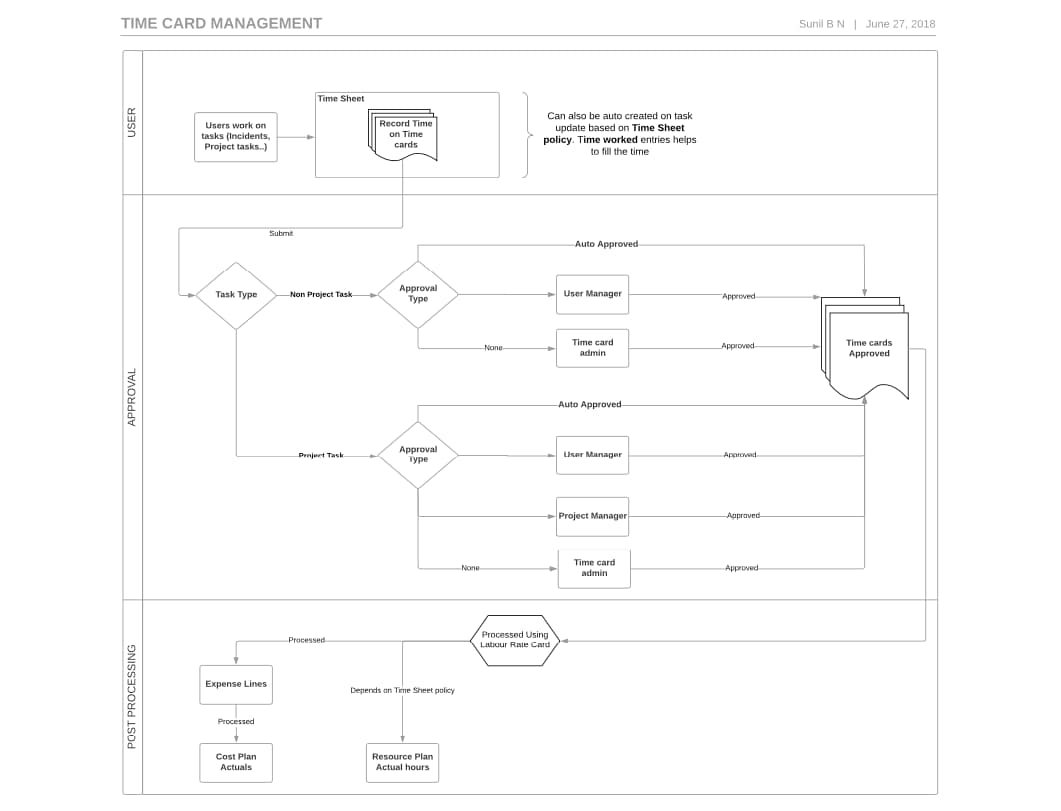
The Time card Management feature enables users track their time for the assigned tasks also helps to capture associated cost along with it. Tasks can be any entity which is extended from task table like project, project task, incident, problem, change request. 
Note: I won't cover what is already there in the documentation. This is applicable for releases below London.
In this, I would like to shed light on overview of how approval flow work and what happens beyond that.

find_real_file.png

Creation Process: 

Users can create time cards from Time sheet portal (formerly known as Worker portal). All the time cards created for a week are tied to a time sheet of that week where hours are aggregated for each day. Time cards can also be auto created based on the time spent by user on a particular task. This feature is driven by Time sheet policy. Initially state will be "Pending", once user submits, state will be "Submitted".

Approval Process: 

Submitted time cards are visible to approvers. Approval process could be 2 step or 1 step process based on the time sheet policy.
There is special approval flow if the task is of type Project task where Project Manager has to approve the work logged by the user.
Note: If a time card is rejected, state will be "Rejected" and associated time sheet also moves to "Rejected" state.

Post Processing:

Once time card is approved and task type is project task, actual hours are updated on relevant resource plan and resource allocation daily table and also on Project task. An expense line would be created based on labor rate card
All unprocessed expense lines are processed by a daily schedule job which updates actual amount on respective cost plan and breakdown. This amount would rollup to project, program and portfolio.

Feel free to ask any questions associated to Time card management.

Thanks Best Regards,
Sunil B N

Comments
Tera Guru

Hi Sunil,

The timesheet process flow is really good. Do you have something to share on the rejection process flow?

Tera Guru

Can you also share your view on below-

1. Can timesheets be auto-created once a task is assigned to a resource? So when a user logs in and navigates to my timesheets, he sees the tasks allocated to him/her.

2. Do we have an option to view the planned hours allocated against each task in the timesheets view?

ServiceNow Employee
ServiceNow Employee

I will add that too. 

ServiceNow Employee
ServiceNow Employee

1. The moment user works on task, task_time_worked would be updated and time card also would be created. You can set auto-creation time card settings in Time sheet policy.
Tasks allocated to user are already shown in Time sheet portal (formerly known as Worker portal)

2. Time sheet is aggregation of Time cards of that week. So, it doesn't have task information associated with it. If you are talking about bringing planned hours on time card, we can bring it once user enters the task reference.

Tera Guru

Wondering if you can tell me if the resource plan reference in the time card can be made smarter? The time card reference field to the resource plan.  We have tons of examples where a plan was canceled or completed and a new one created for the resource, but the time card is still pulling in the old resource plan number.  Trying to find someone who has managed to fix this issue, since it's not OOB.

ServiceNow Employee
ServiceNow Employee

Hi, 
Definitely we have addressed that issue. After N release, you can choose the relevant resource plan which is associated to the Project. This will be shown both in form and Time sheet portal.
Best Regards,
Sunil B N

Kilo Contributor

Hi Sunil

Wondering if it's possible to add an additional approval route? Example would be a "resource manager" who isn't the User's Line Manager but allocates their work. 

Kilo Explorer

This information is very helpful! What about Operational resource plans? Is there anyway to automatically update the Operational resource plans to a time card? 


Kilo Contributor

Thank you for mapping this out.  I appreciate it. How does the Time_Card_Exception fit into this process?  What does the Time_Card_Exception process look like?  What is/are the criteria for a time card to hit the exception table?


Kilo Contributor

Hi Sunil,

I have an issue in time cards management what is the issue is in timecards the state was stucked in Approved state itself it not moving to processed state for this i checked like is expense line is created or not when i checked expense line it is their.

And more point is if the task is empty then also the state will not move right ?

I checked like that also in my issue the task field is not empty for state Approved one below you can see SS

find_real_file.png

Can you please help me on this why the state was strucked in Approved state why it was not moving to processed state

Thanks,

Manikanta

Mega Sage

Hi Sunil, great post, thanks!

Question:  I'm running through the Time Card and Time Sheet approval process, and in my scenario when the user's manager approves a Time Card or a Time Sheet, it moves to State = "Processed".  How does the Time Sheet then move to "Approved"?  I do see in the history that the State field actually went first to "Approved", then immediately went to "Processed".  Can you explain this part of the process?  The Task on the Time Sheet was a Project [pm_project].

Tera Explorer

Hi Sunil , for some of the timecards only the approver list is not showing , remaining for all it is working properly. Here is the snapshot of that

find_real_file.pngPlease can help me to figure this out.

Tera Contributor

Hi @Sunil B N ,

Very helpful article. Can you please share the information on which is the workflow involved in this process. If we want to change the approver from User manager to Resource manager.

Since in our requirement user manager and Resource manager are not same. 


Thanks,

Anusha


Tera Contributor

Hi Sunil,

I've few questions about this,

First is do approvers gets any oob email notifying them a time card needs to be approved by that person.

Second, is there an option to send approval to someone else other than "User's Manager", "Auto", "None", when "Non-Project Time Approver" is selected.