Urgent: Catalog Client Script (onChange) not firing on Demand Task using Variable Set

- Mark as New
- Bookmark
- Subscribe
- Mute
- Subscribe to RSS Feed
- Permalink
- Report Inappropriate Content
07-16-2026 03:24 AM
Environment
- ServiceNow release: Zurich
- Affected table: Demand Task out-of-box table from the Demand Management plugin, extends task (not sc_task)
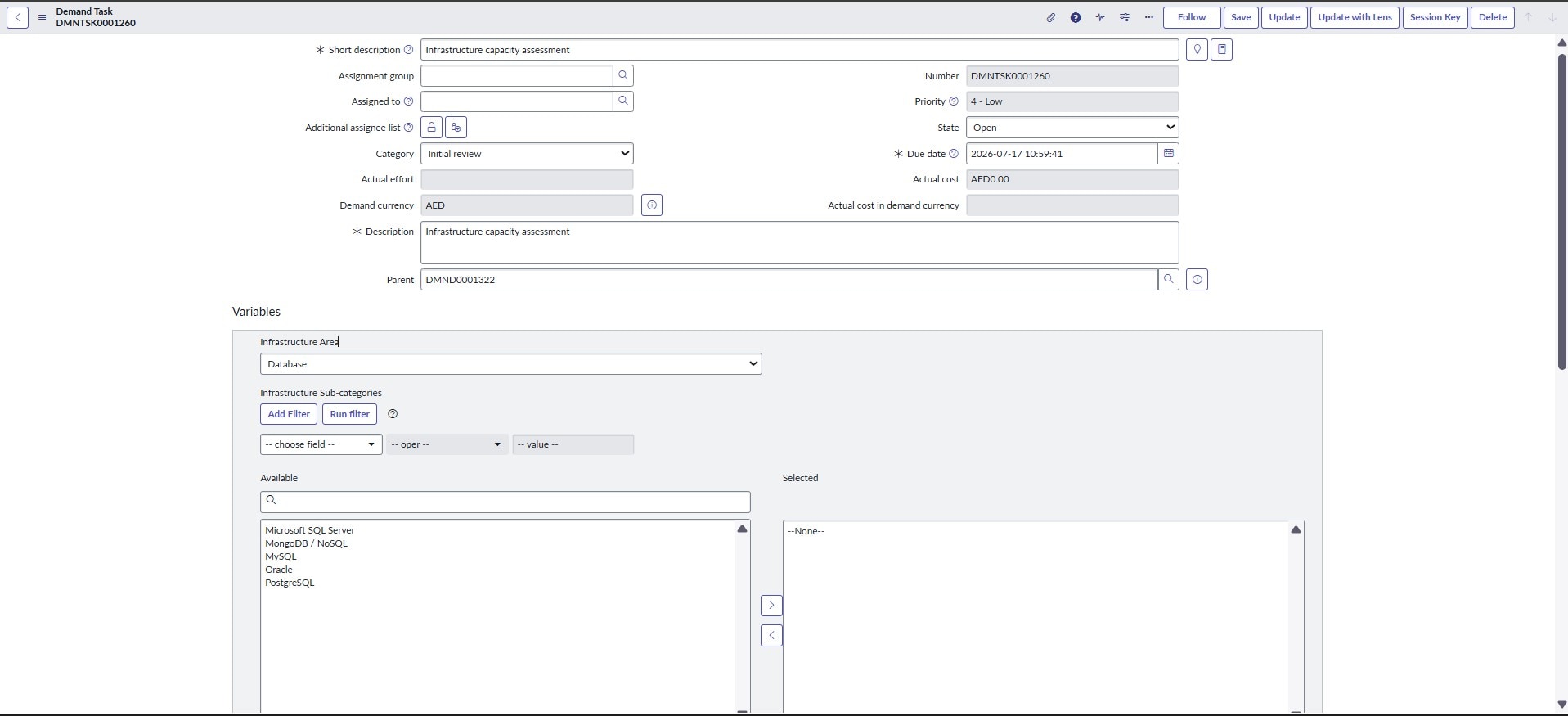
- Variable Set: Variable Set, attached to a Catalog Item, and also surfaced on the Demand Task table via a Formatter using the "Variable Editor" macro (the default Question/Answer editor formatter), added to the form
- Variables involved:
- infrastructure_area — Type: Lookup Select Box, Table: sys_choice
- infrastructure_sub_categories — Type: List Collector, List table: sys_choice
Goal
infrastructure_sub_categories (List Collector) should show only the sub-category choices relevant to whichever option is selected in infrastructure_area (Lookup Select Box), using sys_choice.element + dependent_value to link them.
What's working
Dynamic Reference Qualifier on infrastructure_sub_categories:
javascript: 'element=u_infra_assesment^dependent_value=' + current.variables.infrastructure_area;
This correctly filters the List Collector's Available options but only reflects the value of infrastructure_area as currently saved in the database, since it's evaluated server-side against current.
Strategic Planning Workspace: Cascading behavior works perfectly. Changing infrastructure_area immediately re-filters infrastructure_sub_categories, with no client script involved ,Workspace's Variable Editor macroponent appears to re-evaluate the reference qualifier live via its own AJAX mechanism.
What's not working
Native/classic Task form: The List Collector only picks up the new infrastructure_area value after the record is saved (via the Save UI Action) and the form reloads. Changing the dropdown live, without saving, does not refresh the sub-category options.
To fix this, I added a Catalog Client Script (onChange) to force a live refresh:
function onChange(control, oldValue, newValue, isLoading, isTemplate) {
console.log('onChange fired. newValue=' + newValue);
if (isLoading || newValue === '') {
return;
}
g_form.setReferenceQualifier(
'infrastructure_sub_categories',
'element=u_infra_assesment^dependent_value=' + newValue
);
g_form.clearValue('infrastructure_sub_categories');
}
Configuration used:
- Applies to: A Variable Set
- Variable set: matches exactly
- Variable name: infrastructure_area
- Type: onChange
- Active: Yes
- UI Type: All
- Isolate script: No
- Applies on a Catalog Item view: Yes
- Applies on Requested Items: Yes
- Applies on Catalog Tasks: Yes
- Applies on Target Record: Yes
Result: Even a bare console.log('manual test') and alert() placed at the top of the function never fire on the native Demand Task form, the function appears to never be invoked at all, despite the configuration above matching documented setup for onChange scripts on Variable Sets.
Troubleshooting already done
- Confirmed the Demand Task table extends task, not sc_task — suspect this may be why "Applies on Catalog Tasks" has no effect, since that flag may only recognize tables extending sc_task, not other Task-family tables that merely display catalog variables through a Formatter.
- Variables are displayed on the form via a Formatter field using the "Variable Editor" macro (the platform's default Question/Answer Set editor) added to the Demand Task form layout, rather than the record being a native RITM/sc_task record with its own built-in variable rendering. Suspect this Formatter-based rendering may not bootstrap the same client-side event/scripting bridge that a genuine sc_task record's Variable Editor does — even though the underlying widget looks identical and the reference qualifier (server-side) works fine either way.
Question for the community
- Is it correct that Catalog Client Scripts with "Applies on Catalog Tasks" only fire on genuine sc_task records, and won't fire on other Task-family tables (extending task, but not sc_task), even when variables are displayed via a Formatter → Variable Editor macro, and the Variable Set is properly attached to a real Catalog Item?
- Is the Formatter-based "Variable Editor" macro itself the limiting factor here — i.e., does it render the Question/Answer set purely for display/data-entry purposes without wiring up the full catalog client-scripting event bridge that a native sc_task/RITM form gets automatically?
- If so, what is the recommended/supported pattern for getting live (pre-save) cascading behavior for Lookup Select Box → List Collector variables when they're surfaced via this Formatter on a non-sc_task table?
- Is there a supported client-side API (GlideAjax, a different script type, UI Policy with "Run scripts," or something in the newer client scripting model) that reliably reaches variables rendered through this Formatter, outside genuine sc_task/RITM records?
Any pointers to official documentation on Catalog Client Script scope limitations for non-sc_task tables would also be appreciated .I haven't been able to find this explicitly documented.
Thanks in advance!
- Mark as New
- Bookmark
- Subscribe
- Mute
- Subscribe to RSS Feed
- Permalink
- Report Inappropriate Content
07-16-2026 07:32 AM
Hey @supriya1kum,
Drop the Catalog Client Script here and build a plain Client Script on dmn_demand_task instead, type onChange, field name variables.infrastructure_area. That variables. prefix is the tell you're now in table-level scripting territory instead of catalog-scoped scripting, and it's also the reason your current script never even logs.
Here's why the catalog script is dead on arrival: "Applies on Catalog Tasks" is wired to the sc_task table specifically, not to the Task family in general. There's even a Known Error (KB0564323) describing a catalog client script bleeding across contexts between the RITM and "the catalog task," and those two are literally sc_req_item and sc_task, the only record types the catalog client script engine watches for. dmn_demand_task extends task, not sc_task, so it sits outside that wiring completely, no matter how identical the Variable Editor widget looks or how correctly the Variable Set is attached to the catalog item. Your troubleshooting note #1 is correct, this reads as confirmed platform behavior rather than a misconfiguration on your side.
The Formatter itself, com_glideapp_questionset_default_question_editor, isn't a dead end though. It's the same formatter ServiceNow uses for the Change Variable Editor on Change Request, a genuinely non-catalog table, and the documented pattern there is exactly what you'd want: a standard client script reaches individual variables through g_form using the variables. prefix, e.g. g_form.setValue('variables.replacement', 'false'), and setDisplay, setMandatory, getValue all behave the same way. A table-level onChange script on variables.infrastructure_area should be reachable on Demand Task the same way.
Inside it, keep your logic but add one more call. g_form.setReferenceQualifier on variables.infrastructure_sub_categories updates the qualifier used for the next query, but it doesn't by itself force the Available pane to redraw. Follow it immediately with g_form.refreshSlushbucket('variables.infrastructure_sub_categories'), that's the desktop-only call that actually re-renders a list collector's slushbucket, then clearValue if you still want the selection wiped.
Before you build out the full logic, do a quick sanity pass: put a bare console.log at the top of an onLoad standard client script on the same field to confirm the table-level script even fires on this Formatter instance. That isolates a scoping problem from something else blocking execution on this particular form.
Thank you,
Vikram Karety
Octigo Solutions INC