I am unable to publish product offering

- Mark as New
- Bookmark
- Subscribe
- Mute
- Subscribe to RSS Feed
- Permalink
- Report Inappropriate Content
04-03-2026 03:21 AM
Hi , All
I have created the product characteristics, product offerings, product offering categories, product offering catalog. I have published product categories and product catalog but I can't able to publish product offerings which are associated with those product categories and those product offerings are remained in Draft state only. It was showing an error in Configurable state.
I am attaching the screen shot.
Can anyone help me out to solve this problem.

- Mark as New
- Bookmark
- Subscribe
- Mute
- Subscribe to RSS Feed
- Permalink
- Report Inappropriate Content
04-04-2026 06:04 AM
The Configuration Status field shows "Error", which is what's blocking the publish action.
Looking at the Configuration JSON at the bottom, the root cause is that key required fields are empty or null. Specifically, product_specification has "value":null, and prod_spec_name, prod_spec_desc, and prod_spec_code all have empty values. The product offering configuration validator requires a valid Product Specification to be associated before it can move out of Draft.
To fix this:
- Create a Product Specification record (in the
sn_prd_pm_product_specificationtable) for "Crusher C75" if you haven't already, defining the spec name, code, and characteristics. - On your Product Offering form, populate the Product Specification reference field to link it to that spec.
- After linking, the Configuration JSON should auto-populate with valid spec values and the Configuration Status should clear the error.
- Once the status changes from "Error" to something like "Valid" or "Complete," the Publish button should work.
Also make sure that any Product Characteristics you created are properly associated with the Product Specification (not just the offering directly), as the configuration engine validates that entire chain — Catalog → Category → Offering → Specification → Characteristics — before allowing publish.
- Mark as New
- Bookmark
- Subscribe
- Mute
- Subscribe to RSS Feed
- Permalink
- Report Inappropriate Content
04-05-2026 12:10 AM
Hi @Naveen20
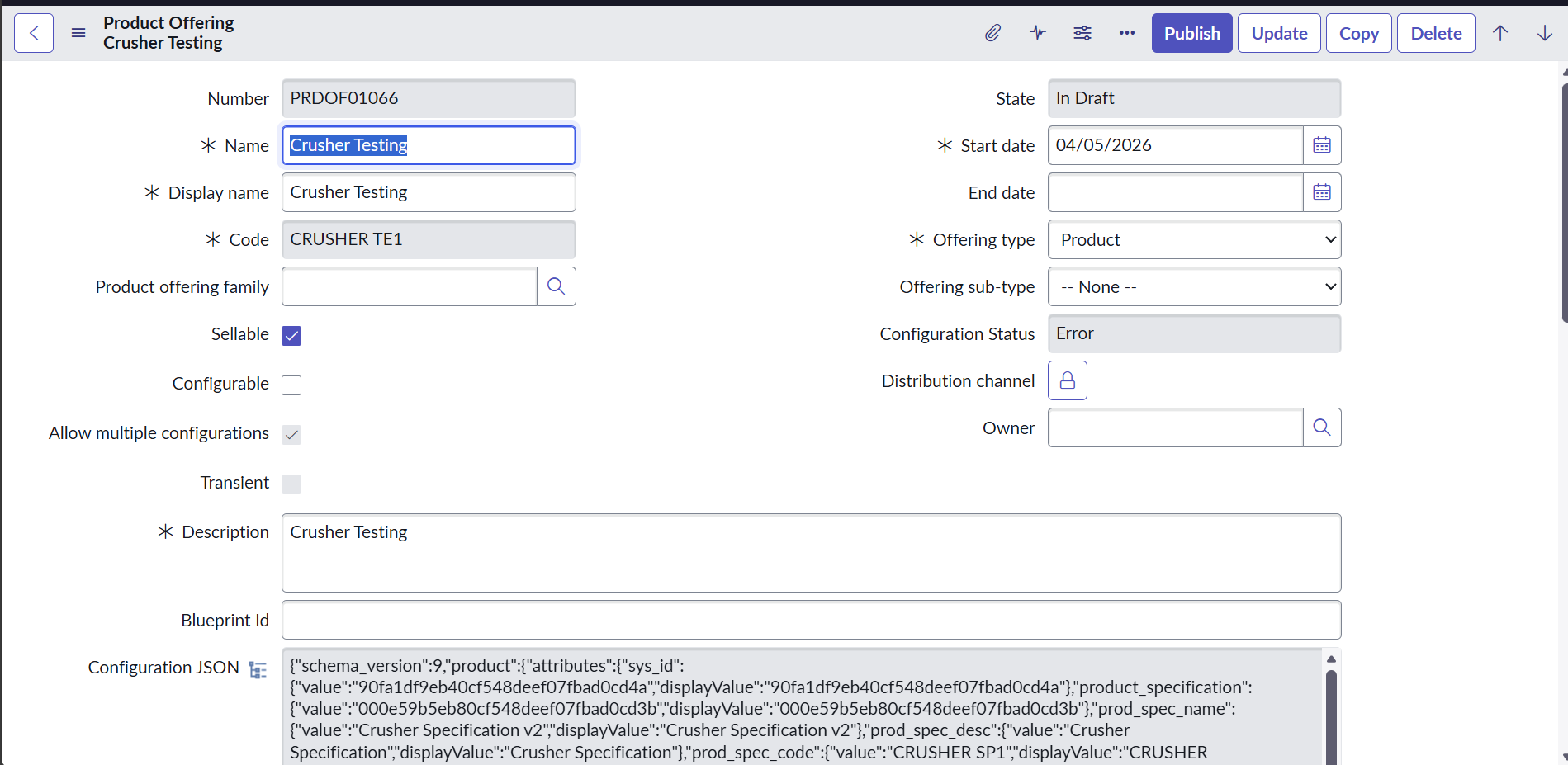
I have created a new product offering crusher testing. I have added characteristics to product specification before publishing and published the product specification. Even though I have added the Product specification from the steps provided. Product offering is not published and still showing error.
I have attached the screenshot for reference.
Please help me out to solve error.
- Mark as New
- Bookmark
- Subscribe
- Mute
- Subscribe to RSS Feed
- Permalink
- Report Inappropriate Content
04-05-2026 08:45 PM
Even though you've correctly linked the Product Specification ("Crusher Specification v2"), both of your characteristics — Product Name and Product Types — are marked as is_mandatory: true with input_type: "choice", but their characteristic_option_value blocks show "value": null.
This means the configuration validator sees mandatory choice characteristics with no selected default value, which triggers the Error status.
There's also a mismatch: Your form shows Configurable = unchecked, but the JSON has "is_configurable": true. This inconsistency compounds the validation failure.
To fix this:
- Set default option values for each characteristic. Open the Product Offering → go to the related list for Product Offering Characteristics → for each characteristic (Product Name, Product Types), ensure a Characteristic Option Value is selected. The options themselves exist (e.g., "Crusher" for Product Name, "Version1" for Product Types) and have
is_default: true, but they aren't being picked up at the offering level. - Resolve the Configurable mismatch. Either check the Configurable checkbox on the form (to match what the JSON expects), or if you truly want a non-configurable simple offering, remove the choice-based characteristics and use fixed values instead.
- After making changes, click Update and check if Configuration Status changes from "Error" to a valid state. Then attempt Publish again.
Most likely quick fix is simply checking the Configurable checkbox and ensuring each mandatory characteristic has its default option value properly saved.
- Mark as New
- Bookmark
- Subscribe
- Mute
- Subscribe to RSS Feed
- Permalink
- Report Inappropriate Content
04-16-2026 10:55 AM
I wonder if this issue is specific to 'Copy'ing Product Offerings . I am running to the same roadblock where a copied Product Offering just does not publish and runs into an error