Missing "New" button on Tasks Page Configuration [sn_grc_workspace_task_page_config] for Custom Work

- Mark as New
- Bookmark
- Subscribe
- Mute
- Subscribe to RSS Feed
- Permalink
- Report Inappropriate Content
03-20-2026 01:54 PM
- My custom workspace is currently pointing to the Compliance Workspace task page configuration.
- I need to create a dedicated configuration record for mygrc because we have specific requirements for the queries and tables displayed on the "My Tasks" page.
When I navigate to GRC Landing Page Configurations > Tasks Page Configuration, I do not see a "New" button to create a fresh configuration record for my custom workspace.
- Roles: I have both
adminandsn_grc_workspace.task_adminroles. - Scopes: I have tried switching between Global, GRC: Policy and Compliance, and GRC: Common Workspace Elements scopes.
- List Control: I checked the List Control settings; the "Omit new button" checkbox is unchecked, yet the button still does not appear.
- Is the
sn_grc_workspace_task_page_configtable restricted OOB to only the core GRC workspaces? - If the "New" button is intentionally hidden, what is the recommended way to register a custom workspace to its own task configuration?
- Should I be looking at a specific UX Page Property (like
taskPageConfigId) in UI Builder to link a new ID, and if so, how do I generate that record if I can't create one via the UI?

- Mark as New
- Bookmark
- Subscribe
- Mute
- Subscribe to RSS Feed
- Permalink
- Report Inappropriate Content
03-20-2026 02:51 PM
I've faced something like this before on my custom workspaces. What I did is create a new Declarative Action.
Navigate to Declarative Actions -> Create New Action -> Select List
Take a look at how existing Declarative Actions are configured, you should get an idea. There's plenty of OOB records for New buttons in that table. It took some time for me before I got it to work.
Just a tip: for your declarative action you will mostly have to go to Advanced view and add table + sysid parameters in the Payload Map field.
- Mark as New
- Bookmark
- Subscribe
- Mute
- Subscribe to RSS Feed
- Permalink
- Report Inappropriate Content
03-30-2026 08:02 PM
Hi Anirudh,
Thank you for your response. I followed the steps you outlined:
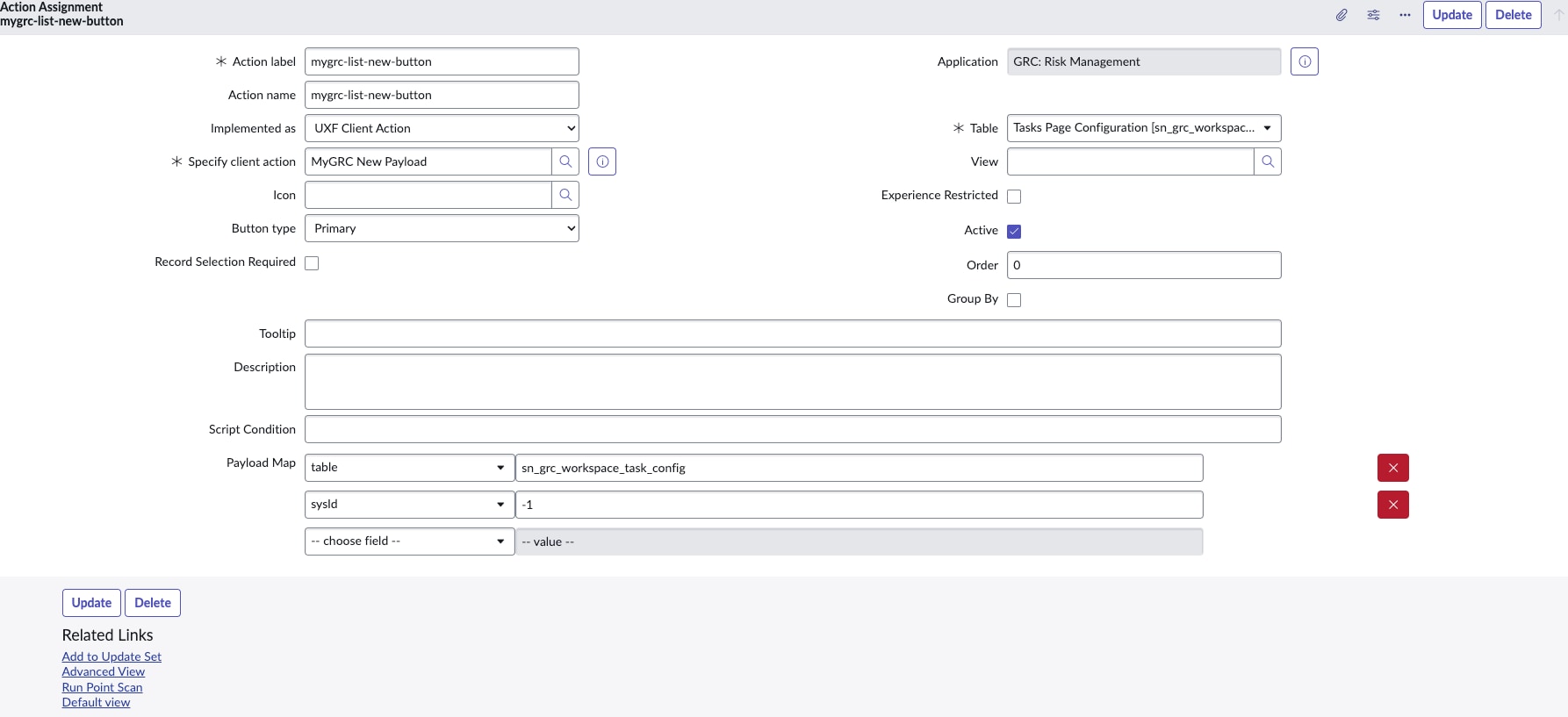
- Created a Declarative Action (List Action) for the table sn_grc_workspace_task_config with the following Payload Map:
{
"table": "{{table}}",
"sysId": "-1"
} - Created a UX Actions Configuration and linked the Sys ID to Workspace UX properties by adding the
actionConfigproperties under experiences. - Created UX Form Action Layouts.
However, I’m still not seeing the "New" button on the Task Page Configuration table.
I’m a bit confused about whether all of these steps are required just to display the "New" button and define its behavior. Since many of these components seem to be OOB in ServiceNow, I’m struggling to understand why this setup is necessary.
Could you please help clarify what might be missing or incorrect in my setup?