Pradeep Sharma

ServiceNow Employee
Options
- Subscribe to RSS Feed
- Mark as New
- Mark as Read
- Bookmark
- Subscribe
- Printer Friendly Page
- Report Inappropriate Content
01-16-2017
02:26 PM
ServiceNow has developed a utility called "code search" which helps to search a code both within and outside of your application. This is helpful whenever you're troubleshooting or just trying to understand how something works. Code search is built into the ServiceNow Studio IDE interface to make developers life easier. Search can be easily applied without navigating to the platform UI by applying additional filters using Code Search. Code search is offered in the Geneva release onwards. I will walk you through an example of how to find a particular line of script/fields and where it is being used in the system
Example of how to use code search
Let's assume as part of my troubleshooting, I want to investigate what all scripts are triggered against a field for ex: close_notes which set the field to be mandatory. Here are the steps to be followed.
- On your instance navigate to System Applications>Studio
- Click on open Studio tab.
- Now select one of the applications from the list (for example, Now application)
- Now on upper right corner, you will see the "Code search" button.
- Click on Code Search.
- Enter the search for ex: close_notes.
- Now you have the option to either select a table to search from or search in all application.
- Select one of those options and hit search button.
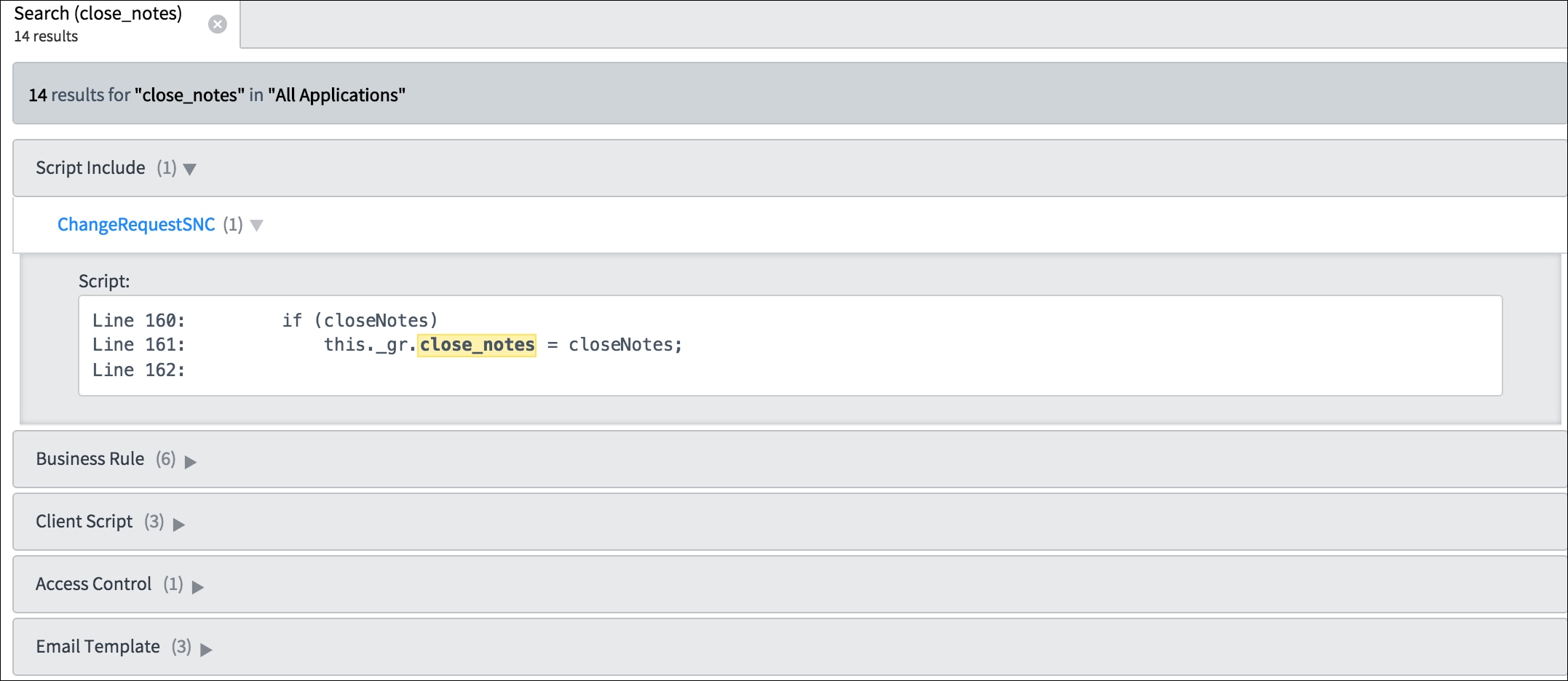
- The output result will be the name of the script(hyperlink) with code line number in case a match is found.
As you can see, we have all of the scripts which are triggered against the field close_notes. In this particular case, it's most likely a client script/UI action/UI Policy which is responsible for the mandatory operation. Now I can go through all the scripts found to understand the behavior further.
Tables included in code search scanning:
Below is the list of tables on which scan is performed whenever a user enters a keyword to search for. For ex: In the above case we have searched for a field "close_notes".
- Access Control
- Business Rule
- Client Script
- Email Template
- Inbound Email Action
- Map Page
- Notification
- Processor
- Relationship
- Scheduled Script Execution
- Script Action
- Script Include
- Style
- Table Transform Map
- UI Action
- UI Macro
- UI Page
- UI Policy
- UI Script
Please note the scan will be across global and scoped applications.
Code Search presents a powerful tool to developers. This is really helpful to find a particular script during active development in their instance. This allows the developer to search scripts across the platform, rather than doing the limited search on the individual table by applying a filter i.e business rules, client script, UI scripts, etc.
For more information on code search see:
Is there a way to make Studio's Code Search into a favorite or module?
- 45,484 Views
26 Comments
You must be a registered user to add a comment. If you've already registered, sign in. Otherwise, register and sign in.