- Mark as New
- Bookmark
- Subscribe
- Mute
- Subscribe to RSS Feed
- Permalink
- Report Inappropriate Content
10-25-2016 06:20 AM
Morning All -
I am working on a custom application that generates approval records via workflow. What I would like to do is have Approve and Reject buttons on my custom table that updates the state field in the sysapproval_approver table.
To that end I have made a UI Action with this code:
var currentRec = current.getValue('number');
var gr = new GlideRecord('sys_approval_approver');
gr.addQuery('approval_for',currentRec);
gr.query();
while (gr.next()) {
gr.state = 'approved';
}
gr.update();
and it is not working. I also had currentRec set like this:
var currentRec = current.sys_id;
and it did not work with that either.
So I guess I'm confused about which field I should be querying for in the Approval table and what I should be passing into it.
Guidance on this issue would be appreciated.
Thanks!
Chris
Solved! Go to Solution.
- Labels:
-
Scripting and Coding


- Mark as New
- Bookmark
- Subscribe
- Mute
- Subscribe to RSS Feed
- Permalink
- Report Inappropriate Content
10-25-2016 06:25 AM
Hi Chris,
Try something more like this:
var currentRec = current.sys_id;
var gr = new GlideRecord('sysapproval_approver');
gr.addQuery('sysapproval',currentRec);
gr.addQuery('state', 'requested');
gr.query();

while (gr.next()) {
   gr.state = 'approved';
   gr.update();
}
- Mark as New
- Bookmark
- Subscribe
- Mute
- Subscribe to RSS Feed
- Permalink
- Report Inappropriate Content
10-25-2016 06:57 AM
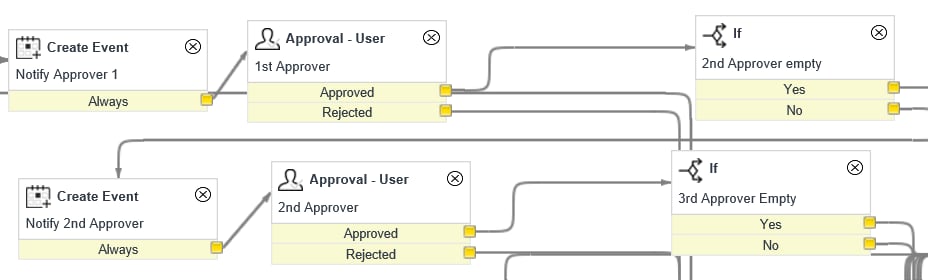
OK, when a record is created, I am populating a number of approver fields on the record. They appear like so:

I populate these fields from another table where I store the names and pull them based on certain criteria. I account for up to 10 approvers in my workflow but here is how it handles the first two:

When I click Approve through the normal approver interface. I have always seen this:

The approval from the person in the first position takes place and it moves on to Approver 2. However, when I clicked the UI Action I just made on my custom table, I see this:

Certainly not what I want to have happen....
- Mark as New
- Bookmark
- Subscribe
- Mute
- Subscribe to RSS Feed
- Permalink
- Report Inappropriate Content
10-25-2016 07:10 AM
I think each time I click the ui action on my custom table, its resubmitting it and treating it like a new record entry. Is there a way to prevent that from happening?
- Mark as New
- Bookmark
- Subscribe
- Mute
- Subscribe to RSS Feed
- Permalink
- Report Inappropriate Content
10-25-2016 07:11 AM
Is there any other code in your ui action?
- Mark as New
- Bookmark
- Subscribe
- Mute
- Subscribe to RSS Feed
- Permalink
- Report Inappropriate Content
10-25-2016 07:17 AM
I think I got it.
I was updating the approval record but not the current record in my custom table.
I changed the code to this:
var currentRec = current.getValue('sys_id');
var gr = new GlideRecord('sysapproval_approver');
gr.addQuery('sysapproval',currentRec);
gr.addQuery('state', 'requested');
gr.query();
while (gr.next()) {
gr.state = 'approved';
gr.update();
}
current.update();
and it moved on to the 2nd approver as before.