- Mark as New
- Bookmark
- Subscribe
- Mute
- Subscribe to RSS Feed
- Permalink
- Report Inappropriate Content
04-03-2020 07:39 AM
In building out our ATFs, I have come across something I am not sure how to do. In some of our Catalog Items, we allow them to enter multiple users. When creating an ATF, usually when setting the variable values, when setting a field that allow multiple entries, you separate them with a comma. If we were selecting specific users from the user table, this would work fine. However, in the interest of keeping our ATF testing dynamic, we do not wish to "hard-code" specific users in our testing. We would like to either query the user table for active users, or create users to use for testing.
So, in my test, I did one of each (Record Query to query active users and Create a User). It was my hope that then when I was populating my user field on my Catalog Item, I would be able to select each of these. But that does not appear to be the case. It looks like if you select a user from a previous step, there doesn't appear to be a way to select another user.
This is what it looks like (the first field is my user field):

So, is there any way to select multiple dynamic users in an ATF test on the Service Portal?
Thanks
Solved! Go to Solution.
- Labels:
-
Automated Test Framework


- Mark as New
- Bookmark
- Subscribe
- Mute
- Subscribe to RSS Feed
- Permalink
- Report Inappropriate Content
04-04-2020 01:43 AM
Hi,
I was able to set the values dynamically using Run Server Side Script
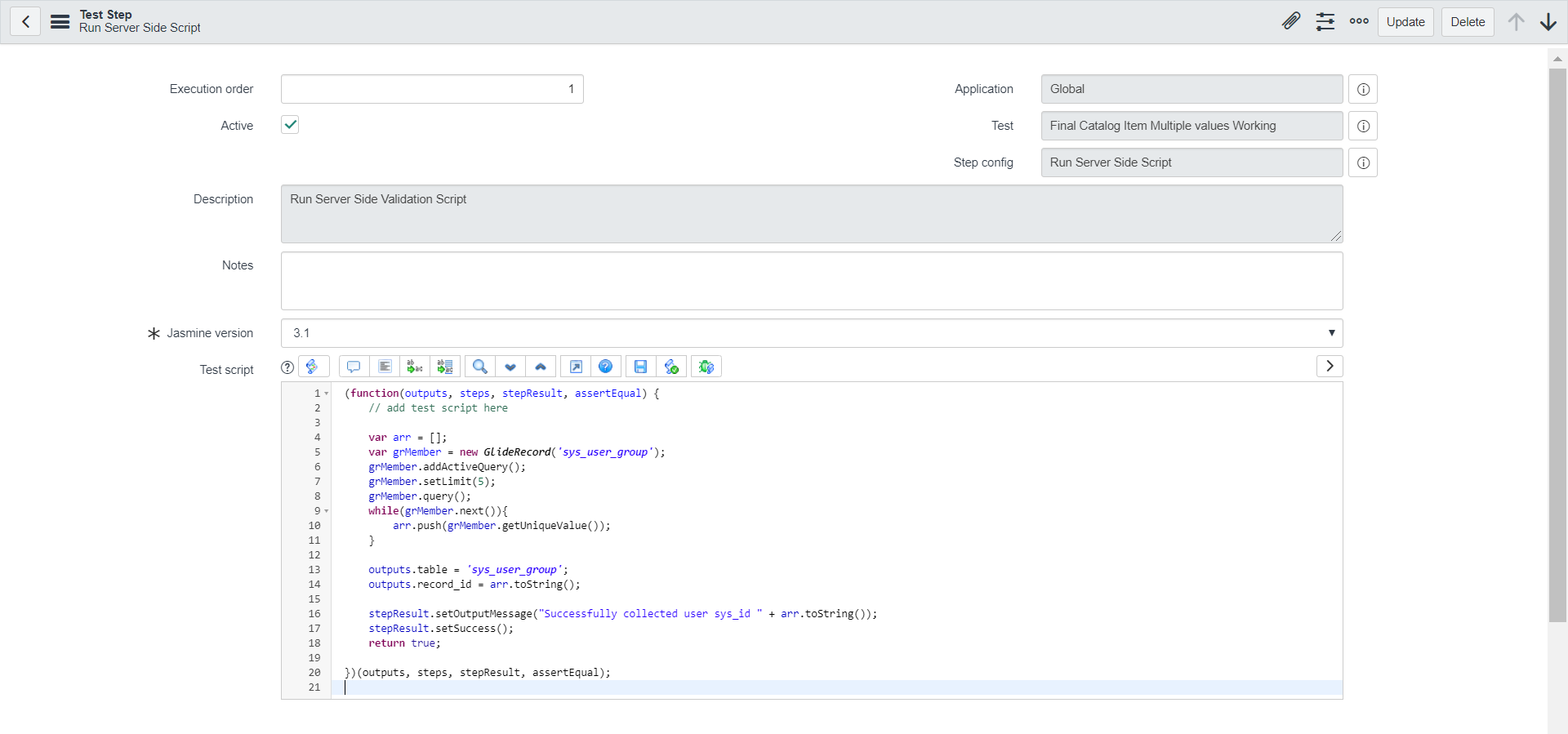
please update code as below in the script; see screenshot as well
Ensure you determine this and then open the catalog item and then set the values
(function(outputs, steps, stepResult, assertEqual) {

	//set up array for output
	var users = [];

	// pull out first 2 active members of sys_user table
	var gr = new GlideRecord('sys_user');
	gr.addQuery('active','true');
	gr.setLimit(2);
	gr.query();

	//build array of two users to output
	while(gr.next()){
		users.push(gr.getValue('sys_id'));
	}

	outputs.table = 'sys_user';
	outputs.record_id = users.toString();

        stepResult.setOutputMessage("Successfully collected users " + users.toString());
	stepResult.setSuccess();
	return true;

})(outputs, steps, stepResult, assertEqual);

Mark ✅ Correct if this solves your issue and also mark 👍 Helpful if you find my response worthy based on the impact.
Thanks
Ankur
Ankur
✨ Certified Technical Architect || ✨ 10x ServiceNow MVP || ✨ ServiceNow Community Leader
- Mark as New
- Bookmark
- Subscribe
- Mute
- Subscribe to RSS Feed
- Permalink
- Report Inappropriate Content
04-03-2020 08:26 AM
Hi,
Can you try to use run server side validation script; query the sys_user table with active user with setLimit(5); push those 5 values in array and use output of this step in the next step
Mark ✅ Correct if this solves your issue and also mark 👍 Helpful if you find my response worthy based on the impact.
Thanks
Ankur
Ankur
✨ Certified Technical Architect || ✨ 10x ServiceNow MVP || ✨ ServiceNow Community Leader
- Mark as New
- Bookmark
- Subscribe
- Mute
- Subscribe to RSS Feed
- Permalink
- Report Inappropriate Content
04-03-2020 10:45 AM
Thanks for the reply. I have tried multiple variations, but just can't quite seem to get it to work. It isn't returning anything.
Here is my script:
(function(outputs, steps, stepResult, assertEqual) {

	//set up array for output
	var users = [];

	// pull out first 2 active members of sys_user table
	var gr = new GlideRecord('sys_user');
	gr.addQuery('active','true');
	gr.setLimit(2);
	gr.query();

	//build array of two users to output
	while(gr.next()){
		users.push(gr.sys_id);
		//users.push(gr.getValue('sys_id'));
		//users.push(gr.name);
	}

	//return string of users
	return users;
	//return JSON.stringify(users);

})(outputs, steps, stepResult, assertEqual);
You can see from the lines I have commented out, I have tried different variations, but none seem to work. None seem to populate my user field with anything when I try to assign the result from this step to that user field variable.
Can you seem what I am doing wrong?
- Mark as New
- Bookmark
- Subscribe
- Mute
- Subscribe to RSS Feed
- Permalink
- Report Inappropriate Content
04-04-2020 01:43 AM
Hi,
I was able to set the values dynamically using Run Server Side Script
please update code as below in the script; see screenshot as well
Ensure you determine this and then open the catalog item and then set the values
(function(outputs, steps, stepResult, assertEqual) {

	//set up array for output
	var users = [];

	// pull out first 2 active members of sys_user table
	var gr = new GlideRecord('sys_user');
	gr.addQuery('active','true');
	gr.setLimit(2);
	gr.query();

	//build array of two users to output
	while(gr.next()){
		users.push(gr.getValue('sys_id'));
	}

	outputs.table = 'sys_user';
	outputs.record_id = users.toString();

        stepResult.setOutputMessage("Successfully collected users " + users.toString());
	stepResult.setSuccess();
	return true;

})(outputs, steps, stepResult, assertEqual);
Mark ✅ Correct if this solves your issue and also mark 👍 Helpful if you find my response worthy based on the impact.
Thanks
Ankur
Ankur
✨ Certified Technical Architect || ✨ 10x ServiceNow MVP || ✨ ServiceNow Community Leader
- Mark as New
- Bookmark
- Subscribe
- Mute
- Subscribe to RSS Feed
- Permalink
- Report Inappropriate Content
04-04-2020 09:47 AM
Hi,
Recently I have published a blog related to this; please check the link and mark as helpful
https://community.servicenow.com/community?id=community_blog&sys_id=3d94d51cdb8cd4d823f4a345ca96198a
Regards
Ankur
Ankur
✨ Certified Technical Architect || ✨ 10x ServiceNow MVP || ✨ ServiceNow Community Leader